Amazon just admitted something a lot of PPC managers already knew. In June 2026, Amazon Ads rolled out unified reporting across its ad console, and the whole point was speed. Amazon says the new system cuts report build time “from hours down to minutes”. That’s a big admission from a platform that used to expect advertisers to stitch together separate Sponsored Ads and DSP reports by hand.
But speed alone doesn’t fix your reporting. Even if you build a report faster, you still have to remember to open it, format it, and send it out on time. The real fix is reporting that runs on its own schedule, lands where your team already looks, and only asks for your attention when something genuinely needs it.
In this blog, you’ll learn how to build a report once and stop touching it, while still catching the moments that actually need your intervention.
Why manual Amazon reporting eats more time than it should
If you run PPC for a small team, you know the rhythm. You pull the data, drop it into a sheet, clean it up, write a summary, and send it. Then you do it again for every account and every reporting cycle.
When your small team manages seven figures in ad spend, you can’t afford to lose hours every week formatting numbers that a machine could handle. You should spend those hours finding your next optimization instead of building reports.
One Optmyzr agency customer, Metrik Marketing, solved exactly this problem. Their team used to download data into Excel and run SQL queries just to put together client reports. Once they moved that work into scheduled, AI-summarized reports, they found that those automated summaries were what kept their clients genuinely happy, not just the raw numbers.
The part manual reporting usually misses: Amazon’s data isn’t finished cooking
Here’s where it gets more interesting than just automating it. Amazon Ads data isn’t fully settled the moment it appears in a report. Amazon’s reporting API doesn’t return data for the current day at all, and attribution keeps updating for a period after a click or a sale happens. The discrepancies between Optmyzr and the Amazon Ads interface usually under 5%, come from this late attribution and typically resolve once updated reports are pulled from the API.
We ran a study across 14,991 Amazon Ads campaigns and found that in the top 5% of campaigns, attributed sales figures moved by at least 18.75% between day one and day seventeen. Impression counts shifted by more than 36%. Roughly one in every twenty campaigns had a discrepancy big enough to change your budget or bidding decisions entirely.
Think about what that means for a scheduled report. A report built around a recent, short date range can easily include days that Amazon hasn’t finished attributing yet. And a report pulled right at the start of a new month can make the tail end of the prior month look worse than it really was, simply because Amazon hasn’t caught up.
Our suggestion: build in a settling period
Instead of scheduling your monthly report for the first day of the month, you should build in a short settling period. This gives your numbers time to finish attributing before anyone reads them.
You can use Optmyzr’s reporting tools to do this easily. Just pick a later date for monthly delivery and let the tool automatically skip weekends. You should treat that buffer as your starting default and then adjust it as you learn how fast each account settles.
What Amazon’s new unified reporting gets right, and where it stops
You should give Amazon credit where it’s due. Unified reporting is a real upgrade.
Instead of juggling separate Sponsored Ads and Amazon DSP reports, you can now build one report across all your ad products, accounts, and countries. You can access up to fifteen months of daily data or six years of monthly data. Amazon is sunsetting the old tools by December 31, 2026, so you’ll be using this new system soon anyway.
For a team that only runs Amazon Ads, this genuinely helps. But most PPC managers aren’t running Amazon in isolation. They’re also managing Google Ads, Microsoft Ads, or Meta campaigns for the same client, and leadership doesn’t want several separate files to compare against each other by hand.
Amazon’s unified reporting is still, by design, limited to Amazon’s own ad products. It builds a faster report. It doesn’t send that report anywhere on its own, and it doesn’t know when to hold a report back because the numbers still look unsettled.
That’s the part worth automating differently.
How to automate PPC reporting with Optmyzr
Optmyzr’s Report Scheduler was built to kill exactly that problem: reports that need a human to hit send every time.
Step 1: Build your report
With Optmyzr, you can build a report layout once, using a pre-built template or a custom one, and reuse it across any Amazon account connected to Optmyzr.
Here are the pre-built options:

Or create a custom report quickly with AI. You can either choose from the pre-built prompts or explain the kind of report you want to build and have our AI build it out for you.

There’s no need to rebuild a report from scratch for every client; only the account it points to changes.
Step 2: Customize your report with data from other platforms
You can also combine Amazon with whatever else the team manages. Optmyzr’s reports can pull Google Ads, Microsoft Ads, Meta and LinkedIn Ads, and GA4 into the same report as Amazon Ads. And this is how the report can look like.
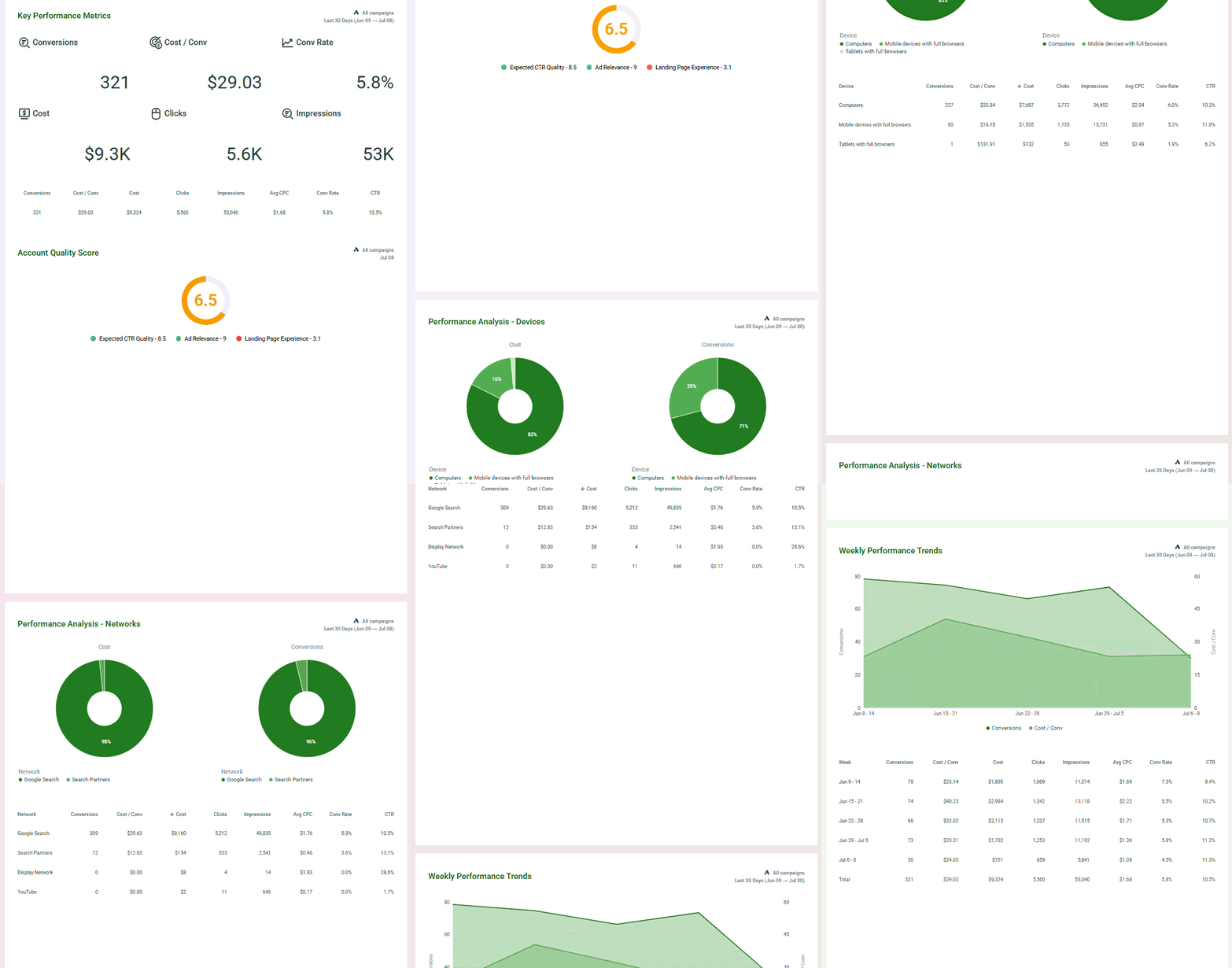
You can choose to edit and customize the report to include or exclude certain sections that have information on keywords, placements, text ad performance, region-wise cost, search terms, performance analysis by device and networks, etc. You can also customize with your branding and white-label the report.
Step 3: Automate your delivery and messaging
You can also schedule delivery on the team’s terms. Reports can run daily, weekly, monthly, or on a custom schedule, and weekends can be skipped so nothing lands in an inbox when nobody’s checking it. For Amazon specifically, building in the short settling period described above helps make sure the prior period’s data has had time to finish updating before anyone sees it.
You can send out as PDF attachments, as a link to a live dashboard, or straight into Slack. For a team that lives in Slack, connecting it once through Optmyzr’s Slack integration means reports show up there automatically at the scheduled time.
And Optmyzr can draft the email body around the report using its built-in AI assistant, so nobody is typing the same kind of update from scratch on every cycle. You can review the draft before it goes out.
None of this replaces judgment. It removes the part of the job that never needed a person in the first place, opening a tool, exporting a file, and writing the same sentence structure into an email cycle after cycle.
A practical reporting setup for a one- to three-person Amazon team
For a small team managing Amazon Ads, a reasonable starting structure looks like this.
- Build one client-facing report template with the core widgets that matter: key performance indicators, a performance summary, and a trend view broken out by time period.
- Schedule the monthly version with a short settling period built in, rather than sending it the moment a new month starts.
- Route the scheduled report to email for the client and to Slack for the internal team, so everyone sees the same numbers without anything being forwarded by hand.
That’s the whole system. Once it’s built, it runs on its own. The only job left is reading what it sends and deciding what to do about it, which is the part of PPC that actually needed a person in the first place.
FAQs
Can Optmyzr schedule Amazon PPC reports automatically?
Yes, you can schedule reporting using Optmyzr’s Report Scheduler. It lets you send Amazon Ads reports—along with data from Google Ads, Microsoft Ads, and other platforms—on whatever schedule works for you. You can choose daily, weekly, or monthly delivery, and have it sent right to your email, a shareable link, or even straight to Slack.
Why does my Amazon Ads report look different if I run it again a few days later?
That’s because Amazon’s reporting data isn’t set in stone immediately. Since attribution continues to update for days after a click or purchase, the numbers can shift slightly.
Optmyzr’s research found that in a significant number of accounts, this delay is enough to skew your data, which could lead to poor budget decisions if you react too quickly.
If you can, always build in a short settling period before finalizing your reports.
How accurate is Amazon Ads reporting data compared to what shows in Optmyzr?
You’ll find that discrepancies between Optmyzr and the Amazon Ads interface are usually under 5%. These small differences are almost always due to that late attribution we mentioned, and they typically resolve themselves once we pull the updated data from Amazon’s API.
What metrics should an Amazon PPC report include?
You should focus on the metrics that actually impact your goals. Most teams find it helpful to build their reports around Return on Advertising Spend (ROAS), Advertising Cost of Sales (ACOS), Cost Per Click (CPC), and Click Through Rate (CTR).
If you can, add in broader summaries and trend views for spend, sales, and impressions so you can see how performance is trending over time.
Can I combine Amazon Ads data with Google Ads or Meta in one report?
Yes, you absolutely can. Optmyzr’s reporting tools are designed to pull in data from Google Ads, Microsoft Ads, Amazon Ads, Meta, LinkedIn Ads, and even Google Analytics. This means you can keep all your platform performance in a single report instead of juggling several different files.
Does Amazon’s new unified reporting replace the need for a tool like Optmyzr?
Not if you’re managing more than just Amazon. While Amazon’s unified reporting is great for building reports faster within their own console, it stops there. It won’t combine data from other ad platforms, and it can’t handle automated delivery to email or Slack.
If you need a comprehensive view across all your channels, you’ll still need a dedicated reporting tool.
What campaign types can Amazon PPC reports include?
You can include all the major Amazon ad types. Optmyzr’s reporting currently covers Sponsored Products, Sponsored Brands, Sponsored Display, and Sponsored Brand Video campaigns.
Why is data missing for the last three days in my Amazon Ads report?
Amazon’s reporting API simply doesn’t return data for the current day, so any report you pull today will always be missing today’s numbers. On top of that, Amazon runs an ongoing validation process that checks for bot traffic and accidental double clicks, and that process can keep adjusting click and impression counts for up to three days after the original date.
Can a returned or canceled order change my Amazon Ads numbers after I’ve already pulled a report?
Yes, Amazon restates conversion data at 1, 7, and 28 days after the original conversion, which is Amazon’s way of saying it keeps correcting the numbers as returns and cancellations come in.
Most canceled orders get removed within 72 hours through what Amazon calls its restatement process, but returns can take longer to work their way through. So if you pull a report before that 28-day window closes, you might be looking at ACoS calculated against sales figures that haven’t finished settling and could still shrink.