It’s 9 p.m. on Black Friday. Andrew Lolk is watching revenue climb, so he raises his seasonality adjustment from 20% to 40%, then 60%, then 100%. The line flattens. He keeps going to 200%, then 300%. Nothing moves.
He calls his business partner, who takes one look and says, “Your budget capped.”
That story opened our Halloween session, BFCM Horror Stories. Host Aaron Levy, our Evangelist, invited five practitioners to share one trick (what went wrong) and a few treats (what they do now). Almost every horror story had the same shape: a limit nobody checked until it was expensive.
Below is one takeaway per expert, with a timestamp so you can jump straight to their segment of the replay.
Check the budget ceiling before you raise the bids
From Andrew Lolk, founder and CEO of savvyrevenue
If you push bids or seasonality adjustments and nothing happens, check the budget cap and max bid limits before you blame demand. Lolk spent most of a Black Friday evening convinced the market had dried up. “It was one of those dumb things,” he said.
His agency has since changed three habits:
- Budgets sit about 50% above the average daily budget, down from his old rule of 10x daily spend.
- Budgets get checked weekly through November, against how spend ramped the year before.
- An AI check runs alongside every bid change. When the team raises a seasonality adjustment or ROAS target, the agent checks the budget and flags if the campaign will hit it within hours.
Levy called it “a real dashboard. Something that will tell you how fast you’re going and it will give a little blinky light if something is wrong.”
If you’d rather not build your own agent, our budget pacing alerts give you a version of that light. They tell you when an account is overpacing or underpacing, and when spend crosses 50%, 75%, 90%, or 100% of target. Alerts arrive by email or Slack, on Google, Microsoft, Amazon, Meta, Yahoo Japan, and LinkedIn.
Promotion mode and seasonality adjustments do different jobs
From Andrew Lolk, with our own data
Google’s promotion mode doesn’t replace seasonality adjustments. Lolk was blunt about it: “Promotion mode has no overlap with seasonal bid adjustments.” Seasonality adjustments raise your bids in auctions you’re already in. Promotion mode loosens your ROAS target and adds budget, so you show up in more auctions.
Promotion mode, still in beta for Search and Performance Max, loosens ROAS tolerance and adds daily budget for a window of three to 14 days, then reverts automatically. Google’s Ads Liaison, Ginny Marvin, has confirmed you can use both tools at once (PPC Land). Lolk’s advice: keep doing what worked with seasonality adjustments, maybe a little less aggressively, and use promotion mode on top.
That “little less aggressively” matters. In our analysis of seasonality adjustments across 5,000+ accounts, we compared 5,886 accounts over BFCM 2024, from the Wednesday before Black Friday to the Wednesday after Cyber Monday.
BFCM 2024 vs baseline | Without adjustments | With adjustments |
CPC | +17% | +34% |
ROAS | +5.7% | −15.7% |
Revenue | +33.8% | +39.9% |
Source: Optmyzr BFCM seasonality adjustments study, 2024 cohort.
Adjustments bought more revenue, but they paid for it in efficiency. Among advertisers who skipped adjustments, the BFCM conversion-rate lift Smart Bidding picked up on its own shrank from +17.5% in 2022 to +7.5% in 2024.
That said, Lolk still runs adjustments, with guardrails on budget and max bids. The data argues for measuring the trade before you make it.
And treat Q4 like a code freeze: “It’s not the time to test brand new things.”
Judge last Black Friday on fully baked data before you plan this one
From Andrew Lolk
The numbers you watched during last year’s Black Friday were incomplete, so review them now that conversions have fully landed. Nobody wants to look at Black Friday data in December. That’s exactly why the in-the-moment read sticks, even when it’s wrong.
Lolk shared an account where the business’s marketing efficiency ratio (MER) improved every day of Black Friday week and peaked on Black Friday itself. Google Ads ROAS, measured by click date, told the opposite story: Black Friday was close to the worst day of the week. “The last dollar that we spent wasn’t worth it. We pushed way too hard that day.”
The wider market points the same way. Our State of Google Ads Q3 2026 benchmark report analyzed 20,000+ accounts and 250,000+ campaigns from Q3 2025 to Q3 2026. Its summary reports that click-through rate rose in every segment while ROAS slipped for a second straight quarter. The full report also compares this year’s pre-peak run-up with last year’s, quarter by quarter, which is useful context before you decide how hard to push.
“We used to be able to pull twice the baseline in CPCs and still be perfectly fine. Not any longer.” Now, if the run-up looks healthy, his team spends more going into Black Friday and a little less on the day, spreading the push over at least three weeks. Levy’s view: Black Friday “is about six weeks long now.”
In the replay, Lolk walks through the account slide day by day, then makes the case for Smart Bidding exploration on Search.
A complicated promo launched late will lose to a simple one launched early
From Akvile DeFazio, founder of AKvertise
Late promotions fail twice: shoppers don’t understand them, and the platforms don’t have time to approve and learn them. DeFazio had asked one children’s products client about Q4 plans since August. The answer was always “nothing.” On the Monday of Black Friday week, the client asked her to launch a tiered promotion: spend $200 and get $50 off, spend $300 and get more.
Their products were large and expensive, so, as she put it, you’re not going to buy two of them just to get $100 off. Evergreen ads with no promotion would have done better. Her rule since: a sitewide offer or a sale-only landing page. “Don’t make it difficult for people.”
Her fix is to start early. She aims to launch by November 1 so campaigns clear approval and the learning phase, with budget kept fluid. If you’re past that date, launch what you can now and keep evergreen ads running underneath. Save the final push for the first week of December and skip the “extended” sale: “It sounds a little desperate.”
In the replay, DeFazio and Levy trade notes on handling a client who insists on a last-minute change anyway.
Plan for the disapproval before it happens
From Brian Binder, Paid Ads Academy
Automated ad review doesn’t slow down for the holidays, so assume something will get flagged and plan around it. Binder remembers a Q4 YouTube campaign for a children’s game built around pants catching fire. It was funded with extra incremental budget, and Google’s automated review flagged it for adult content because of the word “pants.”
His prep list:
- Get creative to Google early. If you have reps, ask them to check for likely flags before launch.
- Launch a day or two ahead on a small budget, with evergreen creative running as a backup in case the promo ads stall.
- Keep checking after approval. “You could be approved today, but then tomorrow you could be disapproved.” Levy added a quieter version of the same trap: ads marked “Eligible (limited)” can be restricted on some devices and serving on others (Google Ads Help).
- Escalate on every channel at once: support chat, email, and your account team.
His treat was the “mullet” approach: prospecting up front, then heavy remarketing at the back end when CPMs climb.
In the replay, Binder explains how to get a stuck ad unstuck without a Google rep, and why he’s bullish on Demand Gen showing up on TV screens.
The scariest BFCM loss is the budget you didn’t spend
From Jyll Saskin Gales, Inside Google Ads
Missed revenue doesn’t trigger an alert, which makes it the BFCM failure you’re least likely to notice.
For Saskin Gales, the real horror is “getting to Q1, looking back, and realizing you left so much money on the table.”
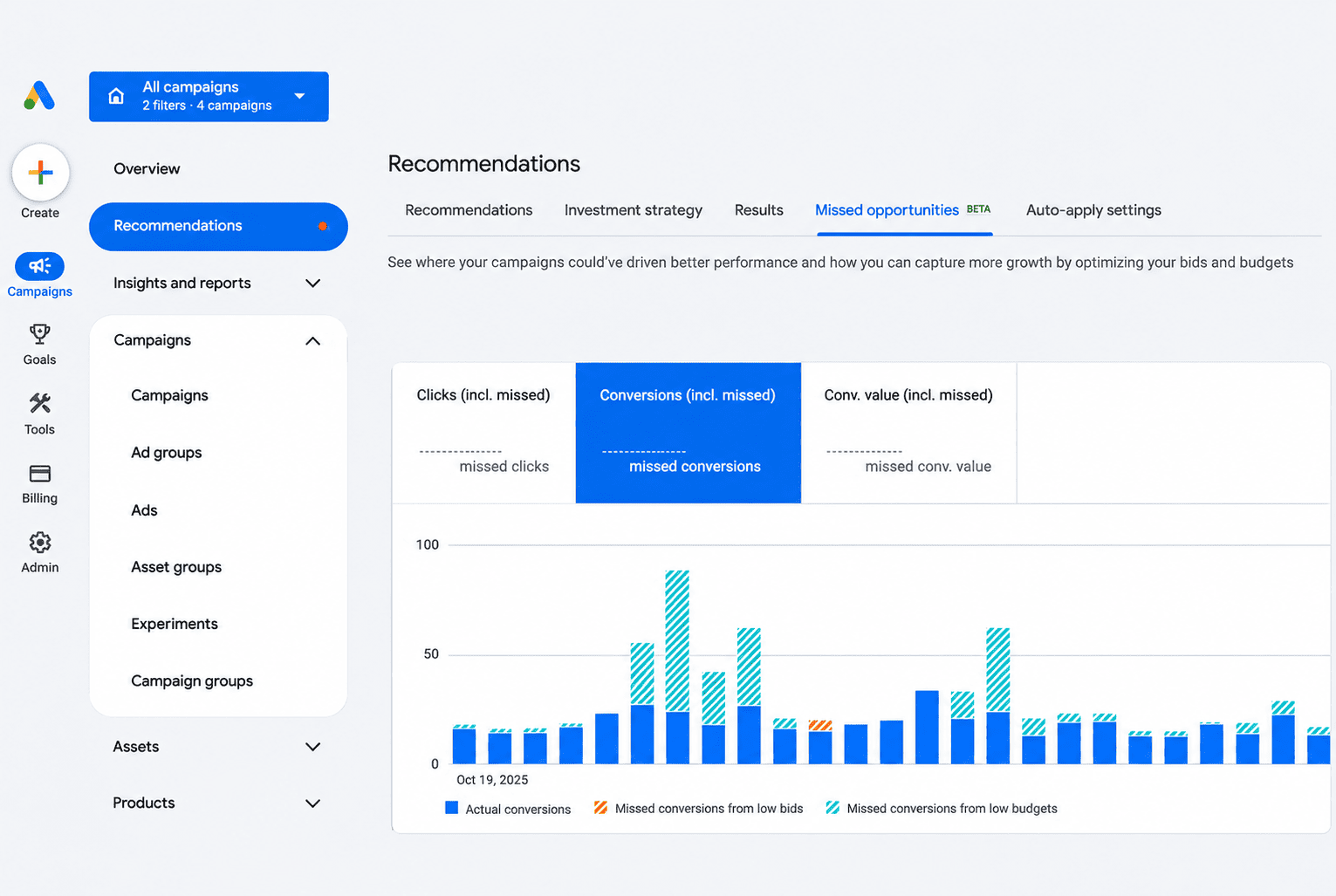
Her example came from Google Ads’ Missed Opportunities view, which Google moved from Labs into the Recommendations tab this summer (Search Engine Roundtable). Treat its figures as Google’s estimates. For one client, it showed big spikes in conversions lost to limited budget around Black Friday and Cyber Monday, while those campaigns beat their ROAS targets. The busy owner never raised spend. This year, they planned the increase months ahead.
And forget the rule about changing budgets only 10% to 20% at a time. For Black Friday, Cyber Monday, and e-commerce, she said, “we don’t want best practice.” Capturing the demand is the goal.
She’s also testing AI Max for Shopping campaigns (still in beta), Merchant Center loyalty features, and Maximize conversion value bidding in Standard Shopping, which Google began rolling out this summer (Search Engine Land). She’ll share results after the season.
“The house always wins, but you can win too,” she said. “It’s not a zero-sum game between you and Google all the time.”
Saskin Gales puts the client’s Missed Opportunities chart on screen. You can see exactly where Black Friday and Cyber Monday fall.
On Amazon, running out of budget beats spending yourself unprofitable
From Sean Stone, CEO of Spillover Commerce
On Amazon, set hard spending limits before Black Friday, because the platform makes it easy to overspend and hard to undo. Stone was hired on December 1 by a large oral care brand that had run an unprofitable Black Friday and Cyber Monday with no budget controls in place. He had to do “a month’s worth of work in one night” to save December.
He walked through three Amazon traps:
- No budget controls. Before Black Friday, compare what each campaign spends on a normal day with its actual budget, and adjust.
- Deals that don’t run. Check every deal the Wednesday before Black Friday, on phone, desktop, and in Seller Central. If a deal is suppressed, “Amazon still charges you for the deal. They just don’t give you any of the sales.” Amazon’s Seller Central forum confirms fees can still apply when a deal is suppressed after it starts (Seller Central forums).
- No stock. A sports and outdoors brand’s bestseller didn’t arrive in time for a Q4 that private equity investment depended on. “Amazon is a demand capture platform,” Stone said. No ad spend fixes an empty shelf.
His main treat is to treat budget like a casino limit. “It is better, unless you have a very specific goal, to have every campaign in your account go out of budget than it is to have higher budgets and then spend yourself unprofitable.” Over the weekend, he checks his accounts every three hours, “except when I’m sleeping, then I go a full eight.”
Our Amazon PPC tools can put that casino limit in writing before the weekend:
- Budget alerts on your Amazon accounts, with pacing and threshold alerts, plus an option to pause campaigns automatically when total spend reaches the target (the alert owner needs write access). Premium and Enterprise plans can set a flighted budget period for the sale dates.
- BFCM Suggested Bids, a filter in our Suggested Bids tool for Amazon. It covers keywords with at least 10 past orders, with suggestions usually within 3x the current bid, and you can revert the changes through Rule Engine afterward.
In the replay, Stone explains how he stacks a Prime Exclusive Discount over the BFCM window with a December deal for last-minute shoppers. Amazon charges a flat fee per promotion plus a percentage of promotional sales, so check current terms in Seller Central (Seller Central forums). Stay for his Halloween costume story at the end.
How Optmyzr helps you get ahead of BFCM
Every trick above was a ceiling someone only saw once it hit them. Our job is to make those ceilings visible before and during the weekend. What you do about each one stays your call.
Before the weekend:
- Set budget alerts for pacing and spend thresholds on every account you’ll push. Use a flighted period for the sale window if your plan includes it.
- Prepare Amazon bids with the BFCM Suggested Bids filter, and download the changes so you can revert them after Cyber Monday.
- Check your bidding plan against our seasonality adjustment data above before you set this year’s adjustments.
During the weekend, Sale Day Command Center puts the sale day on one screen. It works for Google Ads, Microsoft Ads, Amazon Ads, and Meta Ads, with a portfolio view across platforms, and refreshes every 30 minutes.
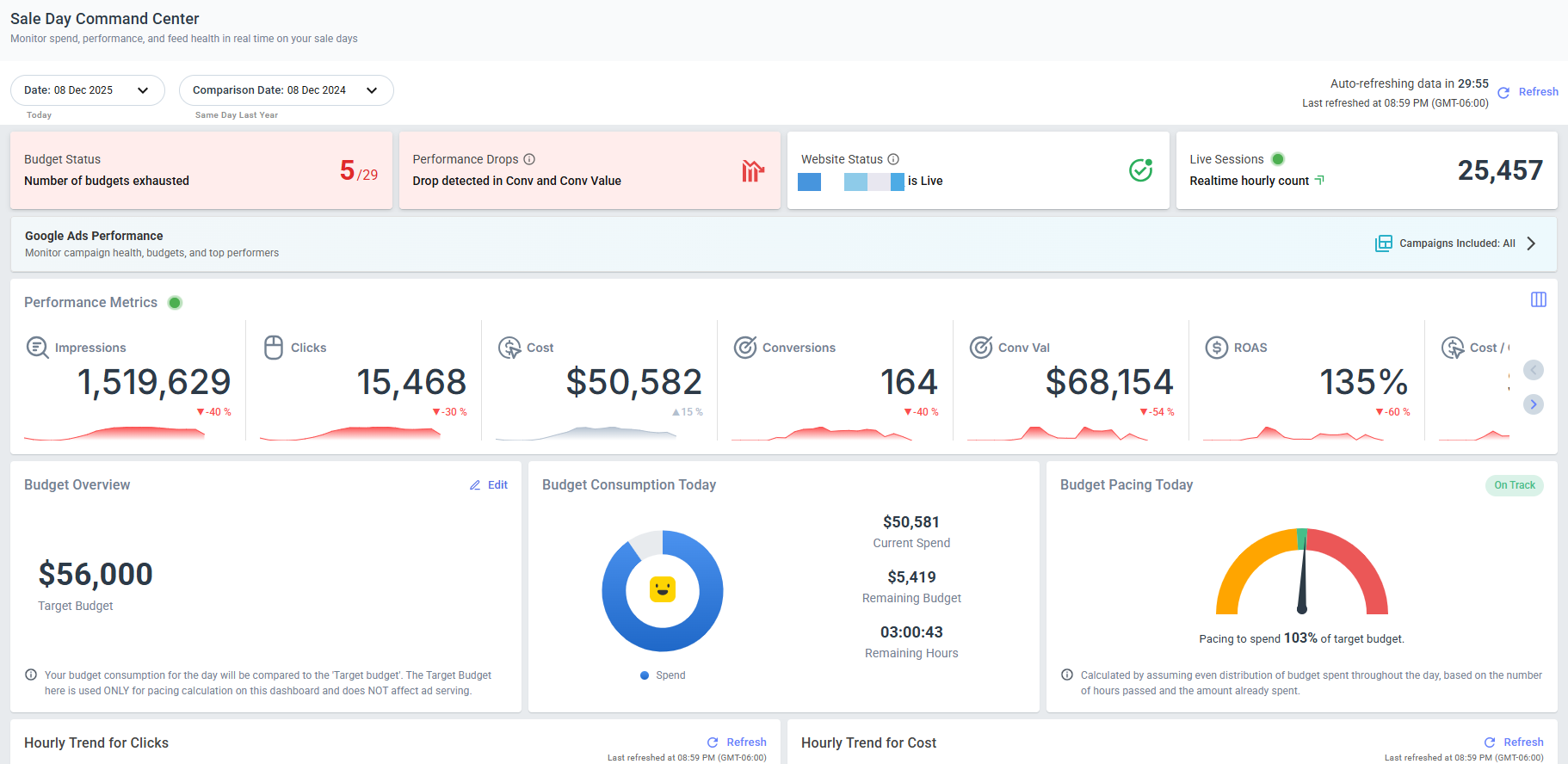
Here’s how it maps to the webinar’s horror stories:
Horror story | What to watch | Where it shows up in Sale Day Command Center |
Budget capped mid-push (Lolk, Stone) | Exhausted budgets, end-of-day pacing | Budget Status card turns red when any budget runs out; Budget Pacing projects end-of-day spend |
Ads disapproved mid-sale (Binder) | Disapproved ads | Disapproved Ads widget, editable in place (Google Ads) |
Bestsellers out of stock | High performers now out of stock | Out-of-Stock Products list (from your Google Merchant Center feed) |
Site relaunch right before the sale (Levy) | Website status | Website Status card shows Live or Offline |
Is this year beating last year? (Lolk) | Hourly trends | Hourly clicks, cost, conversions, and value vs the same event last year |
Sudden drop or spike | Anomalies | Performance Anomaly card |
For the full walkthrough, see how Sale Day Command Center works, or read the six BFCM problems real-time monitoring catches. To set it all up step by step, watch our BFCM pre-season workflow session.
The experts’ BFCM checklist, by week
When | Task | From |
Now | Review last year's BFCM on fully baked data: MER vs platform ROAS, by day and by campaign | Andrew Lolk |
Now | Agree the holiday budget increase, and drop the 10–20% rule for peak days | Jyll Saskin Gales |
Now | Confirm stock for your bestsellers against year-over-year sales and search volume | Sean Stone |
As early as you can (she aims for Nov 1) | Launch promos and creative, with evergreen backups live | Akvile DeFazio, Brian Binder |
Weekly until Black Friday | Check budgets and max bid limits against last year's spend curve | Andrew Lolk |
Before Thanksgiving | Agree the contingency plan with the client: revenue or profit if things go wrong | Akvile DeFazio, Aaron Levy |
Wednesday before Black Friday | Check every Amazon deal on desktop, mobile, and in Seller Central | Sean Stone |
First week of December | Run the final push, instead of an "extended" sale | Akvile DeFazio, Sean Stone |
If you use Optmyzr, add one row before Thanksgiving: set your budget alerts and open Sale Day Command Center so you know what “normal” looks like before the rush. Want the full list beyond the webinar? Use our pre-BFCM checklist.
Every horror story started weeks before the weekend
Lolk’s capped budget, DeFazio’s Monday-of promo, Binder’s flagged ad, Saskin Gales’s unspent budget, and Stone’s missing stock all had one thing in common. Each one could have been caught weeks earlier, by someone looking in the right place. If you can see the ceiling, you can raise it, or decide on purpose not to.
Black Friday doesn’t break your account. It shows you what was already broken.
Watch the full BFCM Horror Stories to hear each expert’s stories in their own words.
Then get your own ceilings in view before November 27:
- Book a demo to walk through budget alerts and Sale Day Command Center for your BFCM setup.
- New to Optmyzr? Start your 14-day free trial to set them up yourself. No credit card required.
- Already a customer? Open budget alerts and Sale Day Command Center in your account.