


Google Ads MCP is a comfortable territory if you’re technically inclined. It requires developer credentials and some familiarity with Python or cloud infrastructure, but gives you direct, flexible access to the Google Ads API.
What comes back is raw data the AI interprets on its own.
Optmyzr’s MCP is built for all skill levels. It takes just a few steps to configure, no developer setup required, and what comes back is already processed, with links that take you straight to Optmyzr.
Here’s the full breakdown.
Quick explainer: what does an MCP server do
Model Context Protocol is a standard that lets AI assistants connect directly to external tools and pull live data. So instead of exporting a report, uploading it, writing enough context for the AI, and then doing all of that again when you open a new chat, MCP keeps the connection live.
You ask a question, the AI calls the tool, the tool returns data, the AI answers.
The context doesn’t disappear between sessions. That matters a lot for PPC teams, because the biggest problem with using AI for paid search is the prep work.
Every workflow looks something like:
export → clean → upload → prompt → verify → repeat |
MCP is what removes that loop. But what’s on the other side of that connection, varies a lot depending on which server you’re using.
That’s what this comparison between Optmyzr MCP vs. Google Ads MCP is about.
What the official Google Ads MCP does
Google released an official MCP server as part of its Google Ads API developer toolkit (last updated May 2026). So instead of writing custom code to authenticate with the Google Ads API and parse its responses, the MCP server handles all of that, and your AI assistant just asks questions.
What it can do
- List accounts: shows which Google Ads accounts you have access to
- Search via GAQL: runs Google Ads Query Language queries to pull campaign metrics, budgets, and status
- Get resource metadata: tells you what fields are available on a given resource before you query it
Some prompts to get you started:
- “How many active campaigns do I have?”
- “How is my campaign performance this week?”
- “Give me a report of the top spending campaigns split by device category over the last 7 days for account [ID]”
What it can’t do
As their official doc states: “This implementation is strictly read-only. It cannot modify bids, pause campaigns, or create new assets.”
How you set it up
You’ll need a developer token, a Google Cloud project ID, and OAuth 2.0 credentials.
From there, two paths:
- Run it locally using pipx,
- Deploy it on Google Cloud Run if you want a shared server your whole team can use
The local setup is faster and Cloud Run is more work upfront (Docker, Artifact Registry, environment variables), but production-viable once it’s running. The setup examples in the docs point to Gemini’s config file, and there’s a community channel on Google’s Advertising Discord if you run into issues.
The honest summary
A solid, officially supported way to give an AI assistant read access to Google Ads data.
Open-source, on GitHub, and flexible enough to query anything in the reporting schema.
What it doesn’t do is interpret any of that data, surface recommendations, flag problems, or take action in the account.
You get the data, and the analysis is on you (or your AI).
What Optmyzr MCP does
Optmyzr MCP is a hosted remote endpoint. No Python environment, no credentials file, no locally running process. You generate an API key in Optmyzr’s Settings, paste a URL into your AI tool, and you’re connected.
The more meaningful difference is what’s on the other side of that connection.
Optmyzr MCP doesn’t give the AI raw API access to Google Ads. It gives the AI access to Optmyzr’s analysis engine, the same engine that runs Sidekick (AI assistant) inside the Optmyzr platform.
That means when the AI calls a function, it doesn’t get back a block of raw API data it then needs to interpret.
It returns outputs built on Optmyzr’s PPC logic.
The available functions cover eight areas:
- Account and performance reporting: Pull active accounts, get campaign performance with sorting, pagination, and filters already handled.
- Competitive intelligence: Find out who’s showing up in your auctions and where you’re going head to head with them, down to the keyword level.
- Industry benchmarks: Compare your CTR, CPC, conversion rate, and impression share against your vertical, with percentile rankings included.
- Alert management: Review every active alert, check what’s fired recently, and create new ones (all without opening a new tab).
- Optimization and strategy: Get recommendations ranked by business urgency (each with a direct link to review and apply in Optmyzr), and generate Rule Engine strategies from a plain-language description of the problem you’re trying to solve.
- Shopping: Retrieve merchant feed details for Google Ads and Microsoft Ads accounts.
- Tool discovery: Not sure where to start? Ask and Optmyzr surfaces the most relevant tools for your query.
- Help articles: Search and pull relevant Optmyzr help content directly from the conversation.
📝Note: It works with Claude, ChatGPT, and any MCP-compatible client. It supports both Google Ads and Microsoft Ads accounts. |
Side by side comparison
Google Ads MCP | Optmyzr MCP | |
Setup | Python, OAuth credentials, developer token, local or Cloud Run | Hosted endpoint, API key, 3 steps |
Production-ready | Yes (with Cloud Run deployment) | Yes |
Output type | Raw API responses (GAQL results) | Pre-interpreted analysis |
Optimization layer | None | Built-in |
Ranked recommendations | No | Yes, with direct review links |
Alert management | No | Create, edit, review triggered alerts |
Rule Engine strategies | No | Yes, from plain-language prompts |
Cross-platform | No | Yes (auction insights + competitor drilldown) |
AI client support | Any MCP compatible client | Claude, ChatGPT, any MCP-compatible client |
Who it's for | Teams with developer resources | PPC managers, agency teams, all skill levels |
Where Optmyzr MCP goes further than Google Ads MCP
We already broke down Optmyzr MCP’s full capabilities with real prompts, outputs, and account data in this article. So if you want the deep version, that’s where to go.
But here’s the short version of what it covers today, with more on the roadmap.
1. Run a full account audit without opening a single spreadsheet
One prompt can pull performance across multiple months and flag:
- What’s trending wrong
- Identify the top drivers of performance swings
- Return a structured verdict.
In one test, Claude made eight live calls to Optmyzr, pulled four months of data, and came back with trend charts and a prioritized analysis, without the Optmyzr platform ever being open.
Once you set up your Optmyzr MCP in your favorite AI agent, here’s a prompt we recommend trying:
💡Try: "Run a month-over-month audit on my account [ID] via Optmyzr for the last four months. Flag what's trending wrong, what's improving, and what's stayed flat when it shouldn't have." |
What you’ll get is a structured breakdown by month with stunning and clear visuals👇

From there, you can dive deep and keep asking questions regarding the audit results.
2. Analyze multiple accounts in a single conversation
Managing multiple accounts comes with the pain of reviewing them individually and missing patterns.
That’s where a single prompt that analyzes multiple accounts in one go can help.
💡Try: Pull performance data across these 5 accounts for the last 4 months (accounts names/ids). Then tell me the account with the biggest performance drop, the one with the strongest performance, and any patterns you notice across accounts that I should pay attention to.” |
What you’ll get is a clear picture of what’s happening across your accounts with patterns you might have missed.

Ask a follow-up about the worst performer and the AI just…..continues without any additional data.
3. See who you’re losing auctions to and on what
Optmyzr MCP pulls your Google Ads Auction Insights data to show which competitors are bidding on your keywords, how much overlap you have with each, and how that’s changed period over period.
Then you can drill into a specific competitor and see the exact keywords, ad groups, and campaigns where you’re going head to head with them.
💡Try: "Pull auction insights for my account [ID] and show me which competitors I overlap with most. Then drill into [competitor domain] and show me where we're competing directly." |
That’s where you’ll get an overlap breakdown across competitors with period-over-period change, plus a keyword and campaign-level view of your head-to-head with the one you care about most.
4. Rule Engine strategy generation from a plain-language prompt
Rule Engine lets you build conditional rules that run against your account on a schedule. To make that even easier, we now let you create these rules right in your favorite AI tools. What’s interesting is, for the tests that we conducted, the account audit earlier in the conversation had all the context we needed to build some strong rules.
So instead of telling Claude what to build, we asked it to look at what it had already found and figure it out.
💡Try: "Based on the performance issues you just found in this account, generate a Rule Engine strategy to address the biggest problem. Walk me through what it's designed to fix and create the strategy." |
And that’s exactly what we got! Two rule engine strategies, ready to be previewed and applied in Optmyzr.

Another important note: Nothing runs until you confirm it in Optmyzr.
📖 Also Read: 8 Ways Optmyzr’s Rule Engine Outperforms Google Ads Automated Rules
5. Audit your alerts and create new ones without leaving the conversation
With a generic AI tool, auditing alerts means exporting configurations and performance data separately, then asking the AI to cross-reference both.
Creating new ones means going back into the platform yourself.
Optmyzr MCP cuts these extra steps and lets you:
- Audit your alert setup
- Find gaps
- Create the needed ones (after your approval) right there in chat
💡Try: Pull all active alerts currently configured in my Optmyzr account (id). Then based on the account's performance data, recommend the most important alerts that aren't set up yet, explain why each one matters, and then go ahead and create the top two. |
That’s it, by the end of the conversation you’ll have the needed alerts live in your accounts.

6. Review and prioritize optimization recommendations
Wouldn’t it be cool if your AI tool could just hand you a to-do list based on what’s actually broken in your account? Turns out, it can.
💡Try: Pull all optimization recommendations for my account [ID] via Optmyzr MCP. Group them by category: keywords, bids, ads, budgets, audiences. For each category tell me how many recommendations exist, what the most urgent ones are, and why they matter. Then give me a single prioritized to-do list ordered by what I should do first, with a direct link to review each one in Optmyzr. |
What you get back is a ranked to-do list with direct links to apply each fix in Optmyzr.

Even before ranking these it pointed out the most urgent recommendation:

We get it, connecting your accounts via MCP might still sound risky.
A few things worth knowing
- The AI connects to Optmyzr’s endpoint using your API key, not directly to your Google or Microsoft Ads credentials
- Your data passes through Optmyzr, which you’re using to manage your accounts.
- You can revoke the API key at any time from the MCP Integration settings page.
For more data and security questions, check out this article!
How to set up Optmyzr MCP
There are two ways to connect, depending on your AI tool:
- OAuth: recommended for Claude and ChatGPT. Sign in with your Optmyzr account, no API key needed.
- API key: for every other MCP client (Claude Code, Copilot Studio, Langdock, and so on).
Server URL: https://tools.optmyzr.com/OptmyzrMcp
Option A: Connect with OAuth (Claude & ChatGPT)
No key to generate or store, you just sign in from your AI tool.
Claude (browser or desktop): Go to Settings → Connectors → Add custom connector, paste the server URL, and click Add. Then click Connect, sign in to Optmyzr, and approve access.
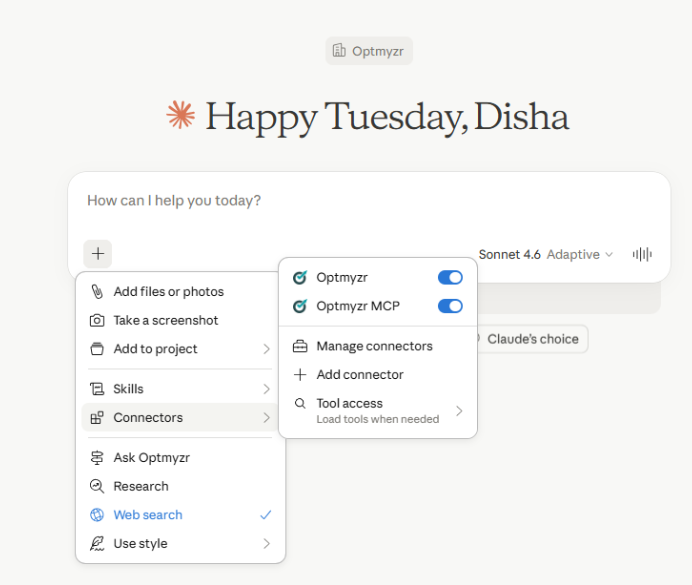
On Team and Enterprise plans, an admin or Owner has to add the connector for the organisation first. After that, individual users can connect it from their own settings. |
ChatGPT: Go to Settings → Connectors (enable Developer Mode if prompted) → Create app. Enter a name, paste the server URL, and set Authentication to OAuth.
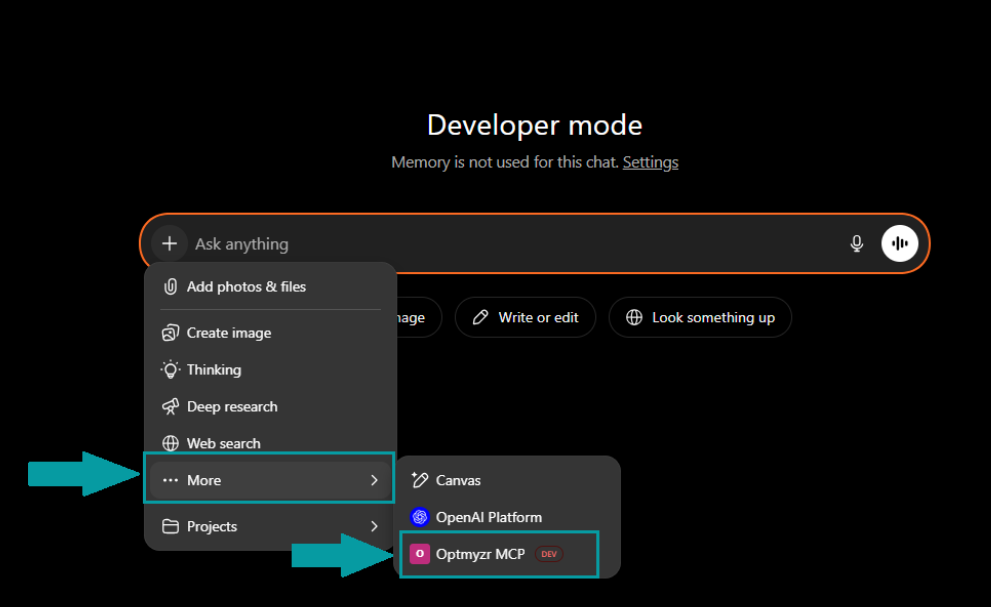
Confirm you trust the app, then click Create.
Option B: Connect with an API key (all other clients)
Step 1 – Get your key. Go to Optmyzr Settings → MCP Integration and generate your API key. Store it somewhere secure, you won’t be able to see it again once you leave the page.
Step 2 – Connect your tool, using the server URL and passing your key in the Authorization header:
- Claude Code: run claude mcp add –transport http optmyzr https://tools.optmyzr.com/OptmyzrMcp –header “Authorization:YOUR_API_KEY”
- Microsoft Copilot: In Copilot Studio, go to Tools → Add Tool → MCP, enter the server URL, select API Key, and enter your key. (Generative orchestration must be enabled.)
- Free Claude plan: You can configure MCP manually under Settings → Developer → Edit Config. This requires Node.js installed on your system.
- Any other MCP-compatible client: Use the server URL and pass your key in the Authorization header. If your client supports MCP, it’ll work.
📝 Note: Google Gemini doesn't currently support MCP integrations in its standard interface. |
Start using it
Once connected, your AI tool can pull live data directly from your Optmyzr account. No exports, no uploads, no re-explaining context every time you open a new chat.

You can find more details on setting up your Optmyzr MCP here!
Stop exporting CSVs and start getting answers with Optmyzr
Google Ads MCP gives you direct access to raw Google Ads data. If you want flexibility and are comfortable working with what comes back, it does the job.
Optmyzr MCP is built for PPC teams who want to skip straight to the work with audits, recommendations, Rule Engine strategies, competitor insights, all from a single conversation with the analysis already done.
Already an Optmyzr customer? Close this tab and go set up your MCP. It takes five minutes and everything in this article is already yours.
New here? Start a 14-day free trial today! No credit card, no commitment, just a cleaner way to work with your PPC data.
FAQs
1. What’s the actual difference between Google Ads MCP and Optmyzr MCP?
Google Ads MCP gives an AI assistant direct, read-only access to the Google Ads API via GAQL queries.
2. Do I need to know GAQL to use Optmyzr MCP?
No, you just have to ask questions in plain language and the AI handles the rest.
3. Can Optmyzr MCP make changes to my Google Ads account directly?
No, the changes happen inside Optmyzr after you review them. When Claude generates a Rule Engine strategy or surface recommendations, it links you to a preview in Optmyzr where you can see what would change before confirming. Nothing touches your account until you approve it.
4. Which AI clients work with Optmyzr MCP?
Claude and ChatGPT are both supported with documented setup steps. As Optmyzr MCP uses the standard MCP protocol, any MCP-compatible client should work.
5. Is it safe to connect Optmyzr MCP to my ad accounts?
Your data passes through Optmyzr, which you’re already using to manage your accounts. The AI client connects to Optmyzr’s endpoint using your API key. It doesn’t receive direct access to your Google or Microsoft Ads credentials. You can revoke the API key at any time from the MCP Integration settings page.








