Inventory moves fast. If your campaigns can’t keep up, you’re either missing revenue or wasting spend.
In today’s market, PPC teams are facing tighter budgets, shifting consumer demand, and mounting pressure from leadership to justify every dollar spent. With unpredictable costs and cautious spending across industries, there’s little room for error.
If you’re managing products or listings that change often, or juggling multiple accounts, manual campaign creation quickly becomes unsustainable. Rebuilding campaigns every time your inventory updates is a time sink. And if you’re transitioning from an older tech stack that no longer meets your needs, you’re likely searching for something more reliable and scalable.
You need a smarter, more adaptive system: one that responds in real time to changes in your inventory so your ads stay relevant, accurate, and efficient. This guide shows you how to do just that by creating inventory-based campaigns that update themselves using dynamic templates and your live product feed.
You’ll learn how to personalize messaging at scale, stay in control, and stop rebuilding from scratch. Whether you’re promoting cars, clothing, properties, travel packages, or job listings, this approach helps you save time, boost performance, and scale your campaigns without the chaos.
What are inventory-based campaigns?
Inventory-based campaigns are created using a live feed of your products or services. Instead of manually updating every ad, you build a reusable template that pulls in real-time attributes like price, availability, or model. As the feed changes, your ads update automatically.
If your stock changes daily or you manage many campaigns across accounts, manual updates aren’t practical. Automated campaigns built from templates keep your ads accurate, timely, and efficient—perfect for industries like ecommerce, travel, real estate, jobs, and automotive.
Glossary: Key terms in this guide
- Inventory-Based Campaigns: Ad campaigns built dynamically using a live feed of your products or listings.
- Feed: A structured file that lists your inventory, used to automate ad creation and updates.
- Templates: Campaign structures that define how ads, ad groups, and keywords are generated from your feed.
- Dynamic Insertion: Placeholders like {Brand}, {Price}, or {Location} are auto-filled from your feed.
- Inventory Filters: Rules to control what gets advertised based on stock, discounts, or attributes.
- Campaign Automator: Optmyzr’s tool for creating and managing inventory-based campaigns.
- Rule Engine: A simple yet powerful tool in Optmyzr that lets you set up rules to automatically make changes to your PPC campaigns based on performance data. Think of it as your assistant that checks how things are going and suggests or applies updates, so your campaigns keep improving without needing constant manual work.
Why templates are the smartest way to scale
Let’s say you manage thousands of SKUs, like sports gear or seasonal products. Manually creating campaigns for every category or product line would take days. One catch-all campaign might be faster, but it gives you zero control.
Templates solve this. You set one campaign structure, define how to pull in key data from your feed, and let automation do the rest. You get targeted ads, organized ad groups, and relevant keywords—without starting from scratch.
You’re not locked into generic messaging. You can create dynamic rules like: “Prices starting from $<min(Price)>” or insert values like {Brand}, {Category}, or {Discount}. That’s flexible, scalable, and personalized automation.
Building campaigns that adapt automatically
Templates are only useful if they stay in sync with your inventory. That’s where Optmyzr’s Campaign Automator comes in:
- Set up templates in minutes with AI-powered suggestions that use your feed and website to automatically generate a campaign structure you can customize.
- Automatically sync ads, keywords, and ad groups with your live feed
- Define the logic once—Campaign Automator handles the rest
Example: Add a new product line to your feed? A new campaign is auto-created with the right structure, ads, and targeting. |
Inventory filters: Show what’s relevant
You don’t need to advertise everything. With Inventory Filters, you can:
- Exclude out-of-stock items: Stock not equal to “Not Available”
- Skip certain brands: Brand not equal to XYZ
- Focus on discounted products during a particular season: Discount > 0
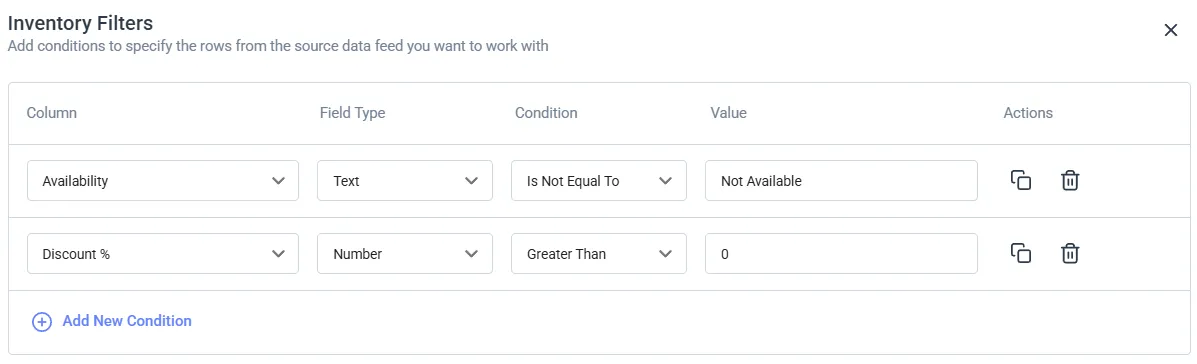
This keeps your budget focused on what really matters.
Dynamic ads, assets, and keywords
Templates shine when paired with dynamic content—this means using placeholders in your campaign setup that pull live data from your feed. For example:
- Use {Brand} and {Category} in your keywords
- Sample ad headline with dynamic insertion: “Limited Time Offer: {Brand} {ProductType} at ${Price}”. This is a dynamic template that automatically inserts product data. For example, if your feed lists “Nike” as the brand, “Trainers” as the product type, and $40 as the price, the generated ad will read: “Limited Time Offer: Nike Trainers at $40”.

Your campaigns stay relevant, even as inventory and pricing evolve.
Automating without losing control
Automation doesn’t mean giving up control. Campaign Automator includes helpful features that let you stay on top of everything:
- Preview Mode: See what changes will be made before anything goes live
- Paused Campaigns: Set campaigns to launch in a paused state so you can review them first
- Fallback Ads: Automatically use a backup ad if one can’t be created properly from the feed (like when a product name is too long)
- Scheduled Updates: Choose how often the system checks and updates your campaigns—daily, weekly, or monthly
- Labels: Add custom labels to easily organize and track campaigns created through Campaign Automator
- Manual Approval Flows: Get notified of changes first and decide if you want to approve them—great for sensitive campaigns or high-budget accounts
Use cases by industry: What this looks like in the real world
Ecommerce
Optmyzr uses the product feed itself as the source for ad matching, generating a dedicated ad group for each product instead of relying on page content to guess what a shopper is looking for. Custom labels inside the feed let you segment by things like margin or top sellers without tagging products by hand.
Here are a few more use cases:
- Promote only in-stock or discounted items
- Generate price-based messaging
- Use {Category} and {Brand} in structure and copy
Joey Bidner used feed-powered DSA groups, one per product, to catch demand his shopping campaigns were missing. He layered search, DSA, and shopping campaigns on top of each other and, in his words, was able to “dominate the search results page” without risking performance during peak season.
Automotive
Some Optmyzr customers running multi-brand dealership groups have found feed-based automation pays off more on the used-car side of their inventory than the new-car side. One dealership group mentioned that their new-car stock isn’t especially varied, since each model comes in a small, fixed set of trims, while their used-car stock is a different story, since every vehicle is its own listing with its own price and condition.
Feed-based automation has more to work with when the inventory itself has more variety and changes more often, which is why it tends to deliver more value on the used-car side.
In the automotive industry, you have more such use cases to work with on Optmyzr:
- Pause ads for sold-out models
- Create campaigns by Make, Model, Trim
- Include price, mileage, and location in the copy
And here are what some of our customers achieved:
- Bruce Automotive Group doubled its click-through rate and cut ad spend by 40% using flexible templates and inventory syncing.
- SearchLab Digital boosted a client’s conversion rate by 42% by building and pausing ads automatically against a constantly changing vehicle feed.
- Constellation Agency cut lead cost by 25% by keeping ads synchronized with dealer inventory pricing and availability.
Real estate
A listing’s shelf life is unpredictable. A property can go under contract in a day or sit for months, and a price cut needs to show up in every ad right away. With feed-based automation, the feed updates and the ads follow, with no need to rebuild anything by hand.
- Promote new listings dynamically
- Pause sold listings automatically
- Segment by location and price tier
Travel
Travel inventory has two things changing constantly: availability and price.
A package sells out, and fares shift day to day. Manually tracking that across dozens of destinations means you’re usually behind on one or the other.
Feed-based templates pull {Destination}, {Duration}, and {Price} straight from the same data, so the ad matches whatever’s actually bookable without anyone updating the campaign by hand. So you can create ads with different variations:
- Show only available packages
- Use dynamic sitelinks for destinations
- Insert {Location}, {Duration}, and {Price} into ad text
Job listings
A job ad that’s still running after the role is filled wastes money and sends candidates to apply for something that no longer exists. This is a volume problem more than anything else: a mid-size company can have dozens of open roles at once, and nobody’s tracking each one’s close date inside the ad account.
A live feed pauses a listing the moment the role closes, and filters handle segmenting by type, department, or city on their own. Here’s how it works:
- Only show live roles
- Option to filter by type, department, or city
- Auto-pause filled roles
DSA campaigns
Matthieu Tran-Van saved 96% of the time he used to spend on campaign creation using Campaign Automator to launch DSA campaigns. Structured feed data-powered fully dynamic ads without losing quality, the same mechanism as every vertical above, just applied to page content instead of a product or listing feed.
Note: DSA campaigns are moving to AI Max from February 2027.
Why Campaign Automator makes this easier
Campaign Automator is purpose-built to create, manage, and scale inventory-based campaigns without compromise:
- Utilizes AI to auto-generate campaign templates based on your feed and website and to suggest sitelinks and callout assets, speeding up setup and reducing manual work.
- Supports Search, Display, and DSA formats
- Available for Google and Microsoft Ads accounts
- Defines campaign rules (keywords, budgets, negatives, audiences)
- Uses dynamic insertion in every element—ads, URLs, keywords, etc.
- Accepts any source feed: Google Sheets, Merchant Center, XML, etc.
- Automates updates on your preferred schedule
- Global Templates let you scale one structure across many accounts. Just link the right data, and each account generates tailored campaigns.
- All activity is tracked via Optimization History
Campaign Automator is just one part of Optmyzr’s all-in-one PPC platform. That means you don’t need separate tools to build, monitor, or improve your campaigns. You can create search, display, or DSA campaigns from your inventory, track performance trends using built-in reports, and use tools like Rule Engine to analyze what’s working and update your templates to make everything better.
It’s a full loop of creation, optimization, and scale—all in one place, without the chaos. And because everything is trackable and adjustable, you’re not only saving time. You’re also making smarter, more defensible decisions. So when your CFO asks how your ad budget is driving growth, you’ve got clear, data-backed answers.
Next steps: Build it once, evolve it always
Templates aren’t a hack, they’re a strategy. One that supports Optmyzr’s core philosophy: automation layering with PPC insurance. You scale fast, but stay safe.
You’re not stuck with rigid black-box automation or bloated workflows. You get:
- Simple templates to get started fast—plus ready-to-use industry examples
- Dynamic logic to adapt to your inventory
- Controls like preview, filters, and labeling to stay in charge
No more manual rebuilds every time your catalog changes. Just evolving campaigns that do the heavy lifting without losing relevance, performance, or visibility.
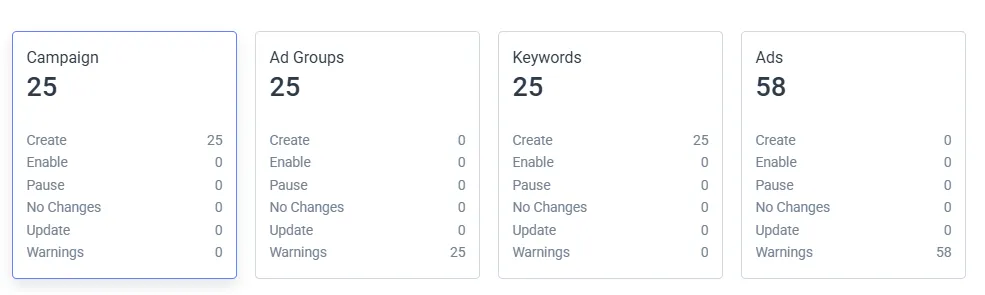
Try Optmyzr’s Campaign Automator now
Launch your first dynamic inventory-based campaign in under 30 minutes—no repetitive work, no stress. Campaign Automator turns your product feed into high-performing, real-time ads with zero manual rebuilds.
Start your 14-day free trial and use our plug-and-play templates, designed for common industry verticals, so you can pick what fits and customize it quickly to get started.
Already a customer? Campaign Automator is free for one Google or Microsoft Ads account, and you can easily upgrade to manage more.
Need help? Check out our detailed user guide, or contact support@optmyzr.com to get a guided demo for easier setup.
Frequently Asked Questions
1. What is an inventory-based campaign, and how does it work?
A campaign built using your live product or service feed. Templates dynamically update ads based on real-time attributes like price, availability, or product type.
2. How do I create scalable PPC campaigns from a product feed?
Use a tool like Optmyzr’s Campaign Automator to turn your feed into dynamic campaigns using templates, filters, and real-time syncing.
3. What is Campaign Automator, and how much does it cost?
It’s Optmyzr’s tool for automating the creation and update of inventory-based search, display, and DSA campaigns. It’s free for one Google or Microsoft Ads account for existing Optmyzr customers. For non-customers, pricing starts at $89/month.
4. Is Campaign Automator a good fit for managing large or complex inventories?
Yes. It’s built for advertisers managing frequent inventory updates across ecommerce, automotive, real estate, travel, and job verticals.