


Everyone who has used AI for PPC has heard the same advice: give it more context.
But giving more context means you export a campaign report, download keyword data, pull the ad performance sheet, upload all of it, and write out enough background for the AI to understand what it’s looking at.
Then at some point the chat gets heavy, responses get sluggish, and the easiest fix is to open a fresh one. That means re-uploading everything, re-writing the context, and starting over from scratch.
So we built Optmyzr MCP to move that work off your plate. Instead of exporting files and re-building context every time you open a new chat, Claude connects directly to Optmyzr and pulls what it needs as the conversation moves forward.
Here are five things you can do from one conversation, without exporting a file or repeating yourself.
1. Run a MoM account audit in one prompt
Doing a PPC audit with Claude means a lot of prep work before you even type a prompt.
Export campaign reports, pull keyword data, download ad performance, upload all of it, and then get started. We wanted to see if one prompt could replace all of that.
💡 Prompt Used: Run a month-over-month audit on my Google Ads account *Account ID* via Optmyzr. Pull account and campaign performance for January, February, March, and April 2026 separately. For each month, report: total spend, clicks, impressions, conversions, CTR, ROAS, cost per conversion, and search impression share. Then compare across months and flag what's trending in the wrong direction, what's improving, and what's stayed flat when it shouldn't have. Identify the top 3 campaigns driving the biggest month-over-month swings (positive or negative) and explain what's likely behind each. End with a verdict: is this account heading in the right direction, and what's the one thing that needs to change most urgently? |
Claude made eight live calls to Optmyzr, pulled account and campaign data across four months, and returned a full analysis in minutes.
No exports or spreadsheets, in fact, I didn’t even have Optmyzr open.
📋 Note: Before any of those calls happened, Claude asked for permission to connect to Optmyzr and confirmed what it was about to do. Every time it needed to pull a new data set, it checked first. So you stay in control of what gets accessed and how. |
What made it useful
1. The analysis came back with compelling visuals for easy understanding.
Claude didn’t return a block of text with numbers buried in paragraphs.
It came back with metric cards for each month, trend charts for ROAS, conversions, spend and Search IS, a colour-coded breakdown of what was improving, what wasn’t, and a verdict.

The structure made it easy to scan and even easier to act on.
2. It didn’t just flag January, it explained it.
Rather than surfacing 915% ROAS as a low number and moving on, Claude traced it back to a single paused Display remarketing campaign spending €1,101 with zero conversions, and showed how much that one campaign was pulling the account-level numbers down.

3. It connected two problems that might look unrelated in a standard report.
The budget was going to two Shopping campaigns with zero tracked conversions every month and Search IS sitting under 50% every month.
Claude linked them directly and named the campaigns involved.
These two findings became the basis for the Rule Engine strategy in the next section.
4. It flagged something that doesn’t appear as a metric anywhere.
A campaign with a Paused status showing up as the second-highest spender in the account every single month. Claude pointed to it as something worth investigating and explained why it was structurally unusual.

2. Conduct a cross-account analysis
Running a cross-account analysis with a generic AI tool means one export per account, each uploaded separately, with enough written context for the AI to understand what it’s looking at.
Do that across seven accounts and you’ve done seven versions of the same work before the analysis has even started.
We wanted to see what one prompt could do connected to Optmyzr MCP.
💡 Prompt Used: Using the Optmyzr MCP, pull performance data across these 5 accounts for the last 4 months (accounts names/ids). Then tell me:
Rank the accounts by which one needs the most urgent attention and explain your reasoning. Don't just report the numbers, tell me what they mean. |
Claude pulled account-level data across all five and returned this.
*One account in this analysis uses real data pulled live via Optmyzr MCP. The remaining four are illustrative but accurately represent the structure and depth of what Claude returns.*

Every account came back with a status, a spend trend, and a reason for its ranking.
The accounts flagged as critical and urgent weren’t ranked that way because of spend levels, but because of patterns- zero conversions across four months of consistent CTR, and a ROAS in freefall while spend kept climbing.
Those are different problems with different fixes, and Claude named both separately.

The patterns section at the bottom is what makes this different from looking at accounts one at a time.
Budget allocation being inverted across the portfolio, three accounts constrained by impression share for the same underlying reason, seasonal uplift hitting multiple accounts in the same window, none of that is visible when you review accounts individually.
It only shows up when you put them side by side.
Because it’s a live conversation, we kept going after the initial output:
“The account ranked number one for urgent attention, what’s the most likely root cause and what are the first two things I should check?”
Claude went deeper without needing any context repeated.
That’s the part that’s harder to replicate with exported files. When the analysis raises a new question, you can just ask it and the conversation continues from where it left off.
3. Audit your account alerts and fill the gaps
A campaign that wasn’t a risk a year ago might be your biggest one today, but if nobody updated the alerts, nothing is watching for it.
With a generic AI tool, auditing your alerts means exporting alert configurations and account performance data separately, then asking the AI to cross-reference them.
Creating new alerts based on that analysis means going back into the platform yourself.
💡 Prompt Used: Pull all active alerts currently configured in my Optmyzr account (id). Then based on the account's performance data, recommend the most important alerts that aren't set up yet, explain why each one matters, and then go ahead and create the top two. |
Claude pulled all eight configured alerts along with the most recently triggered ones, then pulled live campaign performance data to cross-reference both.

The existing setup wasn’t the problem. Conversion volume at account level, cost monitors on key campaigns, impression share alerts on the top Shopping campaigns. One alert had already fired, flagging spend running 68% over target on a Search campaign.
The alerts were doing what they were supposed to do.
What they weren’t covering was two gaps that mattered specifically for this account.
- Conversion volume was being tracked but not cost per conversion
- The account’s best-performing Search campaign had no impression share alert
If that share dropped further, nothing would flag it.
Claude explained why each gap mattered given what it had just seen in the performance data, then created both alerts after asking for confirmation.

So, reading the existing alerts, cross-referencing with live account data, identifying what was missing, and creating the new ones, all of it happened inside one conversation.
4. Generate a Rule Engine strategy in minutes
Rule Engine lets you set up conditional if-this-then-that rules that run against your account on a schedule. Building one usually means starting from a pre-built template or constructing conditions manually.
We wanted to see if Claude could skip that entirely.
The audit had already identified the problems. Could Claude now build the rules to fix them, without being told what to create?
💡 Prompt Used: Based on the performance issues identified in this account, use the Optmyzr MCP to generate a Rule Engine strategy that addresses the biggest problem you found. Walk me through what the strategy is designed to fix, how the rules are structured, and what outcome I should expect if I run it. Then create the strategy. |
Claude had the full context from the audit earlier in the conversation and used it to decide what to build. It went back to the two problems the audit had already named and proposed a rule for each.


What made it useful
The strategy wasn’t generic. Claude didn’t suggest rules that could apply to any account, it built specifically around what the audit had flagged in this one.
Rule 1 targets the zero-conversion budget drain directly.
Rather than pausing campaigns outright, it reduces bids by 30%, a softer intervention that slows the waste without cutting the campaign entirely.
Rule 2 targets the impression share gap.
The audit found Search IS stuck under 50% while the best-performing campaign was being starved of budget. The rule finds enabled campaigns running above 800% ROAS but below 55% IS and increases their daily budget by 20%.
Every campaign touched by either rule gets labelled automatically so you can track what changed and when. As you can see, the whole thing happened in the same conversation as the audit.
Claude used the context it already had rather than starting from scratch.
📋 Note: Creating a Rule Engine strategy through Claude doesn't apply changes to your account automatically. Once the strategy is built, Claude shares a direct link to the preview in Optmyzr where you can see exactly which campaigns were flagged, what actions would be taken, and adjust any thresholds before running it. Nothing touches your account until you review and confirm it in Optmyzr first. |
5. Review account optimization recommendations
If you’re pulling optimization recommendations with a generic AI tool, you’re back to the same problem. We wanted to see what it looked like when Claude could read the recommendations directly from Optmyzr, with the full account context already in the conversation.
So, here’s what we did:
💡 Prompt Used: Pull all optimization recommendations for my account *id* via Optmyzr MCP. Group them by category: keywords, bids, ads, budgets, audiences. For each category tell me how many recommendations exist, what the most urgent ones are, and why they matter. Then give me a single prioritized to-do list ordered by what I should do first, with a direct link to review each one in Optmyzr. |

Claude pulled four recommendation categories and ranked them by urgency.

Even before ranking these it pointed out the most urgent recommendation:

Several of the account’s best performing ad groups were hitting their ROAS targets.
But what Claude caught was that the targets were set so high that Google couldn’t bid competitively enough to win most eligible auctions.
Some ad groups were losing up to 95% of impressions to rank because the targets were too tight to let Google compete. Claude flagged it, explained it, and pulled the exact recommended ROAS adjustment for each affected ad group.
Then it gave you the direct link to go apply it in Optmyzr.
📋 Note: Applying recommendations happens inside Optmyzr, not from the chat. Each one comes with a Review & Apply link that takes you straight to that specific fix. |
How to set it up yourself
How to set up Optmyzr MCP
There are two ways to connect, depending on your AI tool:
- OAuth: recommended for Claude and ChatGPT. Sign in with your Optmyzr account, no API key needed.
- API key: for every other MCP client (Claude Code, Copilot Studio, Langdock, and so on).
Server URL: https://tools.optmyzr.com/OptmyzrMcp
Option A: Connect with OAuth (Claude & ChatGPT)
No key to generate or store, you just sign in from your AI tool.
Claude (browser or desktop): Go to Settings → Connectors → Add custom connector, paste the server URL, and click Add. Then click Connect, sign in to Optmyzr, and approve access.
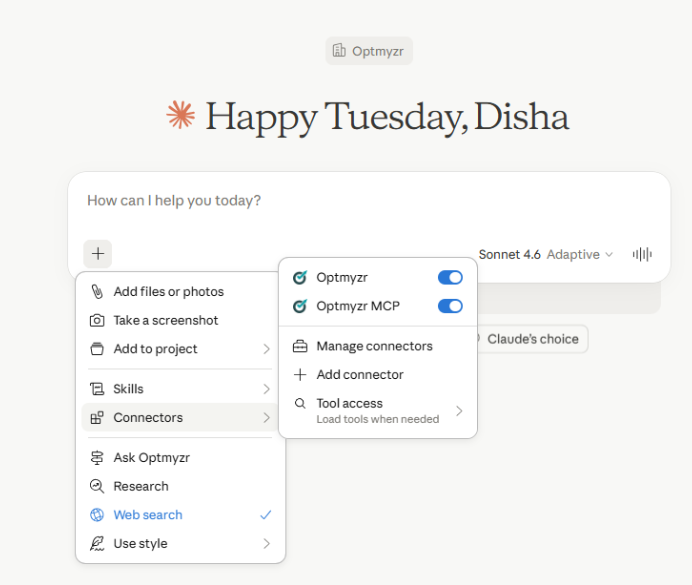
On Team and Enterprise plans, an admin or Owner has to add the connector for the organisation first. After that, individual users can connect it from their own settings. |
ChatGPT: Go to Settings → Connectors (enable Developer Mode if prompted) → Create app. Enter a name, paste the server URL, and set Authentication to OAuth.
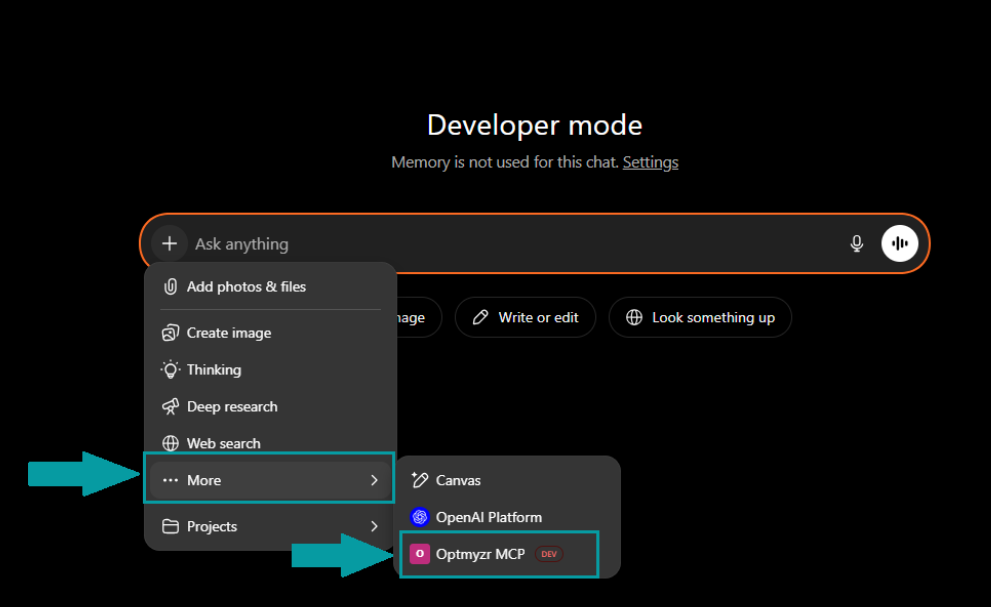
Confirm you trust the app, then click Create.
Option B: Connect with an API key (all other clients)
Step 1 – Get your key. Go to Optmyzr Settings → MCP Integration and generate your API key. Store it somewhere secure, you won’t be able to see it again once you leave the page.
Step 2 – Connect your tool, using the server URL and passing your key in the Authorization header:
- Claude Code: run claude mcp add –transport http optmyzr https://tools.optmyzr.com/OptmyzrMcp –header “Authorization:YOUR_API_KEY”
- Microsoft Copilot: In Copilot Studio, go to Tools → Add Tool → MCP, enter the server URL, select API Key, and enter your key. (Generative orchestration must be enabled.)
- Free Claude plan: You can configure MCP manually under Settings → Developer → Edit Config. This requires Node.js installed on your system.
- Any other MCP-compatible client: Use the server URL and pass your key in the Authorization header. If your client supports MCP, it’ll work.
📝 Note: Google Gemini doesn't currently support MCP integrations in its standard interface. |
Start using it
Once connected, your AI tool can pull live data directly from your Optmyzr account. No exports, no uploads, no re-explaining context every time you open a new chat.

You can find more details on setting up your Optmyzr MCP here!
Connect your AI assistant directly to Optmyzr
With Optmyzr MCP, you no longer have to spend time extracting data, building reports, and then trying to make sense of it all in a separate tool. Instead, start asking the right questions with live PPC context already embedded in your favorite AI tool.
Ready to ditch the back-and-forth?
Start your 14-day fully-functional free trial and connect Optmyzr MCP to your AI assistant today!








