

As technology advances and privacy legislation evolves, Meta Ads has adapted accordingly, altering how we reach and connect with audiences on the way to accomplishing our advertising goals.
Behind the scenes, we have Andromeda, Meta’s next-gen ML engine that processes billions of signals to match ads with users in real time. Then we also have the Advantage+ campaigns on the front lines. These span sales, app installs, and even lead gen. It can automate targeting, creative testing, and budget allocation for peak efficiency
Clearly, we have moved from the hyper-segmentation of audiences and reliance on interest and behavioral targeting to seeing the rise and fall of many custom audiences, such as lookalikes.
In this guide, we’ll walk through the latest Meta Ads targeting strategies that will help you successfully find and engage customers.
Demographic and detailed targeting for all brands
Before we cover the strategies that I (and many other advertisers) find works best at the moment, let’s address all currently available targeting options, both new and old.
Understanding all of the options helps you determine what type of targeting you want to test to see what works best for your brand, goals, budget, and time so you know exactly where to start.
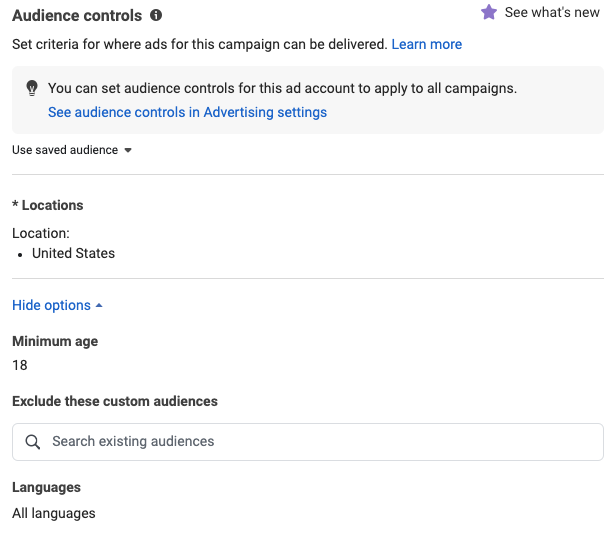
Depending on the selected campaign objective, in the ad set level, under “Audience controls,” you will see demographic targeting options that include location, age, and language (if you only see location targeting, click the “show more options” link to see age and language options). These are the primary controls for your targeting.
Interest and behavioral detailed targeting
When it comes to detailed targeting, you can target by interests, behaviors, and other demographics. Meta has long been renowned for its precise targeting capabilities, enabling advertisers to find innovative ways to reach their audiences.
However, with the evolution of privacy laws, advertisers have lost many detailed targeting options, decreasing their effectiveness over the last few years.
This doesn’t mean you should abandon these options entirely, but it’s important to note that targeting has (and will continue to) evolve. This shift might indicate a future where traditional targeting methods, such as detailed targeting, may be obsolete. Instead, we’ll likely rely more on machine learning to identify the individuals most likely to achieve our campaign objectives. Under Advantage+ audience, Meta treats detailed targeting inputs as suggestions that guide where delivery starts, not as hard limits.
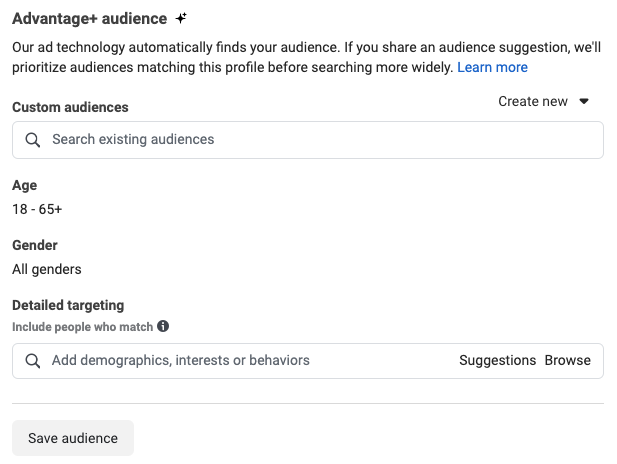
If you’re interested in using these targeting options as a standalone test or in conjunction with Advantage+ audiences, you can access them in the “Advantage+ audience” menu (if you don’t see it, click the “Audience suggestion (optional)” button to reveal it).
Detailed targeting for niche brands
If you work for a brand targeting specific job titles (e.g., nurses) or selling niche products (e.g., specialized automobile parts, solar panels, wine), consider using detailed targeting.
This approach can help you gauge effectiveness against broader targeting options, like Advantage+ audiences (which I’ll cover in a later section). You can manually input relevant keywords to see related suggestions, bundle these audiences together for a larger audience to target, and explore other demographics, such as education, relationships, finances, and more.
Make sure to test various strategies to more accurately determine the best approach to reach your desired audience.
It’s also important to remember that niche targeting often means smaller, so you need to watch it closely. If your audience is too narrow, your campaigns may struggle to exit the learning phase, resulting in higher CPMs and inconsistent performance. Track performance visibility and delivery metrics early to decide whether to expand your audience or rethink your segmentation.
Test a few combinations to see what drives the best engagement, then put more budget behind the highest-value segments.
Ecommerce should use Advantage+ sales campaigns
If you work in ecommerce, use Advantage+ sales campaigns, which use broad targeting. Your hard controls are minimum age, location, language, and custom audience exclusions. Everything else you add, such as custom audiences, lookalikes, age, gender, and detailed targeting, is a suggestion that Meta can expand beyond.
If you’re not in ecommerce, other campaign types, like lead generation, also use a simplified setup with fewer ad set targeting options. These AI-led structures rely on broad targeting and fewer restrictions.
With targeting largely locked down, creative becomes your main lever. Test multiple formats, messages, and visuals to give Meta’s AI the data it needs. A larger creative library can help campaigns exit the learning phase faster and settle down.
Pro tip: Creative fatigue is hard to catch across many ad sets, because rising cost per result and falling CTR show up gradually. In Optmyzr’s Rule Engine for Meta, you can build a rule that flags ads on either signal, then approve each result manually or let Optmyzr apply the fix. Review the first few runs before you automate. Optmyzr’s Metric Alerts can also notify you by email, Slack, or Teams when cost per result crosses a threshold you set, so you don’t check every ad by hand.
Create custom audiences for prospecting and retargeting
Meta offers an option in the Audiences area of Ads Manager where you can set up custom audiences using customer or lead contacts, website traffic, app users, or Meta’s data (e.g., engagers) for your inclusion or exclusion targeting, for both prospecting and retargeting campaigns.
You can set up a variety of custom audiences using your sources or Meta sources.
Each of the available custom audience types has a retention time lookback window. I typically recommend a longer lookback window so that you have a larger audience pool, this helps the system better serve your ads, with more people seeing your ads, so they will not be saturated as quickly as smaller audiences.
In Optmyzr’s Social Campaign Manager, you can create and organize your custom audiences, then link them directly to new or existing campaigns. When you link one, you choose whether it replaces the existing targeting, is included with it, or is excluded from it.
Commonly used custom audiences
Here is a list of some common custom audiences advertisers use for prospecting and retargeting that you may also want to consider:
- Website visitors
- Leads
- Newsletter subscribers
- Customers
- People who viewed your products in your catalog
- Facebook engagers
- Instagram engagers
Many of the above are warmer audiences that you can use in your retargeting efforts (or exclude from your prospecting campaigns).
While some advertisers still rely on exclusions, others do not, as some have found that (with privacy changes) they are not as effective as they once were. But again, I encourage you to test; the worst that may happen when implementing them is that they won’t actually exclude some people.
You can also create lookalike audiences from the custom audiences above and use them in your prospecting campaigns to reach new people.
Lookalike audiences and how to use them
If you create a customer lookalike audience, Meta will create a new audience of people that look like your customers, based on the interest and behavioral data that Meta Ads has, which you can use to find more people that may be more likely to convert.
You can designate a percentage of deviation when setting up a lookalike audience. The lower the percentage, the more similar the new audience will be to your initial audience. The larger the percentage, the broader and less similar it will be to your initial audience. I typically recommend testing 1% first and then gradually testing larger percentage lookalike audiences to see if you can achieve more or better results. Inside Advantage+ audience, lookalikes become suggestions that guide delivery and stop acting as strict limits.
Use Advantage+ audiences for scalable growth
Although you still have access to the targeting options I explained above, you may have noticed that Meta is making detailed targeting less accessible (often hiding it within dropdown menus). Many advertisers, including myself, foresee detailed targeting eventually disappearing, given the gradual removal of older options.
Even so, don’t let this trend deter you from testing detailed targeting. Instead, use it in conjunction with broader targeting options, such as Advantage+ audiences.
The Advantage+ audience option in the ad-set level uses Meta’s ad technology to automatically find your audience, and it does so quite efficiently.
With Advantage+ audience targeting, you can add a suggested audience to help the system identify your target audience more effectively. This enables the system to prioritize specific criteria to find individuals that closely match your desired profile before broadening the search. You can also adjust the age and gender of your audience and apply detailed targeting (as discussed earlier).
Over the past year of testing with Advantage+ audiences, I’ve tested targeting some warmer custom audiences (like website visitors, leads, and engagers) to using no suggested audiences at all. In particular, Facebook and Instagram engagers over the last 90 days were the top-performing audiences.
That means you’re reaching warm and cold people in one ad set, so your creative has to do double duty: build credibility and trust while giving new people a clear value proposition. A/B test formats and messaging here, because Advantage+ campaigns optimize on performance signals.
When it comes to targeting, this has become my go-to strategy to find more customers that convert at higher volume, rates, and returns compared to all of the others that are currently available and shared in this article. I highly recommend testing this approach in your account(s) while also testing others (if your budget allows).
To make that process easier, you can use the Ad Analyzer to track creative performance across Advantage+ campaigns. You can filter ads by declining CTR or rising costs per result, helping you catch fatigue early and pinpoint which formats or messages are working. It includes presets such as Creatives with Low CTR and Top Converting Creatives Losing Traffic, plus a Fatiguing filter.
The Creative-Level Performance View groups Meta ads that share the same image, video, headline, description, and CTA, and shows their combined performance across every campaign they run in. That makes it easier to judge a creative on its own, not ad by ad.
Use saved audiences for better efficiency and consistency
Save time by saving audiences whenever you create manual audiences to test alongside broader targeting campaigns and ad sets. This allows you to easily resume the audience in the future for other campaigns, without the need to recreate it from scratch, allowing you to launch your social campaigns faster.
At the ad set level, under Advantage+ audience and below the targeting options, click “Save audience.” A pop-up summarizes the audience and lets you name it so you can find it later.
Improve ad spend efficiency with exclusion audiences
Exclusion audiences don’t remove everyone in them, because of privacy rules, technology limits, and match rates. They still improve spend efficiency by keeping some people out. They can also reduce fatigue among existing customers and keep ads away from irrelevant users, which matters when you’re trying to scale without letting wasted spend sneak in.
How to create exclusion audiences
To create an exclusion audience, follow the same steps (from above) as you would to create any custom audience. When it’s set up, populated, and ready to use, go to the ad-set level and under “Audience controls,” enter the name of your custom audience in the “Exclude these custom audiences” field.
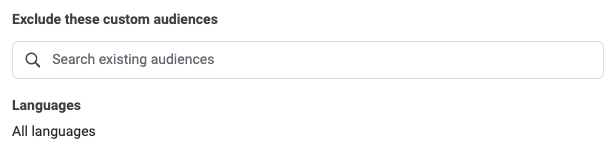
Use cases for exclusion audiences
During the hyper-segmentation era of paid marketing, exclusions were much more commonly and effectively used; but now, they are less effective in excluding people. At the same time, however, Meta’s targeting has improved.
In some instances, the most common use of exclusion audiences these days is in retargeting campaigns where advertisers exclude recent customers, leads, or purchasers, in order to preserve budget but also to avoid bombarding existing customers with more ads. That use case gets sharper in November, as the next section explains.
How to plan Meta Ads targeting for BFCM
Black Friday and Cyber Monday squeezes a large share of an ecommerce year into a few days, so a wrong targeting call gets expensive quickly. The plan below uses the targeting options covered above and splits the season into three windows.
Build your warm audiences before the sale
Your best BFCM audiences have to exist before November. Refresh your customer list so purchasers are excluded accurately. Make sure your website visitor and engager audiences use long lookback windows so the pools are large when spend rises. If you plan to use lookalikes, test the 1% option now, while the cost of learning is low.
Plan the season as three windows
Window | Goal | What I would do in Meta |
|---|---|---|
Week before Black Friday | Reach new buyers before the sale-weekend rush | Prospect with Advantage+ audience, using your best warm suggestion and fresh creative |
Black Friday through Cyber Monday | Convert people who already know you | Shift toward retargeting and exclusions, and watch cost per result daily |
Week after Cyber Monday | Find out what worked | Pull back prospecting, cut weak ad sets, and diagnose before you scale again |
Set up monitoring before the sale starts
Guessing how much demand will lift is risky. A better use of your time is making sure you will see a problem the hour it starts. Here’s how to do that with Optmyzr tools that support Meta:
- Budget pacing: Spend Projection uses AI forecasting for Meta to predict end-of-month spend from historical seasonality and current performance. Budget Alerts, part of the Alerts for Social tool, track monthly pacing and notify you when a portfolio is under or overspending.
- Budget moves: Reallocate and Optimize Budgets supports Meta and can shift budget toward campaigns that can still spend it. Review the suggestion before you apply it.
- Creative ready early: The Image Editor in Social Campaign Manager can generate image variations for different Meta placements, so you can prepare holiday creative before November. You can also upload video when you create or edit ads in Social Campaign Manager, in horizontal, vertical, landscape, and square formats.
- Live monitoring: Metric Alerts and Rule Engine can notify you or pause ads when cost per result jumps. Ad Analyzer’s Fatiguing filter shows which creatives are wearing out. In Rule Engine for Meta, filter campaigns and ad sets by label so your BFCM rules touch only the campaigns you’ve labeled for the sale. Time-based triggers on campaign and ad set start and end dates can alert you before a sale campaign expires.
- Ad-level UTM parameters: Set UTM parameters at the ad level when you build single image ads in Social Campaign Manager (Meta Ads only), so each BFCM offer is traceable in analytics.
- Questions mid-sale: Optmyzr Sidekick can answer pacing and spend projection questions in chat, so you don’t have to open each report.
After Cyber Monday, PPC Investigator for Social shows what caused a metric to move, at the account level for Meta. Use it to separate a seasonal dip from a real decline before you cut anything.
Tighten exclusions in November
Exclusions matter most during the peak. Exclude recent purchasers from your retargeting ad sets, so you don’t pay to show a “last chance” offer to someone who bought yesterday. Refresh your customer list audience before the sale starts, because a stale list excludes the wrong people.
Create high-impact ads
Well-crafted ad copy increases the likelihood that your message resonates with your prospective customers, while creative elements like images and videos complement and enhance engagement to drive higher conversion rates.
Together, they make the ad persuasive from the first impression to the landing page.
Tips for compelling ad copy
When writing ad copy, consider your audience. Craft your ad copy to speak directly to them using language, tone, and references that resonate with pain points, their interests, familiarity with your brand, and how your product or service is a solution or benefit to them.
- Use clear and concise copy so that people take the action you want them to (such as learning more, signing up, or shopping now). Get to the point quickly and avoid jargon so that there is no confusion.
- Ads include built-in CTA buttons, but it still helps to state the action in the copy. Make the next step obvious, from ad to landing page.
- If you are running sales or promotions, highlight these alongside unique selling points, special product features, limited time offers, or free shipping details. For BFCM, put the offer and the end date in the first line.
- Build persuasion by adding customer testimonials, reviews, and statistics as that can increase trust and credibility.
Use urgency (especially in retargeting ads) to encourage immediate action so people don’t miss out on the sale or before a product runs out. Here is a great example of a customer review used very effectively in a clothing ad.

An example of an ad on Facebook. Source: Ingrid+Isabel
I too, often use five-star emojis on review ads to help draw more attention to them and to visually portray that it’s a well-rated product.
Tips for creating effective images
For images, take high-resolution shots that are clear and visually appealing from various angles.
- Keep the focus on the product so there’s no confusion about what you’re advertising. I’ve seen comments on full-body model shots where people ask where to buy the outfit, when the brand meant to promote its jewelry. One clear message or product tends to perform better.
- Use minimal text overlays to ensure legibility on small screens and make sure the text complements your visuals.
Tips for creating effective videos
- Show what you are advertising in the first three seconds so that you can hook people in and they know exactly what you are advertising. No matter how interesting, entertaining, or helpful your video content is, people will drop off and continue scrolling if it’s not clear what they’re watching.
- To improve view-thru rates and conversions, start with an intriguing question, compelling statement, or a striking visual in the first few seconds.
- Optimize your video for silent viewing by including text overlays or captions so that your message is clear, even without sound, as this is essential for hearing-impaired viewers or those watching on mute.
- The visuals alone should tell the story effectively. Here’s a great example from Ruggable, where the video ad starts with a compelling question:

An example of an ad on Instagram. Source: Ruggable
- As for video length, keep it short and ideally about 15 to 30 seconds. Shorter videos help you maintain viewer interest and convey more of your message concisely.
- Lastly, close out your video with a strong call-to-action.
As you get started on creative asset development, understand the various ad placements across Meta’s properties and their specs, so your ads appear optimally and increase your chances for success.
Read More: Social Media Advertising Tools: A Comparison Guide of 6 Leading Platforms
Bringing it all together: build a strategy for the season
Understanding Meta’s targeting options helps you decide which ones deserve priority for your goals. If your budget is limited, test the AI-assisted campaigns first, next to your current top performers. As conversions build, phase out the weak campaigns and assets.
Existing Optmyzr customers can start with the tool links above. New to Optmyzr? Optmyzr for Social puts campaign setup, performance tracking, and optimization for Meta in one place, and you can start a free 14-day trial to set up your BFCM alerts and budget rules before the sale.
People also ask
Q. What are the different targeting options available in Meta ads?
A. Meta Ads supports several targeting types:
- Demographic targeting (age, gender, location, language, and, depending on the campaign, education, job, and household income)
- Interest and behavior-based targeting, which spans interests, purchase behavior, tech usage, and more
- Custom audiences, including website visitors, app users, CRM lists, and engagement-based segments
- Lookalike audiences, which target new users resembling your custom audiences using Meta’s modeling
- Advantage+ audiences, Meta’s AI-driven targeting option that automates audience matching using broad signals instead of manual settings
Q. What types of custom audiences can I create in Meta Ads?
A. You can build diverse custom audiences in Meta Ads, including:
- Website visitors tracked via Meta Pixel
- App activity users based on in-app actions
- Customer/contact lists using email, phone, or user ID matches
- Engagement-based audiences, such as people who’ve interacted on Facebook or Instagram (e.g., likes, comments, video views) These audiences are useful for both prospecting and retargeting campaigns, and can be used to create lookalike audiences for expansion
Q. What’s the best targeting strategy if I have a limited budget?
A. With constrained budgets, it’s recommended to:
- Test Advantage+ audience campaigns first, as Meta’s AI handles much of the optimization work
- Pair these with well-performing custom audiences like recent engagers or past buyers
- Pause manual targeting sets if they underperform, ensuring spend is focused on strong signals
- Keep creative quality high, since AI relies heavily on signal inputs, your creatives help Meta learn faster. This mix of broad AI-assisted reach balanced with targeted retargeting maximizes efficiency and results
Q. How should I plan Meta ads targeting for Black Friday and Cyber Monday?
A. Plan around three windows: the week before Black Friday, the four days from Black Friday through Cyber Monday, and the week after. Prospect before the sale with Advantage+ audience and fresh creative, shift toward retargeting and exclusions during it, and diagnose before scaling afterward. Build your warm audiences and refresh your customer list before November, and set up budget alerts and rules before the sale starts.
Q. Is Black Friday or Cyber Monday better for Meta ads?
A. It depends on your account. Review last year’s Meta results by day, looking at cost per result and conversion value, and split budget based on what you find.
About the Author:
Akvile DeFazio is the President of AKvertise, an award-winning social media advertising agency. With 16 years of experience, she works with eCommerce, lead gen, app, travel, and event clients to reach their goals through future-forward strategies.
This article is a reflection of the author’s experiences and opinions. Optmyzr believes that there are many ways to win in digital advertising, and is committed to presenting a diverse range of ideas and approaches.