Most AI tools for PPC fall into two buckets: generic chatbots that don’t understand your account structure, or black-box automation that makes changes without ever explaining why.
Optmyzr’s Sidekick is intentionally built to avoid both. It’s a live, account-aware AI assistant built right on top of your live account data. It works across your Google, Microsoft, Amazon, Meta, LinkedIn, and Yahoo Japan accounts, pulling real performance data and surfacing insights wherever you need them.
Sidekick understands campaigns, budgets, search terms, and performance patterns in the context of your actual account. Instead of exporting reports, switching tools, or digging through spreadsheets, you ask Sidekick a question, and it pulls from your live account data in real time and helps perform actions.
How is Sidekick different from other AI tools like ChatGPT, Gemini, or Claude?
The difference between Sidekick and LLMs like ChatGPT, Gemini, or Claude (or even Google’s recommendations, for that matter) comes down to context and the ability to make quick changes right from the chat. LLMs provide general advice, but they do not know your campaign structure, budgets, or performance history.
For instance, Google’s recommendations have the opposite problem. They operate inside the account but rarely explain tradeoffs or strategy.
Sidekick sits in between. It gives you the intelligence layer without taking control away from you. It understands campaign structure, budgets, search queries, and performance trends across the account. At the same time, it acts as an assistant rather than an automated decision-maker.
To illustrate the difference in approach, here is a quick look at how Sidekick compares with generic AI tools.
Feature | Optmyzr Sidekick | Generic AI (like ChatGPT, Gemini & Claude) |
Context | Live, account-aware, understands your specific campaign structure and data. | General knowledge; has no awareness of your live account data or structure. |
Data Source | Real-time connection to your live account data across Google, Microsoft, Amazon, Meta, LinkedIn, and Yahoo Japan. | Static training data; cannot access live, proprietary PPC account data. |
Action | An intelligent assistant. Provides insights and explains why they matter, and can execute actions directly, allowing you to decide and act in a single flow. | A conversational generalist. Provides general advice or boilerplate PPC information. |
PPC Workflow | Helps you see what matters faster, without adding a new workflow. Integrates directly into your existing Optmyzr data. | Requires copying data and context from your account into the chat. |
Integration | Seamlessly connects insights to action by generating ready-to-use strategies for Optmyzr's Rule Engine. | Provides theoretical advice; requires manual implementation in a separate tool or platform. |
Read more: Why (And How) Optmyzr’s AI Beats ChatGPT and Claude at Managing Google Ads
Here’s a practical example comparing ChatGPT and Sidekick
Imagine you want to create a rule that pauses campaigns when performance starts deteriorating.
Your goal is simple: Pause campaigns when the CPA from the last 7 days is higher than the average CPA over the last 6 months.
If you use a generic AI tool like ChatGPT, the process looks something like this:
First, you need to export or gather the relevant data from your Google Ads account. This could be recent CPA performance, historical CPA averages, campaign-level conversions, and spend data. Since the AI tool does not have access to your account, you must manually copy or upload that information.
Next, you need to explain the structure of your campaigns and the logic you want to apply. The AI can help you think through the rules, but it does not know what guardrails your account needs. You must decide questions like:
• What percentage increase should trigger the rule?
• What minimum number of conversions should qualify as meaningful data?
• Should there be a cost threshold to avoid acting on small samples?
You might eventually arrive at logic like: “Pause campaigns when 7-day CPA exceeds the 6-month average CPA by 20%, but only if the campaign has at least 5 conversions and $50 in spend.”
Once you have that logic, you can translate it into a script, rule configuration, or platform workflow. That means opening another tool, recreating the conditions manually, testing the rule, and scheduling it to run. The AI helped with reasoning, but implementation still happens somewhere else.
Now compare that to the same scenario using Sidekick.
Instead of exporting data or describing the account structure, you simply describe the intent:
“I need to create an automated rule to pause bidding when CPA for the last 7 days has increased over the average CPA of the last 6 months.” And here’s what Sidekick did.

Because Sidekick already understands the account context, including campaign structure, CPA history, conversion data, and spend, it immediately generates a rule draft inside Optmyzr.
In this example, Sidekick produced the following strategy:
Pause enabled campaigns when the 7-day CPA rises more than 20% above the 6-month average CPA, with built-in safeguards to ensure decisions are based on meaningful data.
The generated rule also included several safeguards as well, like:
• Condition: 7-day CPA > 1.20 × 6-month average CPA
• Volume safeguards: At least 5 conversions and $50 spend in the last 7 days
• Evaluation cadence: Daily
• Action: Pause the campaign
Sidekick even previews the impact before anything changes.
At this point, you do not need to write scripts or configure logic from scratch. You simply review the rule inside the Rule Engine, and if everything looks correct, you click Apply. If you want to modify the strategy, you can just tell Sidekick, like “Make the threshold 10% instead of 20%.”
And Sidekick updates the rule instantly and regenerates the strategy. The final step is a single click to activate it.
This is the key difference. Generic AI can help you think through a PPC strategy. Sidekick helps you turn that strategy into a working automation inside your account.
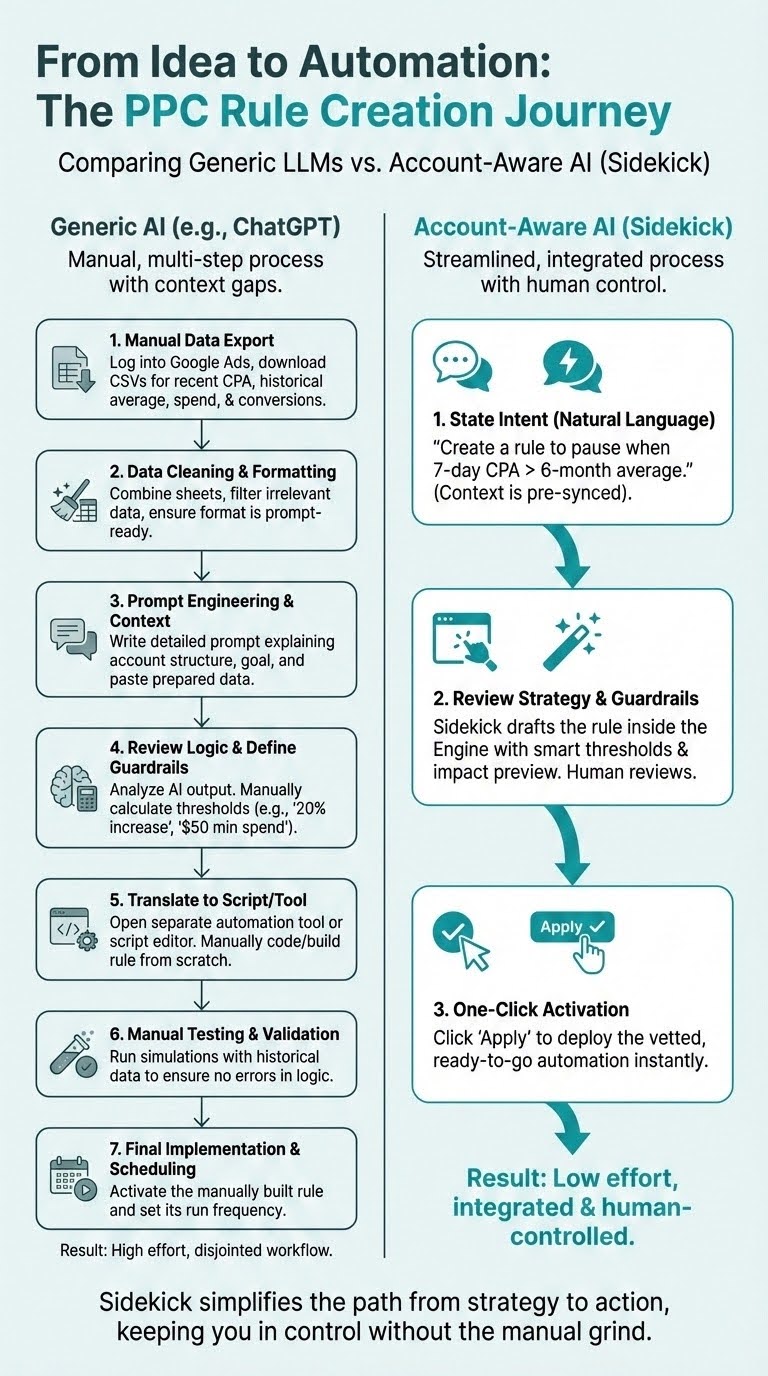
Comparing generic LLMs vs. account-aware AI Sidekick
Instead of moving data between tools and translating advice into rules, you move directly from insight to execution.
With that essential context in mind, let’s dive into a few different ways you can use Sidekick for reporting, budgeting, performance analysis, and optimization.
Sidekick for reporting and executive communication
Raw data from native platforms reports overwhelm most stakeholders since clients and executives rarely need every metric. They need context.
Sidekick helps translate campaign data into clear narratives. Instead of piecing together reports manually, you can ask direct questions about performance trends, campaign drivers, or efficiency changes.
This is exactly where Sidekick becomes useful. Instead of making you manually connect the dots between performance and business outcomes, it helps you organize the story.
The key here is that you still bring the judgment. Sidekick just helps you get to the answer faster.
1. Quick snapshot of significant performance changes
Instead of clicking through campaigns one by one, you can ask Sidekick something simple like, “What has changed in the last 30 days?” You’ll get an immediate summary of major swings in metrics like CPA, conversion, spend, or ROAS, along with the campaigns or segments driving those changes.

While this is an example of a Google Ads account, you can also get an immediate health summary of your Microsoft, Meta, Amazon, LinkedIn, or Yahoo Japan Ads accounts.
This is a much better starting point than just staring at a dashboard. If performance improved, Sidekick helps you see what contributed to it. If it dropped, it points you toward the likely sources of the change. That makes your review process faster and more focused from the beginning.
2. Write reporting emails for clients and stakeholders
Most weekly updates don’t need every metric from every campaign. They need the few changes that actually affected performance. And Sidekick helps filter for that.
You can ask it for a weekly summary and get a concise update focused on what moved the needle, instead of a wall of numbers. For instance, you can ask, “Give me a weekly summary of the key metrics I need to know.” And also ask Sidekick to write an email to your client summarizing the weekly performance.
Some Optmyzr users have been asking Sidekick to draft the weekly update email, and it delivers a ready-to-send email summary, with data and context included.
This is especially useful for internal standups or quick client check-ins where you need to communicate the state of the account clearly.
3. Executive summaries tied to profitability, not platform metrics
Executives care more about the end goals than about impressions, click-through rate, or impression share unless those metrics directly connect to business outcomes. They want to know whether the account is efficient, whether results are improving, and whether performance is tracking against goals.
So, Sidekick helps translate platform language into business language. For instance, we used this exact prompt, “Give me an executive report that I can share with my CFO about this quarter’s performance. Make sure to include only metrics that matter to a CFO and speak their language, give me a message that can go along with this report as well.” And Sidekick not just gave us the key metrics, but also created a quick view of the expenses, like the total spend, its concentration, CPC, and conversions, all explanations CFO would prefer.


That makes it easier to communicate PPC performance in the terms that leadership actually cares about.
4. Turn performance dips into structured client explanations
When ROAS drops or CPA spikes, clients want an explanation. And honestly, the hardest part isn’t finding numbers. It’s explaining what happened in a way that is accurate, clear, and genuinely useful to the client.
Sidekick helps you do that by pulling the underlying account context into one place. If performance dipped because of rising CPCs, a budget shift, a weaker conversion rate, or a broader trend in search demand, Sidekick helps surface those patterns and structure them into a usable explanation.
For instance, you can ask Sidekick, “Why did the impression share increase and CPC decrease in the last 30 days compared to the previous period? Help me find the major reasons.”
That’s how you make client communication stronger. You sound informed and in control, not reactive with explanations on what changed, what likely caused it, and what the next step should be.
5. Frame efficiency vs. scale tradeoffs
One of the most common PPC tensions is the tradeoff between efficiency and volume. Sometimes you can hold CPA exactly where you want it, but only by limiting scale. Other times, growth means accepting some drop in efficiency.
That tradeoff is easy to understand internally if you work in paid media every day. But it’s much harder to explain to clients or stakeholders who just want lower CPA and more conversions at the same time.
Sidekick can help frame that conversation clearly. You can ask it to explain what happened when spend increased but efficiency dropped a bit, or what the likely impact would be if the team prioritized CPA control over conversion growth.
For instance, when we asked Sidekick what would happen to the conversion volume if CPA is maintained at $20, here’s how it answered.

Sidekick for budgeting and forecasting
Budget decisions are some of the highest-leverage decisions you make in PPC. They affect scale, efficiency, pacing, and ultimately whether you hit your targets by the end of the month.
A lot of budget management is still reactive, though. Teams notice a pacing issue too late, realize a high-performing campaign was capped after the fact, or move budget only when the month is almost over.
Sidekick helps you shift to proactive budgeting. It doesn’t replace forecasting models or budget planning, but it gives you faster visibility into where things are heading and where budget decisions deserve attention.
6. Project end-of-month spend based on pacing trends
If you want a quick read on where the account is likely to land, Sidekick can help you get there without having to calculate pacing manually. You can ask where spend is projected to end up by month-end based on current trends, and Sidekick will give you a directional view of whether the account is on track, likely to underspend, or at risk of overspending.


That directional signal is often enough to prompt the right next question. If you’re under pace, you can look for places to scale. If you’re overpacing, you can identify where to pull back before it becomes a problem. The value here is speed. You don’t need to build the whole picture manually before you can act.
7. Identify campaigns constrained by budget despite strong efficiency
Some of your best opportunities for growth are hiding in campaigns that are already performing well but can’t scale because they’re budget-limited. Those campaigns often deserve more attention than the ones that are merely spending more.
Here’s a prompt we used to surface these hidden gems: “Can you find campaigns that are performing well with good CTR and conversions but are limited by budget? And suggest budget increases and project the key metrics for the next 6 months.”
Sidekick can surface these quickly by highlighting campaigns that are hitting efficiency targets but are constrained by budget. That helps you make smarter reallocation decisions, especially when the total budget is fixed, and you need to choose where the next dollar should go.
Instead of guessing which campaigns deserve more runway, you can start from a data-backed list of strong performers that are being held back.
8. Map 60–90 day risk trends based on sustained underperformance
Not every problem shows up as a sudden drop. Some accounts slowly weaken over time. A campaign loses efficiency for several weeks, conversion rate drifts down, or volume starts softening in a way that isn’t obvious in a short date range.
Sidekick can help identify those longer-term patterns by looking at sustained underperformance over 60 to 90 days. That is useful because it helps you separate temporary noise from a real trend that needs intervention.
This matters for budgeting because it tells you where continued investment may need a second look. If a campaign has been weakening steadily for weeks, that’s not something to ignore until next quarter.
9. Check and update your portfolio health through Sidekick
You can now ask Sidekick, “Is anything wrong with my portfolio?” and it will actually check by pulling triggered alerts, surfacing what’s off, and telling you what needs attention.
You can also view configured alerts by portfolio ID and can also set up simple alerts in the conversation. For instance, I asked Sidekick to create an alert for a portfolio when the “budget goes over 75%,” and it immediately created an alert with email notification.

Sidekick routes the more complex alerts to the Alerts Management page with context already loaded.
10. Implement reallocation decisions
A lot of budget reallocation happens in the last week of the month, when there’s less room to recover and more pressure to make the right call quickly. Sidekick helps you get ahead of that.
You can ask where the budget should move to maximize return based on recent performance, and Sidekick can surface the campaigns that are overfunded, underfunded, or simply in a better position to generate stronger results with additional spend.

For example, when we asked Sidekick to “reallocate budget from the underperforming campaigns to the best performing ones,” it suggested precise budget increases and decreases within campaigns of an account. But it didn’t just stop there. Sidekick created a Rule Engine strategy where you can implement the suggested reallocation in just a click of a button.
11. Recommend reallocation based on marginal efficiency
Yes, reallocation is about moving budget from a decent place to a better place. But not every high-ROAS campaign should automatically get more budget, and not every lower-performing campaign should immediately be cut. Context matters.
And Sidekick helps narrow the field so your optimization decisions are based on relative opportunity and marginal efficiency. In simple terms, it helps you see where additional spend is more likely to produce a stronger return and where spend is probably doing less useful work.
Sidekick for search query optimization
Search query optimization is one of the most valuable parts of PPC management, but it’s also one of the most repetitive. It takes time to review query data, separate useful intent from wasted spend, and decide which terms to add, exclude, or promote.
Sidekick doesn’t replace judgment here, and it shouldn’t. But it does dramatically speed up the analysis phase. Sidekick can fetch and analyze search term data across all platforms in a single conversation. You can ask it to surface your highest-spend queries with no conversions, find search terms that are close to your existing keywords but converting worse, or build a list of negative keyword candidates based on match type and performance thresholds.
12. Surface top converting search terms
The easiest place to start is with the terms that are already driving real business results. You can ask Sidekick to show the search queries that are generating the strongest conversion performance, and it will pull them into view quickly.
For example, when we asked Sidekick this question: “help me pick a few search terms that are ranking well to add to my keyword list,” here is what it surfaced.

It gives a complete list of search terms by impression, clicks, CTR, conversions, Cost/Conv, and average CPC. And when you type in “yes,” Sidekick can automatically add those as keywords to the current ad groups. Sidekick can further give a visual n-gram word cloud view of the top converting search terms, which makes it easier to pick & add them as keywords.
It also gives you a strong starting point for expansion, whether that means building new ad groups, adjusting match type coverage, or tightening your messaging around proven themes.
You can further create new keywords and add them to your account without opening Keyword Lasso or the account interface first. You can ask something like “add ‘kids blue running shoes’” as a phrase match keyword to my Kids Shoes ad group” and Sidekick proposes the keyword, shows a preview of exactly what’s about to be added, and applies it once you confirm.
13. Use Keyword Lasso within Sidekick to add top converting search terms as keywords
There are multiple ways to use Sidekick to surface and add your top search terms.
You can tell Sidekick to open Keyword Lasso and it renders the tool right next to the chat, you don’t need to navigate a thing. Then you can give it your criteria. For instance, in this example, I simply said, “add keywords with 100+ clicks as keywords to this account” and Sidekick filters Keyword Lasso based on exactly that and surfaces a list showing the keyword, the campaign, ad group, click data, and match type, all in one table inside the conversation.

Once you’ve reviewed the list, you can just confirm, and Sidekick submits the keywords to your account. The whole flow of opening the tool, filtering down to the right terms, reviewing, and adding all happens inside a single conversation.
14. Flag wasted spend terms to add as negatives
On the other side of the search query report are the terms that cost money but produce no useful results.
Sidekick can identify high-spend, low-return terms that are strong candidates for negative keywords. That helps you tighten traffic quality and reduce leakage without needing to manually sort through every search term report.
This is especially useful in larger accounts where the waste is spread across many campaigns and isn’t obvious until you pull it together. Sidekick helps you see the pattern faster and act sooner.

But it doesn’t stop at surfacing the list anymore. When Sidekick identifies wasted spend terms, it now builds a negative keyword Rule Engine strategy directly in the conversation. You review the list, confirm the terms, and apply the strategy in a single click.
And if you want to move even faster, this is where Optmyzr Express comes in. Sidekick can display Express suggestions, and you can just review the suggestion on Optmyzr Express, click apply, and it’s done.
This also works for Meta and LinkedIn accounts. If you’re running social campaigns in Optmyzr, Sidekick surfaces Express optimization recommendations for those accounts directly in chat, with a link to jump to Express Opts and apply them in one click.
15. Recommend promotion of search terms to exact match
When a search term repeatedly converts well, it usually deserves more control. That can mean promoting it into an exact match so you can bid more intentionally, write more tailored ad copy, and separate it from broader traffic.
For instance, you can ask Sidekick to “pull in search terms that convert well, which could be added as an exact match, based on the last 6 months.” What’s truly powerful is that it doesn’t just hand you a list; it provides the complete rationale and recommended actions. This allows you to make an informed, data-driven decision, moving beyond a simple educated guess.

Sidekick can help you identify those terms based on actual conversion history. This is a simple but useful use case because it turns a recurring manual review process into something faster and easier to prioritize.
16. Detect intent shifts affecting conversion performance
Search behavior changes. Sometimes that shift is seasonal, and sometimes it reflects changes in competition, demand, or the kind of users entering the funnel. When that happens, conversion performance often changes too.
Sidekick can help detect those shifts by highlighting changes in the kinds of queries triggering your ads. Maybe there’s a growing share of informational terms. For instance, maybe there’s a growing share of informational terms, broader, less-qualified searches are starting to dominate, or branded intent is weakening while exploratory queries are increasing.
That kind of change matters because it affects everything: ad copy, landing page relevance, match type strategy, and your negative keyword approach, not just search term quality. You can ask questions like:
- What are the major changes in search queries triggering my ads compared to the previous period?
- Highlight any significant shifts in the type of search terms (e.g., informational vs. commercial intent) that are driving conversions.
Sidekick helps you spot the shift before it becomes a bigger efficiency problem.
17. Pause underperforming keywords directly
This is where Sidekick moves from analysis to action on keywords specifically. You don’t need to take the list it surfaces and go apply changes yourself; you can ask Sidekick to act on what it finds.
Ask Sidekick to show your worst-performing keywords by CPA. It surfaces the outliers — both top and bottom performers — with clear data behind each. Then you can take it further: ask Sidekick to flag and pause keywords that exceed a CPA threshold, and it builds the Rule Engine strategy immediately. Review it, confirm the list, and execute in a single click.
This is one of the most direct ways to use Sidekick’s new action capabilities. The insight and the execution happen in the same conversation, with you in control of the final call.
Performance Max-specific use cases with Sidekick
Performance Max can drive strong results, but it also introduces a visibility problem. It compresses a lot of different placements, signals, and asset combinations into one campaign type, which makes analysis harder. The data is there, but the story is often less clear.
That’s where Sidekick can help. It gives you a more direct way to ask questions about how PMax is contributing to the account, where it may be overlapping with other campaign types, and whether the campaign structure is helping or hurting overall performance.
18. Understand Performance Max contribution across your account
A common question with Performance Max is whether it’s actually adding value or simply taking credit for conversions that may have happened elsewhere. To answer that, you usually need to compare PMax with Search and look at efficiency, scale, and trend direction together.
Sidekick can help make that comparison easier. You can ask how Performance Max campaigns are performing relative to Search campaigns, and get a clearer view of where each campaign type is driving volume, efficiency, and conversion quality.

That helps you move beyond surface-level results and ask the more useful strategic question: Is Performance Max expanding performance, or redistributing it?
19. Identify asset group performance patterns
PMax often makes creative analysis harder because you don’t get the same clean view of asset performance that you’re used to in other campaign types. But even within those limitations, there are still patterns worth understanding.
Sidekick can help identify which asset groups are contributing more effectively and where performance appears weaker. That gives you a practical way to review creative structure inside Performance Max without relying only on scattered signals or manual checks.
When we asked Sidekick to “identify the strongest and weakest Performance Max asset groups based on CTR and CPC,” it clearly displayed two tables with both metrics.

This is especially useful when you’re trying to decide whether a weak result is likely caused by budget, asset quality, or product coverage.
20. Diagnose PMax cannibalization
One of the biggest concerns with PMax is cannibalization, especially when branded or high-intent Search campaigns start behaving differently after launch.
Sidekick can help investigate that by comparing performance trends before and after PMax launch. If branded Search volume, efficiency, or conversion share changed meaningfully after rollout, that can help you spot those.
It won’t give you a perfect answer to incrementality, because no tool can do that cleanly from interface data alone. But it can help surface the performance clues that make it worth investigating.
21. Surface PMax budget constraints
PMax campaigns tend to either absorb spend very quickly or stay limited in ways that are not always obvious from a quick review. That makes budget allocation harder than it should be.
You can ask, “Are any Performance Max campaigns losing impression share due to budget?” That allows you to make more confident decisions about whether a campaign deserves additional budget or whether it’s already getting enough room relative to the return it’s generating.

This is a better approach than simply increasing spend because a campaign looks strong at a high level. You’re making the decision with more context around constraint and efficiency.
22. Evaluate PMax listing group performance (for Shopping)
If you’re using PMax for Shopping, product-level performance still matters. Even if campaign reporting is more abstract, you still need to know which listing groups or product sets are pulling their weight and which ones are not.
Sidekick can help bring that into focus so you can make smarter feed and merchandising decisions. You can ask Sidekick:
- Which listing groups in my Performance Max Shopping campaigns are getting the most spend and clicks?
- Identify product groups with high spend but weak CTR in Performance Max.
- Which listing groups are driving the most traffic in my Performance Max Shopping campaigns?
This makes Sidekick useful not just for campaign analysis, but for connecting campaign performance back to product strategy.
Sidekick for creative and asset optimization
Creative analysis often takes the most time and usually spans multiple campaigns. But messaging quality has a direct effect on click quality, conversion rate, and how efficiently the account scales. The challenge is that it’s not always easy to spot patterns in creative performance when those signals are spread out.
Sidekick helps by giving you a cross-campaign view of what is and isn’t working. It doesn’t write strategy for you or auto-apply changes, but it can help you understand where your messaging needs attention.
23. Evaluate RSA headlines to surface weak messaging themes
Responsive search ads (RSA) create many combinations, making it harder to diagnose messaging problems from a quick report. A low-performing ad may not tell you whether the issue is one weak headline, a recurring message theme, or a broader mismatch with search intent.
Sidekick can help surface headline patterns that are consistently underperforming, so you can review what those messages have in common.
That gives you a stronger starting point for creative testing because you’re not just replacing underperforming text at random. You’re improving based on pattern recognition.
24. Identify top-performing assets isolated within single campaigns
Sometimes your best creative is doing well, but only in one campaign. The missing opportunity here is that you can scale those to other relevant campaigns to increase conversions. But these isolated assets are easy to miss when you’re focused campaign by campaign instead of looking across the account.
Sidekick can help find those strong performers so you can decide whether they should be reused more broadly. So when we asked Sidekick, “Which ad assets have the highest CTR but are only used in one campaign?” it surfaced ad creatives within campaigns and ad groups that have high clicks, CTR, and impressions. It also surfaced the best combinations of headlines and descriptions that can be scaled across other campaigns.

This is one of the more practical ways to use Sidekick. It helps you carry forward what is already working instead of always starting creative improvement from scratch.
25. Suggest copy aligned with converting queries
When certain search terms consistently convert, your ad copy should reflect that intent more directly. Sidekick helps highlight converting query themes and suggest where your current messaging may not fully reflect what users are actually looking for.
That makes it easier to write ad copy that feels more connected to real demand, not just internal positioning. That often leads to stronger click quality and better alignment between search intent and landing page experience.
When asked Sidekick to analyze and surface “ad copy themes based on the top-clicked search queries,” it not just surfaced themes but also included the reasoning behind them, and even gave example headlines and descriptions for each ad theme that works the best.

Sidekick for account structure and hygiene
Some performance problems don’t come from bidding or budgets, but from the structure of the account itself. Sidekick helps by giving you a faster way to spot structural issues that deserve a closer look. And this is helpful for audits, takeovers, and cleanup work.
26. Highlight overlapping keyword clusters
If multiple campaigns are targeting similar keyword themes, you may be competing with yourself more than you realize. This creates inefficiency, makes performance harder to interpret, and reduces control over how traffic is distributed.
Sidekick can surface overlapping keyword clusters across campaigns so you can see whether your structure is more fragmented than it needs to be. That doesn’t always mean you should consolidate everything, but it does help you understand where overlap is intentional and where it may be hurting performance.

This is especially helpful in mature accounts that have grown over time and accumulated layers of structure that no one has revisited recently.
27. Surface tracking inconsistencies
Good optimization depends on clean data. If tracking is inconsistent, reporting and bidding become harder.
Sidekick can help point out issues like missing conversion coverage, inconsistent attribution setups, or areas where measurement may not line up cleanly across the account.

In the above example, Sidekick diagnoses potential tracking issues and offers different ways to check and resolve them. This gives you a faster way to spot problems that might otherwise go unnoticed until performance starts looking strange.
28. Get a fast read on your portfolio with Ask AI, then dig deeper with Sidekick
Before you even open a single account, you can type a plain language question into the Ask AI search bar on the All Accounts Dashboard, like “which accounts are pacing over budget this month” or “show me accounts with a CTR drop in the last two weeks.” It filters your portfolio the way you’d ask a question, not the way you’d build a query.

If the question needs more than a quick filter, Ask AI hands off directly into a full Sidekick conversation, so you keep going without starting over or re-explaining what you’re looking for. That makes it a natural first stop before a portfolio review. You triage the whole account list in seconds, then only open a full Sidekick conversation for the accounts that actually need one.
Sidekick for onboarding and tool walkthrough
One of the most underrated use cases for Sidekick is simply understanding an account faster. When you’re new to an account, taking over a client, or onboarding a new team member, the first challenge is usually understanding the structure and orientation of the account. This is where Sidekick can ramp up the initial learning phase.
29. Summarize bidding strategies across campaigns
Bidding strategy is one of the fastest ways to understand how an account is being managed. But reviewing that campaign by campaign takes time, especially in larger accounts.
Sidekick can summarize bidding strategies across campaigns so you can quickly see where the account is relying on Target CPA, Target ROAS, Maximize Conversions, manual bidding, or a mix of approaches. That gives you a more immediate read on account maturity, strategic consistency, and areas that may deserve follow-up.
It’s a simple use case, but it helps speed up one of the most common review tasks.
30. Ask for an account overview in 5 minutes
A new account almost always comes with a long learning curve. Sidekick helps shorten it by giving you an immediate starting point.
You can ask, “Give me an overview of this account,” and get a quick summary of structure, spend distribution, major campaign types, and key performance drivers. That won’t replace a full account review, but it gives you the high-level picture much faster than starting from scratch inside the interface.

It’s a useful first step because it tells you where to look next instead of leaving you to figure that out manually.
31. Identify top revenue drivers quickly
Once you understand the broad structure, the next question is usually simple: what is actually driving results?
You can simple ask, “Can you also help me understand the top campaigns, ad groups, keywords, and assets that are driving the most revenue?” And Sidekick can give you a fundamental idea of the top revenue drivers of that account. That helps you focus on what matters first, especially if you’re stepping into an account you didn’t build.
This is useful for onboarding, and it’s also great for account reviews where you want to make sure the team’s attention is aligned with the actual business drivers.
32. Explain the structural setup for new team members
When a new person joins the team, part of onboarding usually involves walking them through the account structure and explaining how everything fits together. That takes time, and it often pulls senior team members away from other work.
Sidekick can help by providing an initial orientation. A new team member can ask about campaign groupings, bidding structure, revenue drivers, or major areas of spend and get grounded much faster before the deeper handoff conversation even begins.
You can even create a quick onboarding guide, SOPs, and things they definitely need to know so they can quickly understand the account. Here’s what Sidekick gave us when we asked for an onboarding guide for a new team member.
Sidekick gave a complete guide with account structures, naming conventions, keywords, access, permissions, Optmyzr tools, and how to use them, along with a 1-week task list and SOPs. It doesn’t replace human training, of course, but it makes the training more quicker and simpler because the basic context is already in place.
Novel use cases of Sidekick
Once you get comfortable using Sidekick for reporting and routine analysis, it becomes much more useful as a thinking partner for account strategy.
Some of the most valuable use cases can help you zoom out, challenge assumptions, and look at the account from a fresh angle.
33. Build Shopping campaigns end-to-end through chat
Creating a Shopping campaign structure used to mean hours of manual configuration: selecting feed attributes, defining product groups, setting budgets and bids, and making sure everything stays in sync with your Merchant Center. Sidekick now handles that entire process of creating Shopping campaigns through conversation.

You can also have a customized prompt to describe what you need, and Sidekick can walk you through each step with smart recommendations: which campaign type makes sense for your account (Standard Shopping, PMax Retail, or Optmyzr Smart Campaigns), how to structure your product groups based on feed attributes or performance data, which metrics or feed attributes to use and how, and what budget and bidding setup fits the goal. You can take actions directly through chat or the interface.
Sidekick can also use AI-generated structure suggestions based on your account’s top-performing attribute combinations, most frequent feed attributes, or performance-based segmentation by ROAS and cost. If the structure you’ve chosen isn’t optimal for your account, Sidekick will flag it and recommend a better approach before you launch.
34. “If you took over this account today”
One of the best ways to pressure-test an account is to ask Sidekick what it would prioritize if it were looking at the setup for the first time.
A prompt like, “What are the first five changes you’d prioritize in this account?” can surface those issues that are often easy to miss when you’ve been living inside the day-to-day management for too long.
This is especially useful for audits, account reviews, and moments when you want to challenge your own blind spots.
35. Scenario modeling
Budget pressure is common, and sometimes the question is not how to grow but how to cut without causing unnecessary damage.
That’s where scenario modeling becomes useful. You can ask something like, “If we had to reduce spend by 20%, where should it come from with minimal performance loss?” and get a more structured view of which campaigns are less efficient, more replaceable, or less critical to overall results.

Sidekick not just analyzed but also created a Rule Engine strategy to actually pause the non-converting high-spend campaigns, if the user wanted to. The best part is that you can choose from the list of campaigns that Sidekick filtered out, or change the thresholds it set, within just a few minutes, and make an informed decision based on the data.
36. Bidding strategy alignment check
Bidding strategy is often set, then left alone. But the right strategy depends on the campaign’s volume, data quality, maturity, and business objective. When those conditions change, the strategy should be reevaluated too.
Sidekick can help by checking whether current bidding approaches still make sense for the campaigns they’re attached to. If a campaign lacks the conversion data needed to support a certain automated strategy, or if the current setup doesn’t align with the goal, that’s worth knowing.
Here are a few specific Sidekick prompts you can use:
- Does the bidding strategy for Campaign X still align with its current conversion volume and goal to increase ROAS?
- Identify campaigns currently using a Smart Bidding strategy that have fewer than 15 conversions in the last 30 days.
- Review Campaign Y’s bidding strategy. Given its maturity and objective to maximize clicks, is ‘Maximize Clicks’ the most appropriate choice?
- Check if any campaigns are using a Target CPA strategy where the actual CPA has exceeded the target by more than 20% for the past two weeks.
37. Prepare for a client call in minutes
Before a client call, the hardest part is usually figuring out what actually changed since the last update.
You can ask Sidekick something like:
“What are the three most important things I should discuss with this client about the last 14 days of performance?”
Sidekick can highlight major shifts in spend, conversion volume, or efficiency, so you walk into the call already knowing what needs to be addressed.
38. Compare your performance against your competitors
Sidekick is connected to competitor insights and industry benchmark data. That means you can ask it how your account’s performance stacks up against others in your vertical, backed by actual benchmark data.
This is useful when you’re trying to understand deviations in your performance. If the whole vertical is seeing rising CPCs, that’s a very different conversation than if your account is the outlier.
It’s also useful before a client call or quarterly review. Instead of presenting numbers in isolation, you can frame them against where the market actually is right now.
How to start using Sidekick effectively
The best way to start using Sidekick is not to treat it like a separate AI feature you need to learn from scratch. The better approach is to plug it into the parts of your workflow that already slow it down.
If you spend a lot of time coming up with ad creatives, use Sidekick there. If budget pacing takes too long to review, use it there. If search query analysis keeps getting delayed because there’s never enough time, start there.
Sidekick works best when it shortens the steps you are already taking.
Setup your Optmyzr AI Profile
Before you ask Sidekick your first question, there’s one thing worth doing: fill in your AI Profile. You’ll find it as a small icon “AI Profile” in the top right corner of the Sidekick chat panel or in the left tab on the full screen mode. It takes a few minutes, and it makes everything Sidekick produces more relevant to your actual situation.
The Profile has two layers. The first is about your organization: your website, brand name, industry, the terms that describe your business, the terms that shouldn’t be associated with it, your key competitors, your most important conversion action, and who your audience is. The second is personal: your name, your role, your experience level with PPC, how you prefer information to be presented, and how you want Sidekick to communicate with you.
This matters because Sidekick uses this context every time it generates a response. Without it, Sidekick is working from account data alone. With it, Sidekick knows that a certain search term conflicts with your brand positioning, that your primary audience is paid media teams rather than consumers, or that you prefer a direct summary over a detailed breakdown. The difference shows up in the quality and precision of every insight, suggestion, and draft it produces — especially for things like executive summaries, client emails, and ad copy recommendations.
Start simple, then get strategic
A good starting point is a broad but useful prompt like, “What is the biggest optimization opportunity in my account right now?” That gives you an immediate example of how Sidekick thinks about your data and usually points you toward something concrete.
From there, you can move into more specific prompts based on your workflow. Ask what changed. Ask where the budget is being wasted. Ask which campaigns are limited by budget. Ask what queries are converting and how to use them across campaigns. Once you see how it handles those questions, it becomes easier to use it for more strategic analysis.
Pair Sidekick with Rule Engine
Where Sidekick becomes especially powerful is when you combine it with Rule Engine. Sidekick helps surface the opportunity, and Rule Engine helps implement it. The best part is that Sidekick can create automated rules on its own (via Rule Engine), so all you need to do is run the strategy.
That pairing matters because insight alone is only half the job. Once you know what needs attention, the next step is deciding whether it should be handled manually every time or turned into a repeatable process. In most cases, Sidekick automatically creates Rule Engine strategies based on your questions. All you have to do is go into the strategy, run it, or make small tweaks based on your additional requirements.
For example, if Sidekick helps you find campaigns that are budget-constrained and consistently efficient, that insight can inform a Rule Engine setup that increases budgets under clearly defined conditions. If it surfaces recurring wasted spend, that analysis can feed directly into how you handle query exclusions going forward.
Use Sidekick from your existing AI tools via MCP
If your team already works with external AI tools like Claude or ChatGPT, you don’t need to move to a separate workflow to get Optmyzr’s account intelligence. Sidekick is now accessible via the Model Context Protocol (MCP), which means you can connect it to your preferred AI environment and invoke Optmyzr data and actions directly from there.
Once connected, your external AI tool can access Sidekick’s account data, surface Express suggestions, run queries, and create and apply new keywords, positive or negative, the same way you would from the Sidekick panel inside Optmyzr, with the same preview-before-apply step.
Building complex, layered optimization strategies
This becomes even more valuable when the logic is more complex. Many PPC decisions are not based on one condition. They depend on several signals working together.
Maybe you want to increase budgets only when a campaign is limited by budget, hitting its ROAS target, and maintaining that performance for at least seven days. Maybe you want to reduce spend only when efficiency drops below a threshold and conversion volume also declines.
These are the kinds of layered decisions that experienced PPC teams make all the time. Sidekick helps you think through that logic more clearly, and implement a Rule Engine strategy.
Why this matters for scale
At smaller scale, you can often manage everything manually. At larger scale, it becomes complex and difficult. More accounts, more campaigns, and more moving parts mean more chances to miss something important or spend time on work that could be handled more efficiently.
That’s why this combination matters. It helps you spend less time pulling data, checking for obvious patterns, and repeating the same analysis across the account. Instead, you can spend more time on the decisions that actually require your experience and judgment.
That is where Sidekick is most useful for existing Optmyzr users. It does not replace expertise. It helps experienced marketers apply that expertise faster and more consistently.
Get meaningful insights from your live account data in just minutes.
Most PPC tools either show you data or make changes for you, but Sidekick does something different. It helps surface meaningful insights from your live account data while keeping you in control of the decision.
That makes it useful for explaining performance clearly, identifying budget opportunities, spotting inefficiencies faster, reviewing search terms more efficiently, and understanding account structure without spending hours piecing things together manually.
For Optmyzr users, the value is not in adding another tool to the stack. It is in making the workflow you already have faster, clearer, and easier to act on.
If you want to get more out of Sidekick, start with the questions you already ask every day. That is usually all it takes to move from curiosity to a workflow that is genuinely beneficial.
Start a fully functional 14-day trial today — no credit card required.
FAQs
Does Sidekick replace the need for an expert PPC manager?
No. Sidekick acts as an intelligent assistant to accelerate analysis and surface meaningful insights, but it keeps you in control of the decision-making. The tool does not replace expertise, but rather helps experienced marketers apply their judgment faster.
Does Sidekick require me to manually export my data from Google Ads?
No. Sidekick maintains a real-time connection to your live account data across every platform you manage, including Google, Microsoft, Amazon, Meta, LinkedIn, and Yahoo Japan, which means you don’t need to manually export reports, switch tools, or copy data and context into a chat.
Does Sidekick make changes to my account automatically?
No. Sidekick is an assistant that provides insights, analysis, and ready-to-use strategies (often through the Rule Engine). It never makes changes without your explicit review and approval. You maintain full control over the execution of any recommended action.
How current is the data Sidekick uses?
Sidekick connects to your live account data. This means the insights are based on the most up-to-date information available in your Optmyzr account.
What is the main benefit of combining Sidekick with the Rule Engine?
This pairing helps you move directly from insight to execution. Sidekick can automatically create Rule Engine strategies based on your questions, allowing you to review and implement complex, data-backed optimization decisions with a single click.
What if Sidekick gives me a recommendation that I don’t agree with?
This is expected. Sidekick’s purpose is to surface data and possible strategies. You, the expert, bring the judgment. You can simply modify the suggested Rule Engine strategy, or ask Sidekick to re-analyze the situation with new parameters (e.g., “Analyze the CPA dip again, but exclude the branded campaign data”).
Can I use Sidekick to compare performance across different date ranges?
Yes. Asking Sidekick questions that specify different date ranges (e.g., “How did Q4 performance compare to Q3 in terms of ROAS?”) is a core use case for reporting and analysis.