


You check your Amazon campaigns on one fine morning. At first glance, things look healthy. ACoS hasn’t moved much. Conversions are still coming in, and daily spend sits roughly where you expect it.
Nothing looks wrong.
Then Friday arrives and you’re suddenly 40% over budget for the week.
That usually does not happen because someone forgot to check the account.
It happens because Amazon gives you lagging visibility, which means you can see what happened, but you cannot clearly see where spend is heading. That matters more than most advertisers realize.
On Amazon, ad spend usually spikes first before it drifts. Then CPCs start creeping up, and budgets begin burning earlier in the day. Next, campaigns start entering auctions that aren’t as high intent. Meanwhile, conversion data is still catching up.
So, by the time ACoS clearly tells you something’s wrong, the budget is already spent.
During busy periods—Prime Day, Q4, seasonal promotions like Lightning Deals—that drift can accelerate quickly.
These issues can be mitigated by building a system that:
- predicts where spend is headed,
- reallocates budgets toward your best-performing campaigns, and
- alerts you the moment pacing breaks or budget threshold hits.
This guide walks through exactly how to do that.
The core issue: Amazon makes you manage spend with lagging data
Amazon’s advertising interface works primarily as a reporting tool. Forecasting isn’t built into it.
Conversion data can also take up to 72 hours to appear, which means the numbers you see today often reflect activity from several days ago. As Scott Desgrosseilliers from Wicked Reports points out in a PPC Townhall episode,
“The ad platforms update their conversion reporting up to 72 hours after the fact. So to say that the algorithm’s been good to me today, I’m gonna spend more is tricky because that algorithm might be good to you because you sent an email today, people bought, and yes, paid did help drive it, but it was from a day, two days, a week, a month ago.”
That delay creates a gap between what you see and what is actually happening right now.
Suppose you check campaign performance on Wednesday and notice strong conversions. Those conversions may come from clicks that happened earlier in the week. Meanwhile, today’s clicks still sit in Amazon’s reporting pipeline.
So if you increase budgets based on Wednesday’s numbers, you may actually be reacting to Monday’s performance.
Amazon also makes pacing difficult to judge. You can see that you’ve spent $1,200 of your $3,000 monthly budget by the 10th. But is that on track? Ahead? Dangerously behind? The interface doesn’t tell you.
So, most advertisers end up making budget decisions without knowing whether spending is drifting ahead of plan. When the problem finally becomes visible, it has usually been developing for several days.
4 ways your Amazon spend goes off track before you notice
1. CPC increases without obvious warning
A campaign can look perfectly stable while costs quietly rise.
Here’s how: Your top-performing campaign has been running at a CPC of $0.80 for weeks. Conversion rate holds at 12%, ACoS stays around 25%. Everything looks healthy in your performance columns.
But CPCs creep to $0.95 over four days due to increased competition. You’re still converting at the same rate, so ACoS doesn’t spike dramatically. But your daily spend accelerates from $150 to $175 without triggering any obvious alarms.
Across multiple campaigns, that difference becomes expensive. Five campaigns spending an extra $25 per day add up to $3,750 in a month.
Michael Erickson Facchin, Amazon PPC expert and co-host of The PPC Den podcast, drove this point home in the PPC Town Hall episode “Amazon PPC: How to Launch a Profitable Holiday Shopping Campaign in Q4”:
“Understanding where to boost those CPCs and where to boost those budgets is really important going into holiday season. Generally putting it on your best keywords, not blanketing it across your entire campaign, is like giving you the best bang for your buck where you’re not increasing everywhere—you’re increasing a little bit more strategically.”
This CPC creep accelerates dramatically in the weeks leading up to major sales events. For instance, competitors would increase bids to capture share of voice before Prime Day or holiday shopping peaks, pushing your CPCs higher even during what should be normal traffic days.
By the time the actual event arrives, you’ve already burned through the budget at inflated rates.
2. Daily spend curve shifts without changing total volume
Daily totals don’t reveal when spending occurs.
For instance, let’s say your campaigns typically spread $200 evenly across the day. Then the auction competition shifts. It could be a competitor adjusting their dayparting, or Amazon’s algorithm prioritizing earlier placement opportunities.
Suddenly, 60% of your daily budget is depleted by 2 PM. The dashboard still shows $200 spent, so nothing looks unusual.
But your campaigns stop appearing during evening hours when your conversion rates may be good. Revenue starts declining while spend holds steady, and you don’t notice until ACoS creeps up a week later.
By then, you’ve lost a week of peak-hour conversions, and your monthly efficiency target is already compromised.
This clustering effect gets worse during high-traffic periods. Prime Day preparations, seasonal surges, or even just a busy Monday can accelerate your burn rate early in the day or week.
3. Spend outpaces revenue signals
ACoS is a lagging efficiency metric. It tells you how profitable your spend was after conversions happen. But spend velocity (how fast you’re burning budget relative to plan) is a leading indicator.
You can hit your ACoS target while still staying within 130% of your monthly budget. That disconnect happens when spend accelerates (more clicks, higher CPCs, expanded campaigns) while conversions haven’t caught up yet due to reporting lag.
Julie Bacchini, explained the risk during a PPC Town Hall discussion, “PPC in 2025: What to Stop, Start & Double Down On”: attribution data should be treated as “a weighting or contributing factor rather than some absolute piece of data.”
That’s exactly the risk with ACoS during high-spend windows. You’re trusting a metric that, by the time it reflects the problem, the damage is already done.
During high-volume sales periods, this lag becomes critical. You’re spending aggressively during Prime Day, but Amazon’s lagging reporting window means you won’t see the full revenue impact until days later. Meanwhile, your budget is already depleted, and you’re making real-time decisions based on incomplete performance data.
4. Impression share climbs while click-through rate stays flat
More impressions usually sound positive. But they can also mean your campaigns enter more auctions—some of which deliver lower-intent traffic.
Consider that your campaigns are starting to win more auctions. And impressions jump 20% over three days, but your CTR holds steady at 0.8%. Nothing alarming in your performance columns, but more visibility should be good, right?
But here’s what’s happening behind the scenes: You’re now competing in more auctions, many of them lower-intent or higher-competition placements. Your bids are winning impressions that cost more per click, even though your CTR hasn’t changed much.
Daily spend creeps from $180 to $215, but because CTR and conversion rate look stable, there’s no obvious red flag. You’re just getting more traffic. Three weeks later, you realize you’ve burned an extra $2,500 without a proportional lift in revenue.
This pattern accelerates as we head into promotional periods. During major sales events, auction volume may multiply. Campaigns suddenly compete across many more search and product placements, which accelerates spending dramatically.
By the time the actual event hits, you would have already consumed the budget you were counting on for peak traffic days.
How to catch your Amazon spend drifting off: A three-step process
While we have a foundational idea of why your Amazon spend can drift off-track, catching these patterns early requires a dedicated system. So here’s a process that lets you spot budget drift when there’s still time to correct it.
Step 1: Look at your projected spend
Amazon doesn’t estimate where your spending will land. That’s where Optmyzr’s Spend Projection tool comes in.
It takes your historical spend patterns—weekly trends, historic seasonal spikes, recent daily burn—and forecasts where you’ll land at month-end if current pacing continues.
There’s a daily view as well that breaks down your expected spend, min, and max for each remaining day. This reveals weekday patterns and helps you spot which days are burning through budget faster than others.
Most advertisers worry about overspend, but underspend is just as costly. If you’re sitting on an unused budget while competitors dominate the share of voice, you’re leaving revenue on the table. The tool flags both scenarios, so you know whether to scale back or accelerate.
The projection updates daily, so you don’t have to wait until the end of the month to realize you’re off track.
Step 2: Reallocate budgets with structure
Once you know you’re overpacing or underpacing, the next step isn’t to slash budgets randomly across campaigns. It’s to redistribute them intelligently.
Optmyzr’s Budget Control Center handles this through the Optimize Budgets tool. It shows you which campaigns are constrained by budget, which ones are underutilizing, and where you should shift dollars to hit your target without killing performance.

The tool can simulate changes before you apply them, so you see the projected impact on daily spend. You can also choose a manual, smart, or optimize for metrics strategy. In the optimize for metrics, you can choose a metric like sales, ACoS, clicks, CPA, or orders to simulate the spend based on the budget changes.
Remember that many advertising platforms, including Amazon, recommend increasing the budget to improve performance, but make sure to be thorough before you do it.
As one Reddit user noted when discussing Amazon’s constant prompts to increase budgets,
“Do NOT increase your daily budget unless you’ve tried many other things first and gotten your feet wet. Collect some data and see what’s working for conversions in the leanest and most efficient manner possible. Make changes to everything else before you make changes to the budget.”
That advice holds, but it assumes you know which campaigns are inefficient. Budget reallocation tools give you that clarity. You’re not increasing spend blindly. Instead, you can compare performance metrics, projecting spend, and moving the budget from low-impact campaigns to high-impact ones.
Step 3: Let alerts catch budget drift without manual check-ins
The final piece is automation: not full autopilot, but proactive monitoring.
Optmyzr’s Budget Monitoring Alerts let you set overpacing and underpacing thresholds tied to your monthly budget. You can set a monthly target budget and get notified via email when it’s reached. You can also create budget alerts for your portfolio or individual accounts.
You define the budget, set the tolerance (like, alert me if I’m pacing 15% over target), and add your team’s email addresses. That’s it. The system watches for you. And you’ll receive alerts when your budget overpaces or underpaces, or when you reach a certain monthly target amount.
And if you want to dig deeper about the exact timings of underpacing or overpacing and find the hourly consumption patterns, you can try it out with Sidekick, Optmyzr’s chat-based PPC assistant.
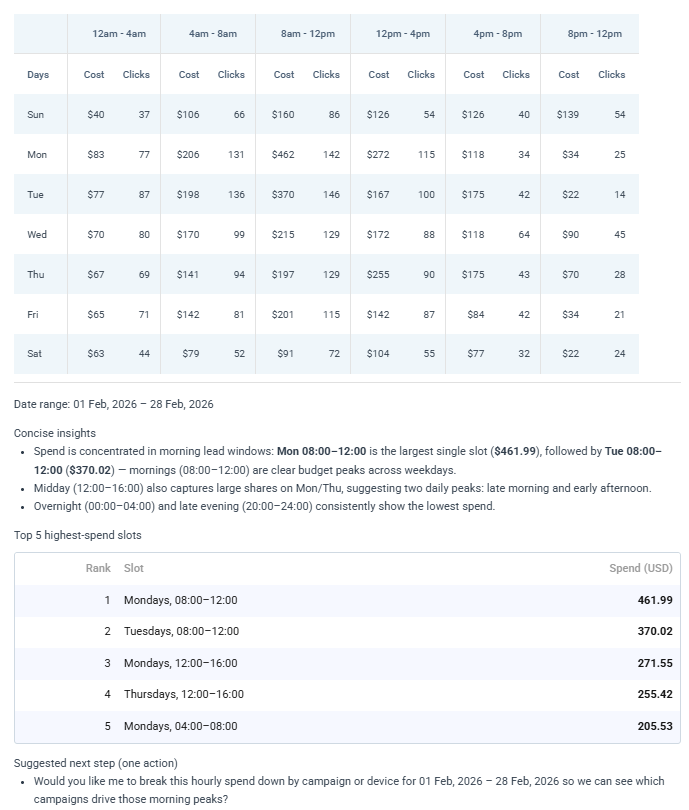
You can use this breakdown to investigate further and surface patterns on the timings of your budget consumption and you can cross-reference this with your performance metrics to validate your spend.
Build budget guardrails for your Amazon account
Frederick Vallaeys, CEO of Optmyzr, framed the broader challenge perfectly during a recent PPC Town Hall,
“If you don’t put these measurement models and attribution models in place, you are sort of playing on a different field than smarter competitors, and you’re always gonna be behind them in terms of bids.”
That same logic applies to budget management. If competitors are using projection and structured reallocation while you’re checking spend manually, they’re operating with better information, which means better outcomes.
Instead of constantly checking campaigns and trying to catch problems after they appear, make your process more structured:
- Review spend projections regularly to understand where monthly spend is likely to end up
- Adjust budgets when pacing changes
- Use alerts to monitor performance automatically
Create your budget guardrails with Optmyzr today (completely free for 14 days)
Frequently Asked Questions
How often should I check my Amazon spend projections?
You can check your Amazon spend projections once a week, once the rest of the guardrails are set. It takes less than two minutes to catch drift while there’s still time to correct it. The Spend Projection tool updates automatically each day, so you’re seeing the latest forecast based on your most recent spend patterns.
During high-volume periods like Prime Day or holiday sales, check twice daily—morning and evening—since spend can accelerate dramatically within hours during these events.
Should I increase campaign budgets when Amazon recommends it?
Not automatically. Amazon’s budget recommendations are algorithm-generated to increase platform spend. So before increasing any budget, check three things:
- Is the campaign actually constrained during high-converting hours?
- Is its ACoS within your target range?
- Will the increase push you over your monthly projection?
You can use the Budget Control Center to see the projected impact before committing.
How do I handle Amazon’s 72-hour conversion lag when making budget decisions?
Use the “ignore last N days” toggle in Spend Projection to exclude incomplete conversion data from your forecast. Focus on spend velocity (how fast you’re burning budget) rather than same-day ACoS when making real-time decisions.
During high-stakes periods like Prime Day, rely more heavily on projected spend trajectory than conversion metrics, since conversions will continue trickling in for days after the event ends.
What if I’m underpacing? How do I scale spend without wasting budget?
First, check the daily projection view to identify which days have capacity for increased spend. Then use the Budget Control Center to find campaigns that are performing well but hitting budget caps early.
Increase budgets on these constrained, high-performing campaigns rather than spreading budget across underperformers. Simulate the changes first to ensure the reallocation moves you toward your target without overshooting.
Can I use this system during Prime Day or other high-volume sales events?
Yes, this is when the system is most valuable. Set your Prime Day budget as a separate simulation target, tighten your alert thresholds to 5-10%, and monitor projections multiple times per day. The tool accounts for historical seasonality, so if you’ve run Prime Day campaigns before, it will factor those patterns into your forecast. Use the daily view to spot hour-by-hour clustering and adjust budgets in real-time as auction competition shifts.








