Use Cases
    Capabilities
    Roles

Optmyzr Vs. Adpulse

What each tool is built for

Optmyzr

What is Optmyzr?

Your PPC Partner
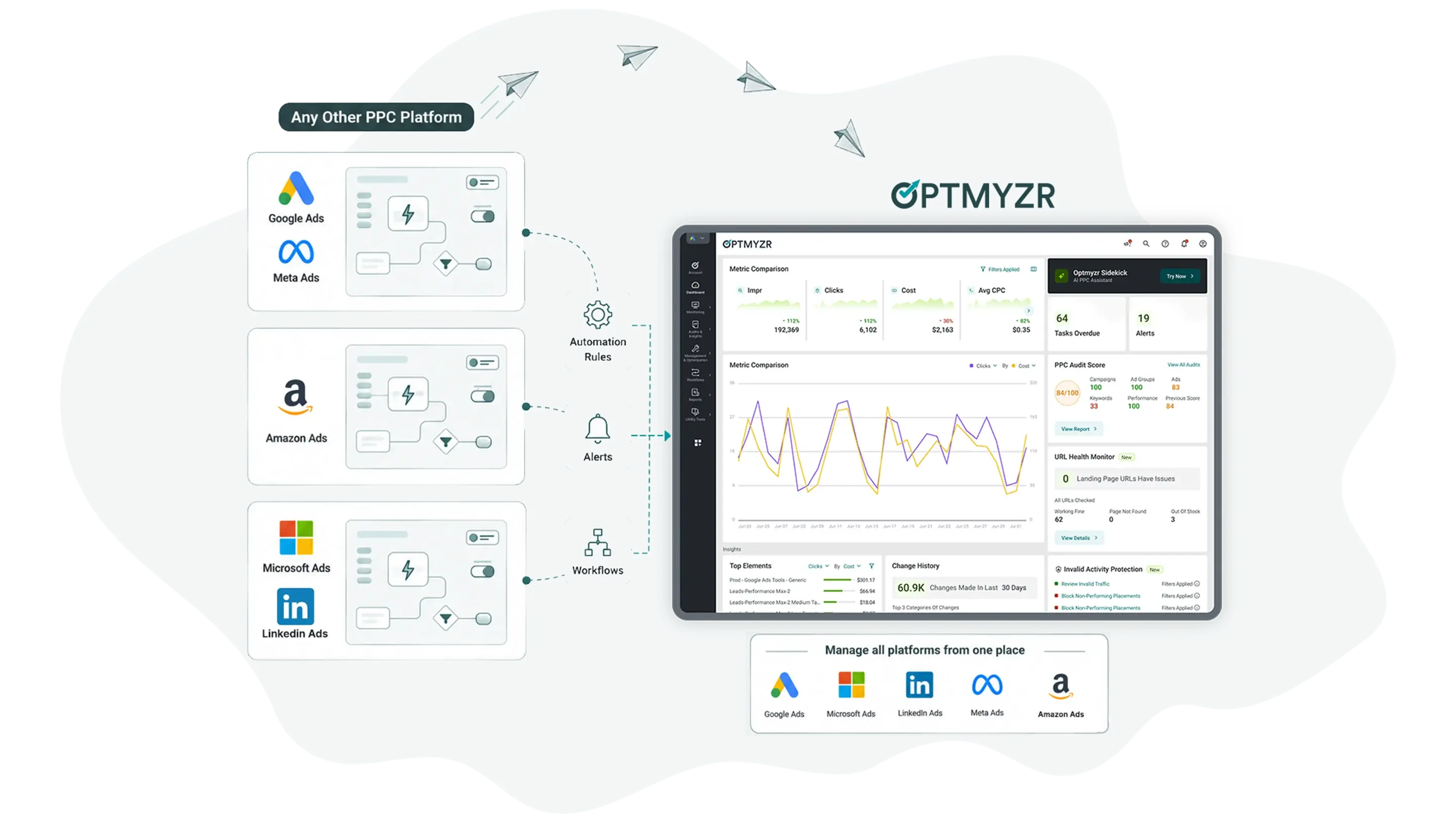
Optmyzr is a multi-platform PPC management suite for agencies and enterprise PPC teams covering Google Ads, Microsoft Ads, Amazon Ads, and Meta. It combines automation (Rule Engine), reporting, bid management, and account auditing in a single platform built for advertisers managing significant ad spend across multiple accounts and channels.

Best for: Agencies managing multiple client accounts, and in-house teams running significant spend, who want automation, reporting, and AI access across every platform without adding headcount.

What is Adpulse?

What is Adpulse?

Adpulse is a paid media management platform built for budget control. It helps agencies monitor spend, automate pacing, and keep campaigns aligned with budget targets across major advertising platforms. The product is built around the idea that budget management should be proactive, automated, and scalable without relying on spreadsheets.

Best for: Agencies and paid media teams managing high volumes of client accounts across multiple ad platforms and strict budget targets.

Which tool fits which buyer?

Choose Optmyzr if…

You need multi-platform management, automation, performance analysis, and monitoring


  • You need automation that goes beyond spend management

  • You want to understand why performance changed, not just that it did

  • Clients need to view their own performance between calls

  • You want to analyze performance across multiple accounts

  • You need a systematic feed hygiene audit on a schedule

Choose Adpulse if…

Budget automation and cross-platform spend control are your primary need


  • Budget automation depth is your main requirement

  • Your team actively manages TikTok, Pinterest, or Reddit campaigns alongside Google and Meta and needs a single budget management and reporting view across all of them

  • Close variant control is a recurring workflow problem

Automation you can verify before it touches your accounts

Adpulse automates budget decisions well. Optmyzr automates across the full account and shows you exactly what will change before anything does.

Rule Engine - Preview Suggestions

View Suggestions mode shows every individual change a Rule Engine strategy would make: specific campaigns, keywords, bid values, and budgets, account by account, before anything is applied. Select which campaigns to include, filter by individual rules, and review a breakdown of exactly how many entities matched each condition. Approve what you want, discard the rest.

Rule Engine - Preview Suggestions

Automation History

Every Rule Engine automation that runs across your accounts is logged in Automation History: what changed, which automation type ran, on which account, when, and by whom. When a client asks why their bids shifted or a campaign paused, you filter by account, find the automation, and have the answer. Adpulse keeps historical budget data. It won’t tell you which rule caused the shift you’re looking at.

Automation History

Optmyzr MCP

Connect Claude, ChatGPT, or any MCP-compatible AI client to live Optmyzr account data. Ask questions in plain English to pull performance reports, surface alerts, and generate complete Rule Engine strategies. Changes are applied through Optmyzr, not directly from the AI client.

Optmyzr MCP

Where each tool is genuinely stronger

Optmyzr

Optmyzr wins on automation breadth and performance visibility

Adpulse is built around one problem: keeping spend aligned with targets. Optmyzr covers the rest of the account: bids, keywords, placements, and ad copy with the same level of control. The Rule Engine handles bids, keywords, placements, and ad copy across all supported platforms (not just budgets) with multi-condition logic, a preview before any change fires, and a complete attributed log of everything that ran. PPC Investigator answers the question Adpulse’s date comparison tables leave open: not “did the cost per acquisition (CPA) change?” but “which campaign, keyword, or device combination drove it, and by how much?” For teams managing client accounts who also need to report on performance, explain decisions, and justify automation choices, these two capabilities, breadth of automation and depth of diagnosis are what Optmyzr brings that Adpulse doesn’t.

Adpulse wins on budget management depth

Adpulse wins on budget management depth

Adpulse’s budget management tooling is the deepest in this comparison by a significant margin. AutoPacing adjusts daily budgets automatically on an hourly cycle. AutoProtect fires within one hour of a spend threshold being crossed. AutoRecommendations shifts daily spend from underperforming campaigns to better performers automatically. Child Budget hierarchies support up to three tiers of budget organization. Open-Ended Budgets adjust spend dynamically based on KPI conditions rather than a fixed monthly target. Every one of these features is available from $33/month with no plan restrictions. For agencies whose primary operational pain is keeping cross-platform spend aligned with client targets, especially across a high volume of accounts. Adpulse is built more specifically for that problem than Optmyzr is. The hourly data cadence in particular means it acts faster than tools running on daily cycles.

Know why performance changed and show clients without a meeting

Adpulse tells you what your numbers are. Optmyzr tells you what moved them and gives clients a live view between calls.

PPC Investigator

Select any metric and any date range. PPC Investigator’s Cause Chart shows how changes in upstream metrics, Search Query Volume, click-through rate (CTR), average CPC, flow into downstream outcomes. Root Cause Analysis identifies the top three positive and negative contributors to the shift: specific campaigns, ad groups, keywords, devices, placements, or combinations of those. Date comparison tables give you the delta. PPC Investigator gives you the reason, specific campaigns, keywords, devices, down to the combination that drove it.

PPC Investigator

Shareable client dashboards

White-labeled shareable dashboard links give clients a live, auto-updating view of their account performance without requiring a login. Send the link once, clients can check it before every call, share it with their team, and see the same data you see. Adpulse has no equivalent external dashboard link. For agencies managing multiple client accounts, this eliminates an entire category of reporting overhead: the recurring “can you send me an update?” email.

Shareable client dashboards

PPC Account Audit

Run a scored health check against any connected account, structure, feature adoption, attribution model, keyword conflicts, missing extensions, and more and get a graded summary of what needs attention. Express Optimizations let you act on findings without leaving the audit page. Schedule it weekly or monthly so structural issues don’t accumulate between reviews. Adpulse’s Audit Dashboard works as an internal triage tool. Optmyzr’s Account Audit produces a scored report, structured for systematic review, and useful for new business pitches and account takeovers where you need something you can hand someone.

PPC Account Audit

Ask AI about your PPC accounts. Get real answers from live ad data.

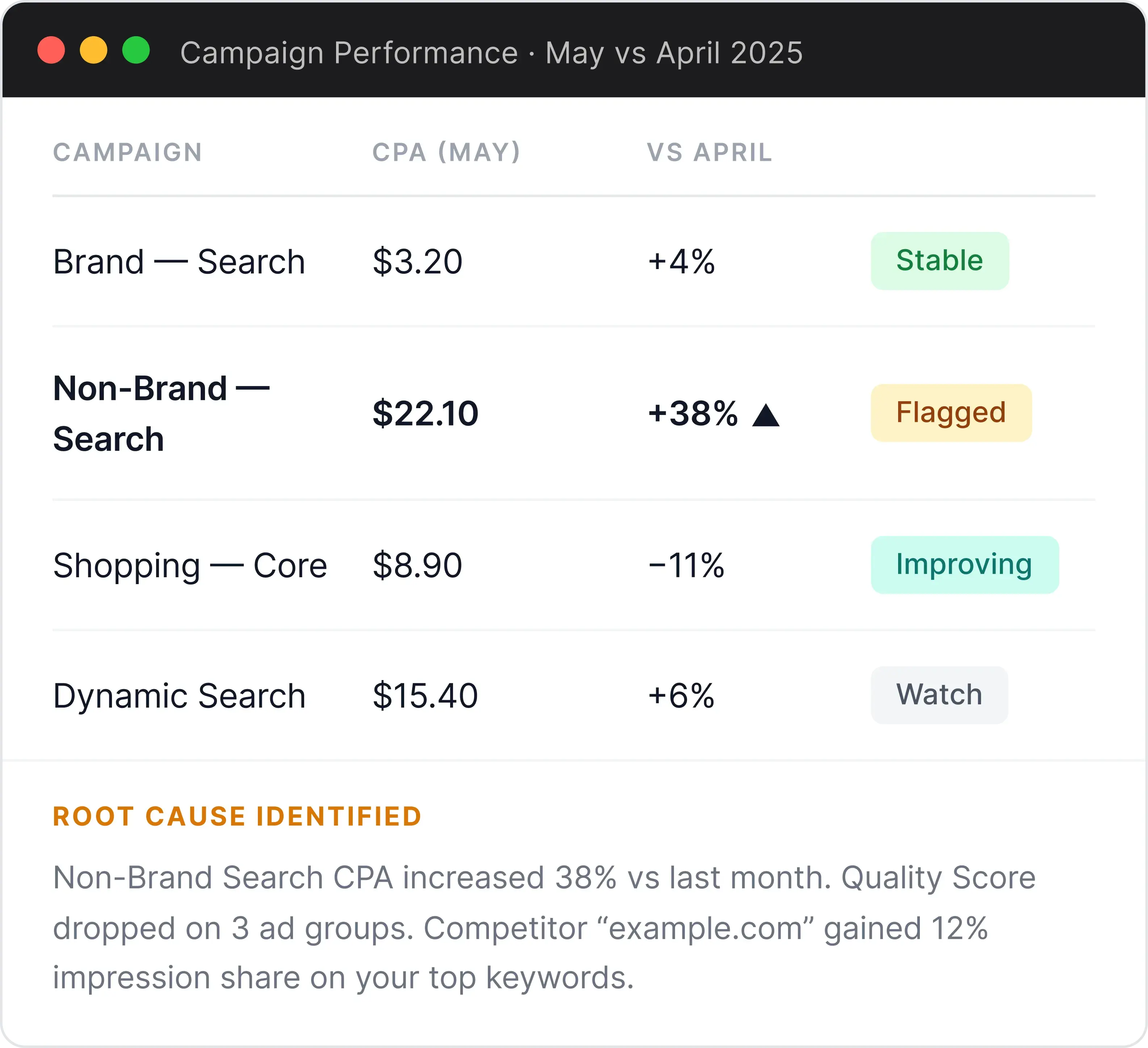
Diagnose what’s driving performance changes across accounts

Ask about any account and the MCP pulls live data from Optmyzr, compares time periods, and explains exactly what shifted with no manual report needed.

Diagnose what’s driving performance changes across accounts
Example Prompt

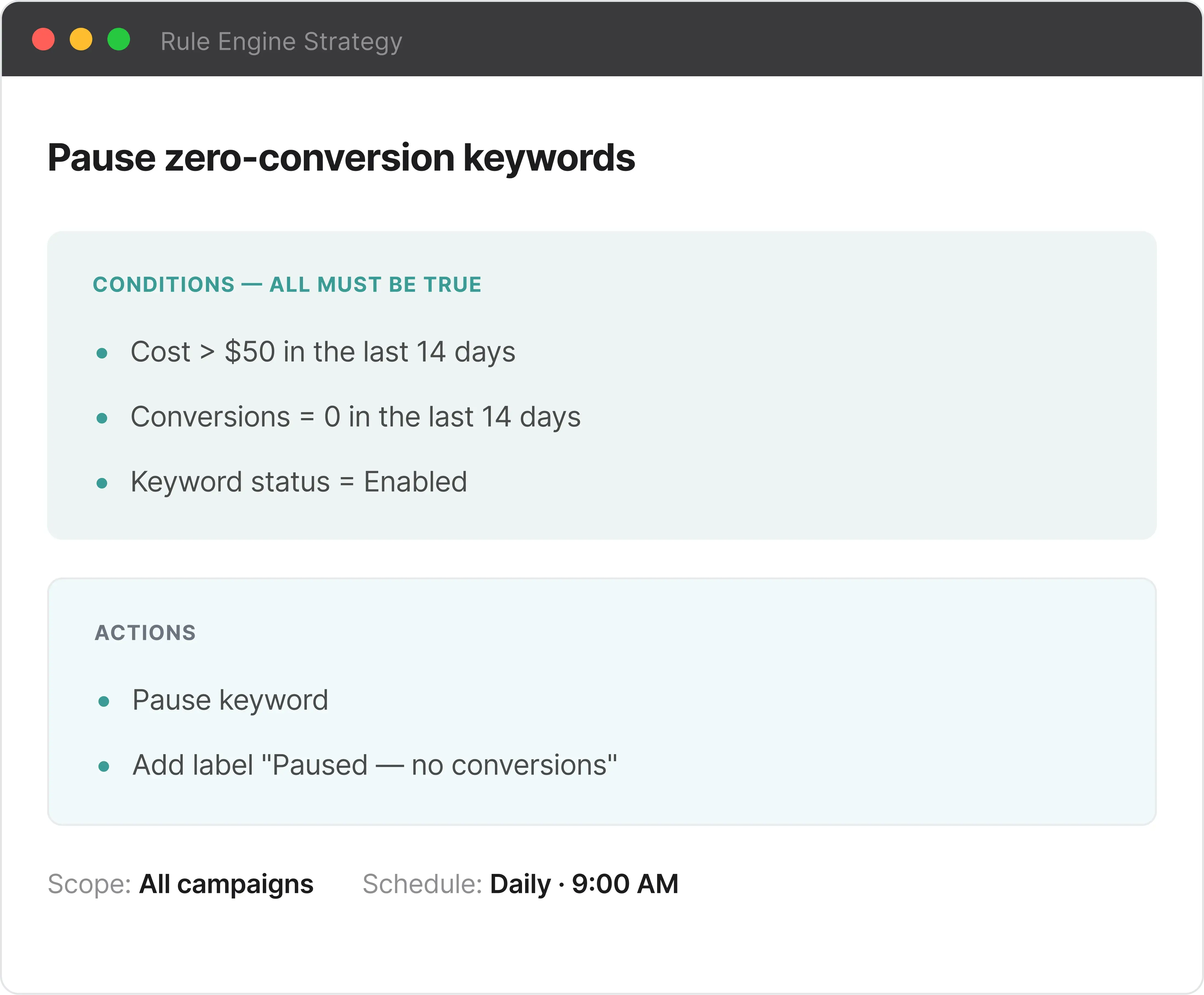
Create a Rule Engine strategy to pause keywords that have spent more than $50 with zero conversions in the last 14 days.

Write Rule Engine strategies in plain English

Describe what you want to automate. The MCP writes the complete strategy, conditions, thresholds, and actions, ready to review and apply in Optmyzr.

Write Rule Engine strategies in plain English
Example Prompt

Create a Rule Engine strategy to pause keywords that have spent more than $50 with zero conversions in the last 14 days.

Works with the AI tools you already use

Claude

Claude

Live

One-click connection via Claude Settings → Connections → Optmyzr. The fastest setup — no manual configuration needed.

Requires paid Claude plan
ChatGPT

ChatGPT

Live

Connect via the Optmyzr MCP server URL in ChatGPT Settings. Full access to all capabilities once configured.

Manual URL configuration
Any MCP-Compatible Tool

Any MCP-Compatible Tool

Live

Cursor, Windsurf, n8n, or any tool that supports MCP server connections can access your Optmyzr data the same way.

Manual configuration

How each tool charges

Optmyzr

From $209 /month

Tiered by monthly ad spend under management. Two main paid tiers (Essentials and Premium) plus Enterprise on custom pricing. Annual billing saves 30% vs monthly rate.


  • Essentials: from $209/month — core optimization, monitoring, and reporting tools; limited scheduling frequency and single-account reporting

  • Premium: from $272/month — full Rule Engine daily scheduling, cross-platform multi-account reporting, Shopping/PMax tools, Campaign Automator (1 account), and Platform Migration Service

  • Enterprise: custom pricing — unlimited accounts, hourly Rule Engine automation, dedicated account manager, Okta SSO, monthly training

  • 14-day free trial. No credit card required

  • Platform Migration Service included on Premium and Enterprise at no additional cost

  • Campaign Automator available as a paid add-on from $249/month

Adpulse

From $27 /month

Tiered by monthly ad spend under management (last 30 days, converted to USD). Single plan — all features included at every tier. Annual billing available at approximately 20% discount.


  • Up to $3K spend: $27/month (annual)

  • Up to $20K spend: $83/month (monthly)

  • Up to $50K spend: $165/month (monthly)

  • Up to $150K spend: $275/month (monthly)

  • Up to $500K spend: $550/month (monthly)

  • $1M+ spend: Enterprise / price on application

  • All features at every tier · Up to 100 accounts · Unlimited users

  • 14-day free trial. No credit card required. Annual billing requires a 12-month commitment

Switching to Optmyzr doesn't mean rebuilding from scratch

Our Platform Migration Service replicates your existing setup — automations, reports, and workflows — inside Optmyzr. You don't have to start over.

  1. 1

    Operational configuration — automation rules, alerts, and account structures rebuilt inside Optmyzr

  2. 2

    Reporting and dashboards — custom reports rebuilt to match your existing formats

  3. 3

    Workflow management — recurring optimization routines and structured workflows carried over

Complimentary for Premium and Enterprise plans.

Read the full details and fair usage policy

Premium & Enterprise

What's included

  • Complimentary — no extra cost at onboarding
  • Submit your configuration within 30 days of sign-up
  • One round of revisions after delivery
  • Covers automations, reporting, alerts, and workflows

Optmyzr vs. Adpulse

Head-to-head comparison • Last updated: July 30, 2026

Why PPC Pros Love Optmyzr

Frequently Asked Questions

For most use cases, yes with one honest caveat. Optmyzr covers the core budget monitoring, pacing alerts, and campaign pause automation that Adpulse offers. Where Adpulse goes materially deeper is in hourly budget automation (AutoPacing, AutoProtect) and the Close Variant Manager. If those two capabilities are central to your workflow, evaluate both. If you also need Rule Engine automation across bids and keywords, PPC Investigator root cause analysis, or client-facing reporting, Optmyzr covers all of that and Adpulse does not.

Yes. Adpulse supports TikTok Ads for budget management, reporting, and optimizations. Optmyzr does not currently support TikTok. If TikTok is a significant part of your media mix, that’s a meaningful factor in this comparison.

Different scope entirely. Adpulse’s automation handles budgets: AutoPacing, AutoProtect, AutoRecommendations, Close Variant Automatic Mode. Optmyzr’s Rule Engine covers bids, keywords, placements, ad copy, and budgets — across any combination of platforms, with multi-condition logic and a per-entity preview before anything runs.

No. Adpulse schedules exports to Google Sheets or CSV and gives you API access for Looker Studio or Tableau. If you need a drag-and-drop report builder, white-labeled templates, or a dashboard link you can send a client without giving them a login, that’s not in Adpulse.

The Optmyzr MCP (Model Context Protocol) lets AI assistants like Claude, ChatGPT, and others, access your Optmyzr account data and generate Rule Engine strategies from plain-language descriptions. You can ask “which campaigns have the highest CPA increase this month?” and get a live answer from your actual data. Adpulse has a full API but no MCP implementation, connecting an external AI to Adpulse data requires custom integration work. The Optmyzr MCP is available on all paid plans with no additional cost.

Both charge by monthly ad spend. Where they diverge: Adpulse starts at $33/month with every feature included at every tier. Optmyzr starts at $209/month, and Shopping/PMax tools, daily Rule Engine scheduling, and multi-account reporting all sit behind the Premium plan at $272/month or above.

Yes. The Platform Migration Service — included on Premium and Enterprise plans — replicates your existing Rule Engine strategies, system alerts, and custom reporting formats inside Optmyzr. One round of revisions is included. Submit your migration data within 30 days of starting your plan. Adpulse does not offer an equivalent migration service.

On Premium or Enterprise, the Platform Migration Service rebuilds your existing automation rules and reporting setup inside Optmyzr. For Rule Engine strategies, Optmyzr’s team works through the logic with you directly. The 14-day free trial lets you validate the new setup before you commit.