Use Cases
    Capabilities
    Roles

Optmyzr Vs. Birch

What each tool is built for

Optmyzr

Optmyzr

Your PPC Partner
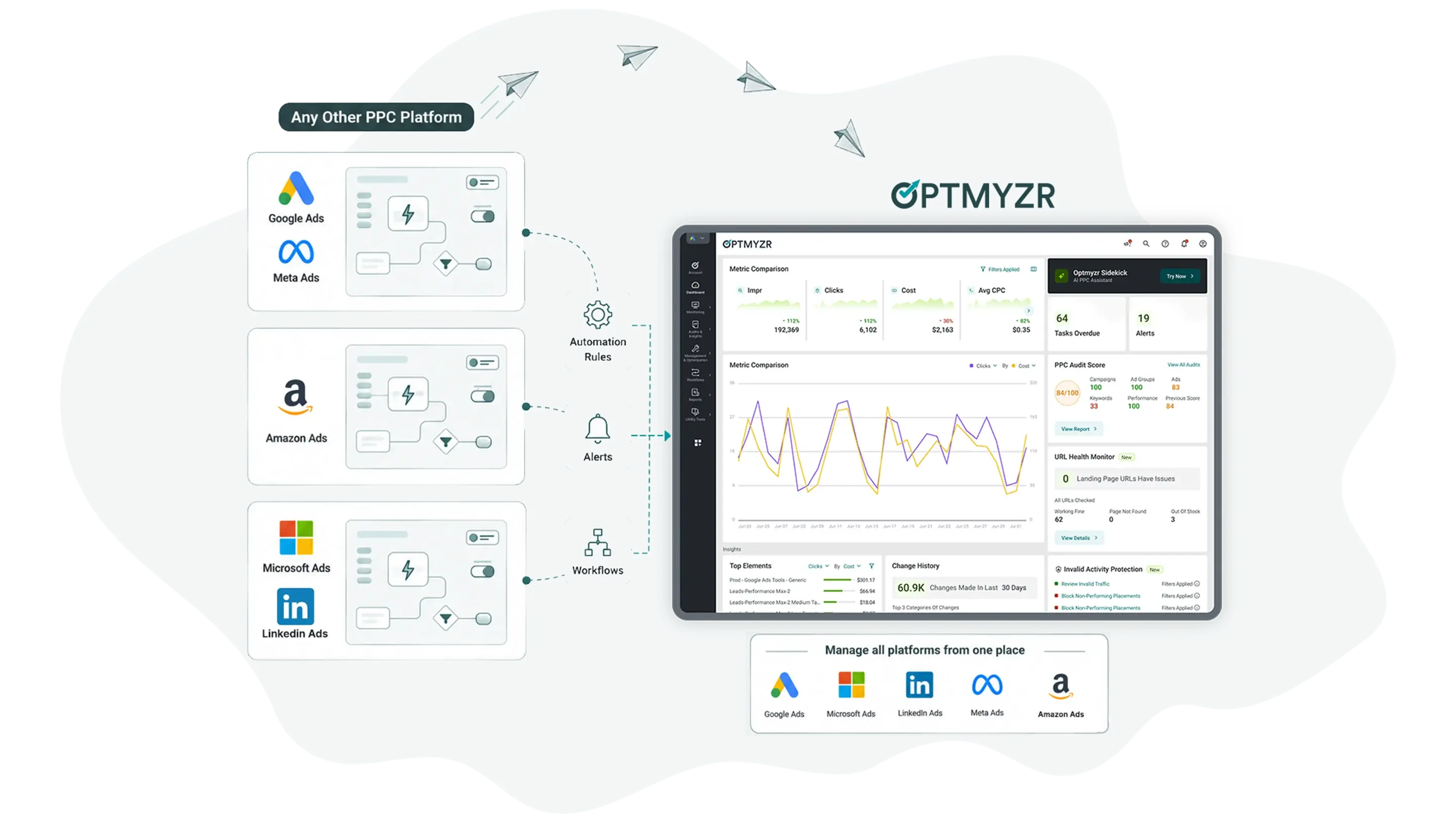
Optmyzr is a multi-platform PPC management suite for agencies and enterprise PPC teams covering Google Ads, Microsoft Ads, Amazon Ads, and Meta. It combines automation (Rule Engine), reporting, bid management, and account auditing in a single platform built for advertisers managing significant ad spend across multiple accounts and channels.

Best for: PPC agencies, freelancers, and in-house teams who manage search, shopping, and Amazon alongside social and need optimization, auditing, and reporting in one place.

Birch

Birch

Birch (formerly Revealbot) is an ad automation platform built for social and performance marketers running paid campaigns on Meta, Google, TikTok, and Snapchat. Its core is a rule-based automation engine paired with creative-focused tooling: bulk ad launching, post boosting, creative insights, and server-side tracking for Meta.

It takes repetitive, high-volume social campaign management off your plate and runs it on rules around the clock, so your team spends less time on manual checks and more time on the creative itself.

Best for: Performance and social teams running high-volume creative testing on Meta, TikTok, and Snapchat who want rule-based automation across those channels.

Which tool fits which buyer

Choose Optmyzr if…

You manage search and shopping across several platforms every day


  • You run PPC across Google, Microsoft, Amazon, Meta, and LinkedIn.

  • You want to preview every automated change before it goes live.

  • You need to know which keyword or campaign caused a performance shift.

  • You run scored account audits against PPC best practices.

  • You manage Shopping and Performance Max from product feeds.

  • You run an agency needing white-labeled reports and client dashboards.

  • You want to see what automation will do before it applies to your campaigns.

Choose Birch if…

Your spend lives in social and creative volume is the job


  • Most of your budget runs on Meta, TikTok, and Snapchat.

  • You launch large batches of creative and need bulk ad creation.

  • You want to auto-boost organic Facebook and Instagram posts.

  • You need server-side tracking for Meta through a first-party gateway.

  • Your team works primarily in social ad automation, not search.

  • You’d rather rules just run the moment conditions are met, with no approval step in the way.

Where each tool is genuinely stronger

Optmyzr

Optmyzr leads on search, shopping, and cross-platform depth

Optmyzr runs on the platforms most PPC programs live on: Google, Microsoft, Amazon, Meta, LinkedIn, and Yahoo Japan. Managing all of them from one login is the baseline. What you get on top is the part that’s hard to replicate.

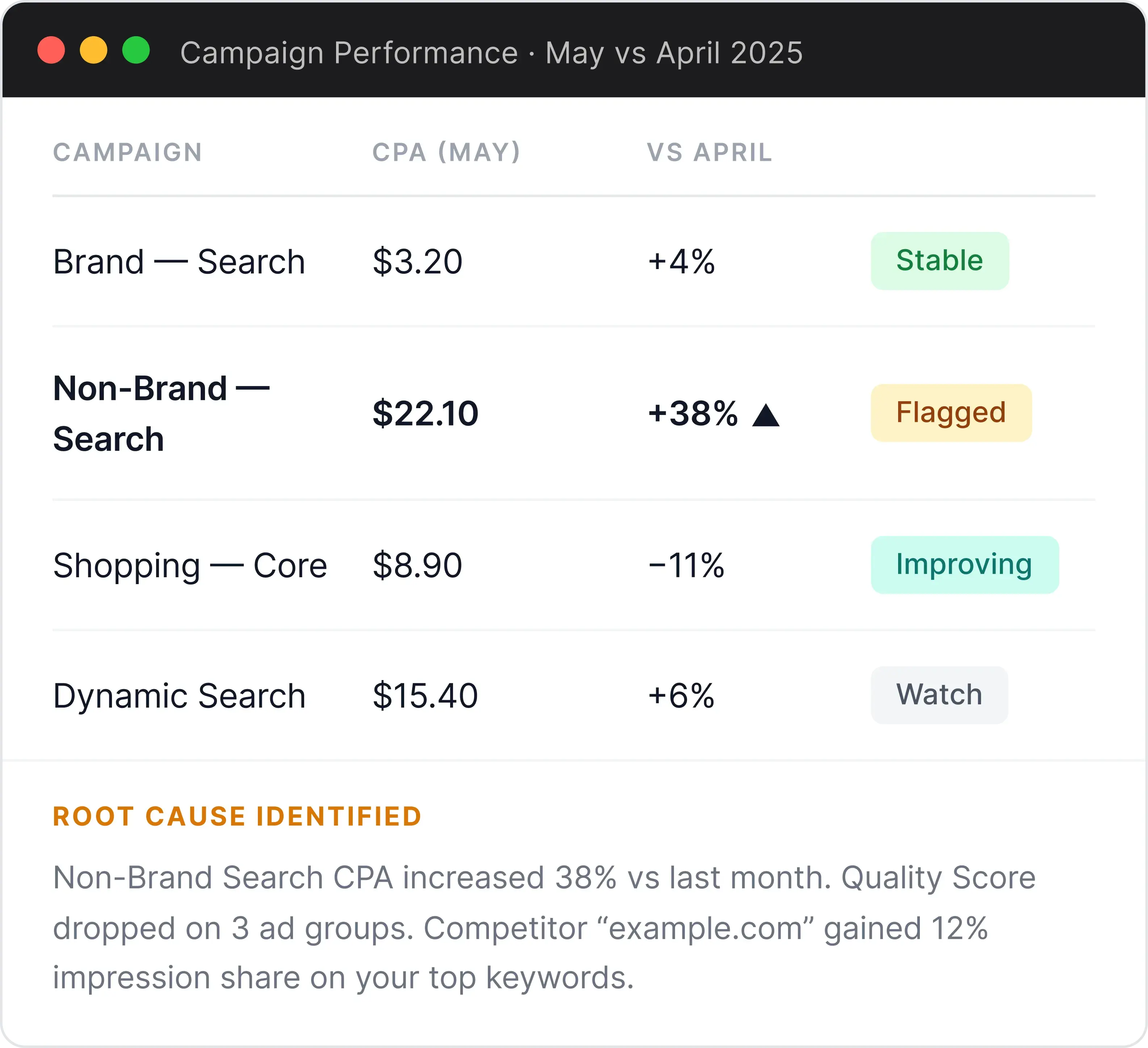
If you’ve ever spent an afternoon trying to figure out why a campaign’s CPA suddenly climbed, that’s the job Optmyzr is designed to shorten. Run a quick diagnostic and PPC Investigator traces the shift back to the specific campaign, keyword, or network that caused it, in about two minutes. You come to the next call with an answer, not a guess.

Automations show you their proposed changes before going live, so nothing touches your accounts without you seeing it first. A scored audit flags exactly what’s underperforming and lets you fix it in one click.

It’s more to take in than a single-purpose tool, but that’s the point: it covers the full daily job of managing search, shopping, and social in one place.

Birch leads on social, creative volume, and tracking

Birch leads on social, creative volume, and tracking

Birch has built a focused, well-liked engine for social ad automation. For teams whose spend concentrates on Meta, TikTok, and Snapchat, its rule builder, bulk Launcher, Stage media workflow, and post boosting genuinely take repetitive work off the table, and the time savings for social-first teams are real.

Its Hub server-side tracking for Meta and native TikTok and Snapchat automation are real advantages for social-first teams. Birch AI adds a conversational layer on top: ask about performance, compare channels, audit your rule logic, or describe a goal and it will draft a full automation rule ready for you to review and activate. The enhanced version is currently in closed beta.

If your world is high-volume creative testing on social, Birch is built for exactly that.

Features that Optmyzr users love

Automation is only useful if you can trust it, see it, and learn from it. There are a few important reasons teams come back again and again to Optmyzr.

Sidekick to make changes right from chat

Sidekick lives inside every Optmyzr tool, aware of the screen you are on. It does the analysis and the work: ask it to adjust a budget, update a keyword bid, change a setting, or build a report, and it makes the change directly from the conversation, with a clear confirmation before anything applies.

Sidekick to make changes right from chat

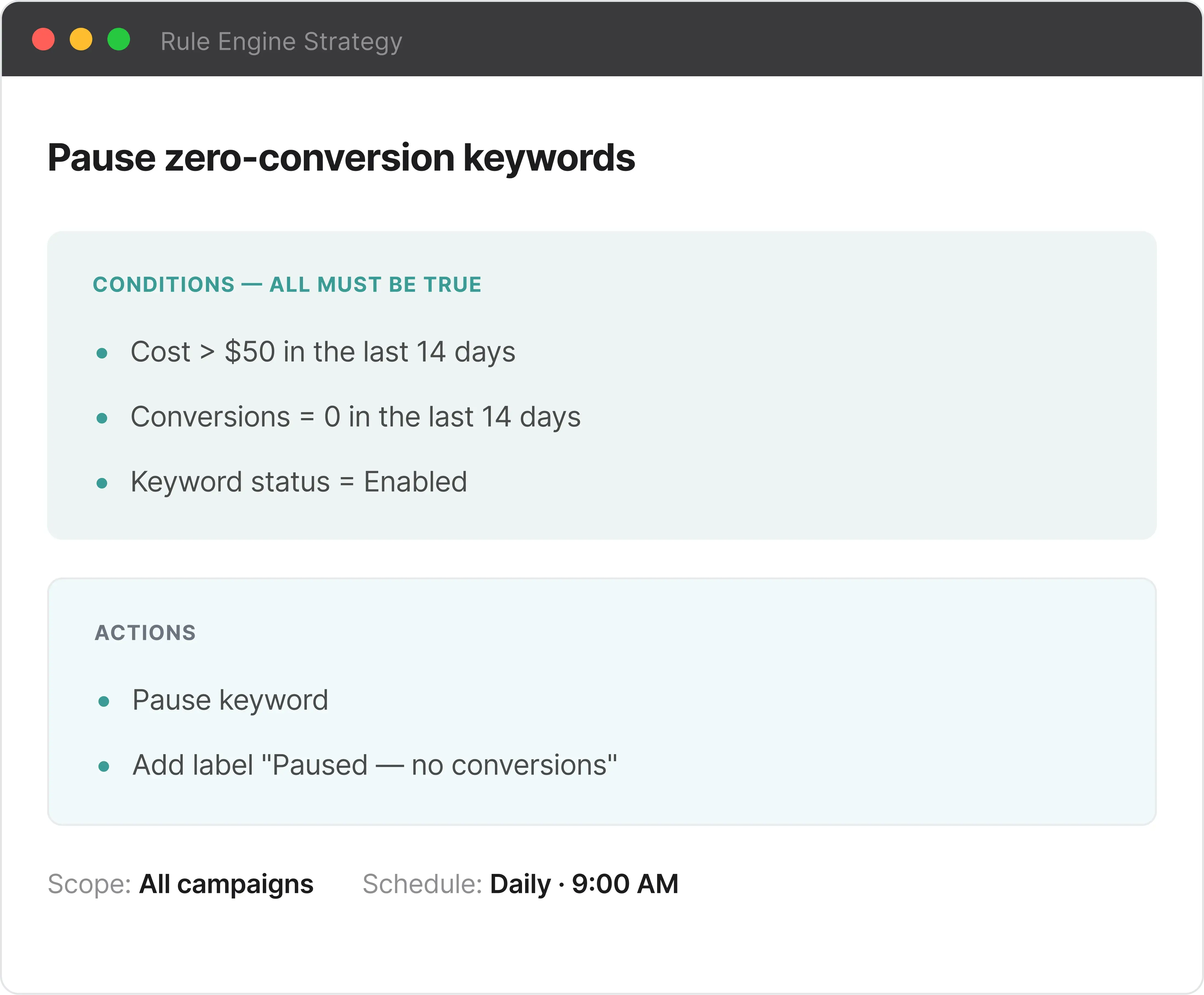
Rule Engine with a preview step

Every automation recipe can run in “View Suggestions” mode before anything goes live. You see the full list of proposed changes, every bid adjustment, budget shift, and keyword pause, across every campaign and account, then approve, edit, or discard them one by one or in bulk. The automation never gets ahead of you.

Rule Engine with a preview step

Automation that handles the repetitive work

Set the conditions once and the Rule Engine takes over the daily grind: adjusting bids, pacing budgets, and pausing what is underperforming across every account on the schedule you set. It runs continuously in the background, so the repetitive optimization work stops eating your day. Standard Birch rules fire automatically when conditions are met. Birch AI can generate rule drafts you review before activating, though that feature is currently in closed beta.

Automation that handles the repetitive work

Shopping campaigns that run from your feed

Shopping Campaign Manager reads your product feed and builds campaign structures from it, grouping products, proposing bid strategies, and syncing automatically when your Merchant Center feed changes. New products flow in, out-of-stock items update on their own, and Sidekick can walk you through the whole build step by step. It is the inventory-driven campaign workflow that social-first tools aren’t built for. Birch manages social campaigns. It has no equivalent for search and shopping built from a product feed.

Shopping campaigns that run from your feed

Budget Monitor, so your spend never goes dark or runs over

Set a monthly target and the Budget Monitor watches pacing across every account, alerting you at 50%, 75%, and 90% thresholds and automatically adjusting daily budgets before campaigns overspend or burn out too early. No more checking at the end of the month to find out something went dark on day 28.

Budget Monitor, so your spend never goes dark or runs over

PPC Investigator for root cause

When ROAS slips or CPA climbs, PPC Investigator decomposes the shift for you. Pick a metric and a date range and it returns Cause Charts showing how metrics relate, plus a Root Cause Analysis naming the exact campaigns, ad groups, keywords, and device or network combinations behind the change.

PPC Investigator for root cause

Ad Text Optimization for faster, cleaner ad management

Review, edit, and improve ads across every campaign in a single view, with AI-suggested copy sitting right next to your existing headlines and descriptions. A single toggle identifies and consolidates duplicate ads automatically, which is often the tedious cleanup jobs in account management. Birch has no ad management tool at this level of depth.

Ad Text Optimization for faster, cleaner ad management

Ask AI about your PPC accounts. Get real answers from live ad data.

Get a spend summary before a client call

Pull spend, ROAS, and budget pacing across all your accounts for the last 7 days, formatted and ready before you walk into the meeting.

Get a spend summary before a client call
Example Prompt

Summarize spend and ROAS by account for the last 7 days. Flag any that are pacing more than 15% over budget.

Build a shopping campaign from your feed

Describe the products and goals, and the MCP drafts a full Shopping campaign structure from your feed, ready to review and launch in Optmyzr.

Build a shopping campaign from your feed
Example Prompt

Build a Shopping campaign for my outdoor furniture feed. Group products by category, split best-sellers into their own campaign, and suggest starting bids based on margin.

Works with the AI tools you already use

Claude

Claude

Live

One-click connection via Claude Settings → Connections → Optmyzr. The fastest setup — no manual configuration needed.

Requires paid Claude plan
ChatGPT

ChatGPT

Live

Connect via the Optmyzr MCP server URL in ChatGPT Settings. Full access to all capabilities once configured.

Manual URL configuration
Any MCP-Compatible Tool

Any MCP-Compatible Tool

Live

Cursor, Windsurf, n8n, or any tool that supports MCP server connections can access your Optmyzr data the same way.

Manual configuration

How each tool charges

Based on publicly available information.

Optmyzr

From $209 /month

Tiered by monthly ad spend under management. All platforms are included on every plan, with no per-seat charges. Annual billing saves 30% against the monthly rate.


  • Rule Engine, reporting, and account audits on all plans

  • Google, Microsoft, Amazon, Meta, and LinkedIn Ads

  • AI Sidekick Assistant and Optmyzr MCP

  • Agency features on higher tiers

  • 14-day free trial, no credit card required

Birch

From $49 /month

Tiered by monthly ad spend across connected accounts. Annual billing saves 20%. In practice most active Meta advertisers will need a paid Hub tier and could be paying $99 + $49–$499/mo depending on event volume, before overage charges. Performance Pro at $99/mo includes:


  • Automated rules and strategies

  • Explorer, Launcher, and Stage

  • Custom metrics and timeframes

  • Top audiences and audience builder

  • Slack, Google Sheets, AppsFlyer, Hyros integrations

Switching to Optmyzr doesn't mean rebuilding from scratch

Our Platform Migration Service replicates your existing setup — automations, reports, and workflows — inside Optmyzr. You don't have to start over.

  1. 1

    Operational configuration — automation rules, alerts, and account structures rebuilt inside Optmyzr

  2. 2

    Reporting and dashboards — custom reports rebuilt to match your existing formats

  3. 3

    Workflow management — recurring optimization routines and structured workflows carried over

Complimentary for Premium and Enterprise plans.

Read the full details and fair usage policy

Premium & Enterprise

What's included

  • Complimentary — no extra cost at onboarding
  • Submit your configuration within 30 days of sign-up
  • One round of revisions after delivery
  • Covers automations, reporting, alerts, and workflows

Optmyzr vs. Birch

Head-to-head comparison • Last updated: July 30, 2026

Why PPC Pros Love Optmyzr

Frequently Asked Questions

It comes down to where your spend sits. If most of your budget runs on social, especially Meta, TikTok, and Snapchat, and your day is about launching and testing creative at volume, Birch is built for that. If you manage search and shopping across Google, Microsoft, and Amazon (often alongside social) and want auditing, root-cause analysis, and client reporting in the same place, Optmyzr is the better home. Plenty of teams find their answer just by looking at which platforms appear most on their invoices.

Not everything, and we’d rather be straight about it. Birch has things Optmyzr doesn’t: native TikTok and Snapchat automation, bulk social ad launching, organic post boosting, and server-side tracking through Hub. If those are core to your work, Birch is the right tool. Where Optmyzr pulls ahead is the search-and-shopping side, Microsoft and Amazon Ads, scored audits, root-cause diagnosis, feed-driven Shopping campaigns, and no-login client dashboards.

Some teams do run both, and that’s a valid setup. But if the bulk of your time goes into search, shopping, and Amazon, and social is part of the mix rather than the whole job, Optmyzr handles Meta alongside Google, Microsoft, Amazon, and LinkedIn so you can keep it under one roof. The honest deciding question is where most of your daily work and spend actually lives.

Yes. Birch is the rebranded name for Revealbot, same company and same core rule engine, now with a wider product family that includes Hub for server-side tracking and Stage for launching media from Google Drive. If you used or researched Revealbot in the past, you’re looking at the same automation engine under a new name.

The big difference is when you see the changes. Birch’s rules fire automatically when conditions are met, and you review what happened in the logs afterward. Optmyzr’s Rule Engine can run in “View Suggestions” mode, which shows you every proposed change before it goes live so you can approve, edit, or discard it first. If you’re comfortable letting automation run hands-off, Birch’s model is fast and effective. If you want a look before anything touches a live campaign, that’s Optmyzr’s approach.

They draw the line in different places. Birch AI is a strong analyst: ask it about performance, compare channels, or have it review your rules, and it tells you what it sees and what to consider. Optmyzr’s Sidekick does that analysis too, but it can also carry out the change for you, adjusting a budget or a bid straight from the chat with a confirmation step. One advises, the other advises and acts.

Both charge by monthly ad spend and both give you a 14-day free trial with no credit card, so you can try before deciding. Birch starts lower, from $49/mo (Essential, annual) and $99/mo (Pro), with Hub server-side tracking billed separately on top, from free (up to 10K events/mo) to $499/mo for high-volume accounts. Optmyzr starts from $209/mo and includes the full toolset, with 30% off on annual billing. The gap reflects scope: Birch is a focused social automation tool, Optmyzr is a broader management platform. Check each pricing page for current numbers since both use spend-based tiers.

Our team helps you connect your accounts, rebuild your automation logic in the Rule Engine, and get your reporting set up correctly. The migration service is complimentary on Premium and Enterprise plans, and you can start with the 14-day free trial to run Optmyzr alongside your current setup before committing.