
Use Cases
    Capabilities
    Roles
Unlock powerful automation with Optmyzr’s AI and MCP

Your Microsoft Shopping campaigns update the moment your product feed does.

When your feed changes, your Microsoft Shopping campaigns should change with it. New products, sold-out items, price shifts — Optmyzr picks it up and updates your campaign structure without manual rebuilds.
Left Background Right Background Center Card
  • No credit card required
  • Free 14-day trial
  • Cancel anytime
  • No credit card required
  • Free 14-day trial
  • Cancel anytime

What Optmyzr does for Microsoft Shopping

Create, structure, and refresh Microsoft Shopping campaigns from one place
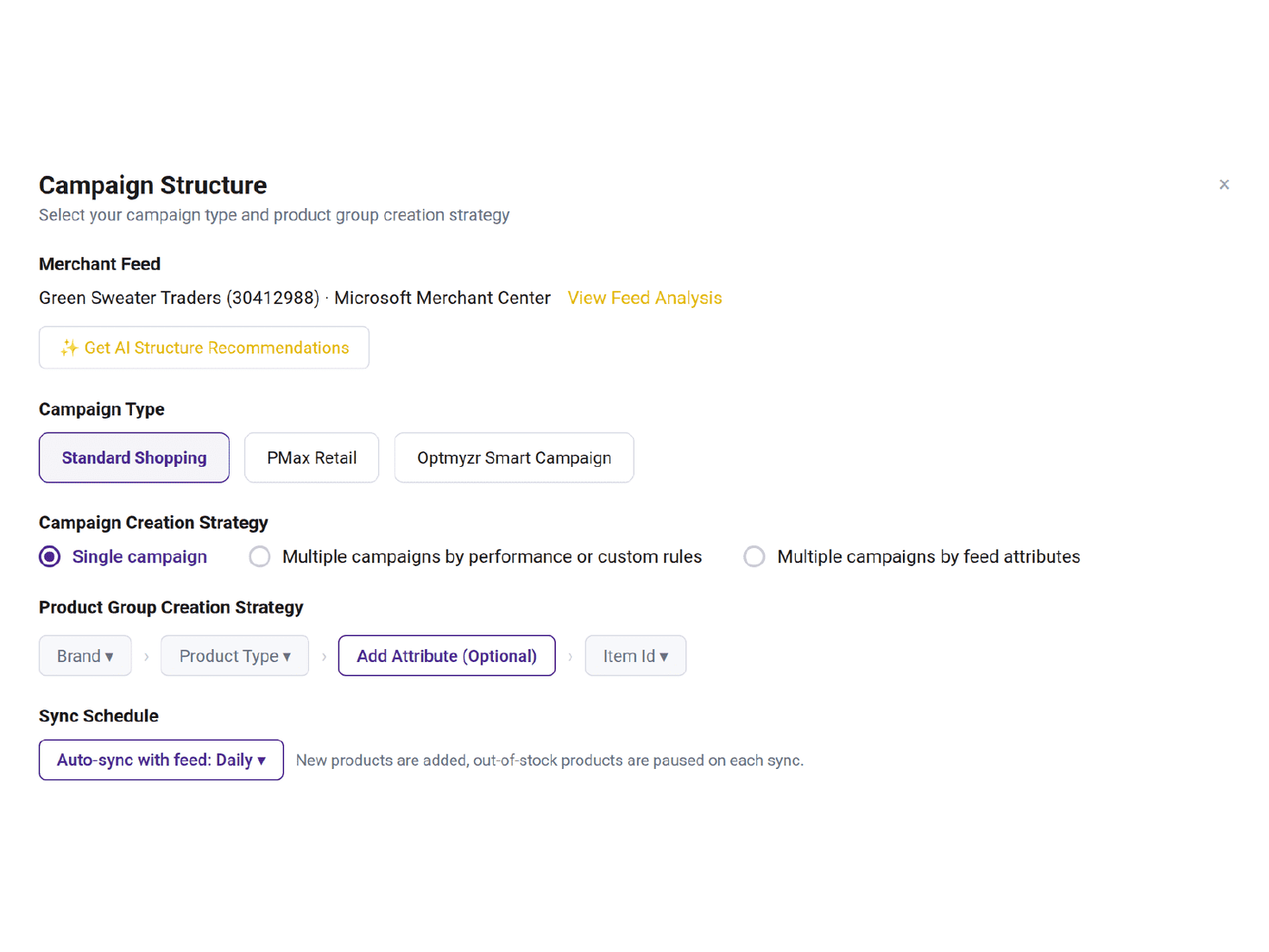
You can build Standard Shopping, PMax Retail, and Optmyzr Smart campaigns directly from your Merchant Center feed and segment multiple products at scale. You can define the structure of your campaign type, asset groups, listing group hierarchy once, and the tool handles the rest. And it keeps everything in sync as your product data changes.
Build Microsoft Shopping campaigns from your feed
Create, structure, and refresh Microsoft Shopping campaigns from one place

See which products are worth bidding more on

Your Microsoft Merchant Center feed score sits right next to the performance data, so feed quality problems surface before they pull products out of the auction. The tool also identifies product groups where bids are running above target returns and suggests reductions, so you are not manually hunting through campaigns for the ones doing damage. Ask Sidekick why a specific product group’s CPA shifted and get an immediate diagnosis without pulling separate reports.
Spot expensive product groups to re-bid
See which products are worth bidding more on

Know where your Microsoft budget will land before the month ends

Spend Projection uses historical performance patterns and current pacing to model how much you’ll spend by month-end. If you’re heading toward early burnout or significant underspend, you’ll see it with enough time to act.

Budget Monitor recalculates daily budgets to keep you on pace for your target, and can shift spend toward your stronger-performing campaigns automatically.

And you can also ask Sidekick to explain any sudden shift in pacing and get a breakdown of what’s driving it, without pulling a manual report.
Project month-end Microsoft spend
Know where your Microsoft budget will land before the month ends

Segment your product catalog by performance

Smart Product Labeler sorts your products into five performance buckets, from Heroes to Villains, based on ROAS and cost, so you’re not treating your best sellers and your worst spenders the same way.

You can set the rules once using performance metrics or feed attributes, and the tool keeps labels current as performance shifts or new products land in your Merchant Center feed. And you can use that to build campaigns with bids tailored to each tier.
Label Microsoft products by ROAS and cost
Segment your product catalog by performance

Watch your campaigns in real time on your highest-stakes sale days

Sale Day Command Center pulls budget pacing, performance anomalies, and product-level data into one dashboard that refreshes every 30 minutes, so a spend spike or a stockout during Black Friday doesn’t sit unnoticed for hours. You can:
• Find exhausted budgets before they cut your campaigns off.
• Catch any real drop in cost, clicks, or conversions the moment it happens.
• Monitor your budget pacing and get hourly trends for clicks, conversions, cost, and conversion value.
• Share the Google Ads view of the dashboard with clients and stakeholders through a secure link, no login needed.
Run Sale Day Command Center on Microsoft Ads
Watch your campaigns in real time on your highest-stakes sale days

Scale your revenue with advanced Microsoft optimizations

LinkedIn audience targeting inside Microsoft Ads lets you layer professional demographic signals onto search campaigns alongside Shopping. It affects traffic quality and the CPCs you’re paying in the auction. Optmyzr Express surfaces which campaigns are missing those audience layers and makes adding them a quick fix.

From there, Rule Engine handles the rest: you can set automation rules for custom bids for product groups, scheduled budget adjustments tied to your sales calendar, and automated alerts before any metric moves far enough to become a real problem.
Scale Microsoft Ads with Rule Engine
Scale your revenue with advanced Microsoft optimizations

What it looks like when you actually run Microsoft Shopping well.

30K+

SKUs managed

4–6h

saved per week

$450K+

revenue tracked since 2021

Optmyzr's value extends beyond features. Their agility in adapting to platform changes and introducing new capabilities ensures our PPC strategy stays future-proof. In short, Optmyzr isn't just a tool; it's a strategic partner, accelerating efficiency and growth in our PPC operations.

Deki Hoek, Channel Manager, BBQGuys
Read the full story
Deki Hoek

It's a powerful tool that saves a lot of time, especially in an industry where so much of the work is repetitive. Being able to get an overview and analyze it effectively is what Optmyzr does best. With other tools, you have to click through multiple boxes. Here, you log in and see everything you need right away.


Chris Delport, Customer Success Manager, StubGroup
Read the StubGroup story
Chris Delport

Connect your Microsoft account and see what you've been missing.

Try Optmyzr for 14 days. No credit card required.

FAQs

For most ecommerce advertisers, yes. The Microsoft Advertising network reaches around 700 million unique monthly searchers, so your products get an audience beyond Google.

Yes. Microsoft Performance Max campaigns work similarly, running ads across Bing, Yahoo, DuckDuckGo, and the Microsoft Audience Network. Optmyzr's Shopping Campaign Management tool supports Microsoft Performance Max alongside Standard Shopping, so you can create, manage, and refresh both campaign types from the same workflow.

Optmyzr's Shopping Campaign Management tool builds Standard Shopping, PMax Retail, and Optmyzr Smart campaigns directly from your Microsoft Merchant Center feed. You can choose to create campaign structures based on the feed attributes or performance metrics automatically. Once campaigns are live, automatic sync schedules keep them refreshed as your product data changes.

Optmyzr's Shopping Campaign Management connects directly to your Microsoft Merchant Center and updates your campaigns as the feed changes. When items sell out, get repriced, or get added to your catalog, product groups adjust automatically. You can run it manually or set it on a daily schedule so it runs without any input from your team.

The native Microsoft Ads budget controls give you a daily cap without any pacing projection or cross-campaign reallocation. When demand spikes or seasonal patterns shift, there is no early warning system in the platform. Optmyzr's Spend Projection models where your budget will land by month-end based on current pacing, so you can see the problem coming and adjust before it becomes one.

You can use the pre-built Rule Engine strategy on Optmyzr to reduce the bids on expensive product groups. You can also use the Search Term N-Gram analysis that breaks your queries into word patterns so you can exclude common irrelevant phrases in bulk rather than chasing individual matches one at a time. The tool also identifies product groups where bids are running above target returns and suggests reductions in the same view.

Yes. Optmyzr's multi-account budget portfolios span Microsoft Ads and Google Ads simultaneously. You can set combined monthly spend targets, track pacing across both platforms in one view, and get alerts when either platform overpaces or underspends. Budget reallocation recommendations also work across both platforms in the same portfolio.

Yes. The Sale Day Command Center monitors performance across Microsoft Ads, Google Ads, Amazon Ads, and Meta simultaneously. You can see how all four platforms are performing on the same day, compare against targets, and spot shifts in any of them without switching between separate dashboards.

Yes. Optmyzr's reporting engine consolidates performance from both platforms into a single report. You can build custom dashboards with widgets pulling from Microsoft and Google, schedule them to be sent automatically, and apply white-label branding for client-facing output. Combined cross-platform reporting is available on Premium plans and Enterprise plans.

Yes. You can create a new Microsoft Ads account directly from Optmyzr's Account Dashboard. And our Customer Success team can guide you to setup your campaigns. The Shopping Campaign Management tool, feed audit, budget monitoring, and optimization tools are all available from day one.

And if you’re already using another PPC management tool, we can replicate your existing automation rules, budget alerts, and workflows to Optmyzr, as a complimentary service for our Premium & Enterprise customers.