


Build PMax retail campaigns in minutes. Know exactly how they're performing by channel.
Create structured retail campaigns from your Merchant Center feed in minutes, then see exactly which channels spent, which products earned, and which feed issues are costing you — all from one workspace.


The complete toolkit for PMax Retail campaigns
Launch and auto-sync structured PMax retail campaigns 10x faster
Setting up a PMax retail campaign requires navigating listing groups, asset groups, and bid settings across multiple screens, one campaign at a time.
Optmyzr’s Shopping Campaign Management builds PMax retail campaigns directly from your Merchant Center feed using AI-suggested structures. And it automatically syncs every campaign as your inventory changes.
Prefer to automate this further? Describe your catalog and goals to Sidekick, our AI chat assistant, and it takes you through the process of creating campaign structures and allows you to review before anything goes live.
Build a PMax Retail campaign from your feed
Optmyzr’s Shopping Campaign Management builds PMax retail campaigns directly from your Merchant Center feed using AI-suggested structures. And it automatically syncs every campaign as your inventory changes.
Prefer to automate this further? Describe your catalog and goals to Sidekick, our AI chat assistant, and it takes you through the process of creating campaign structures and allows you to review before anything goes live.

See exactly where your PMax budget goes
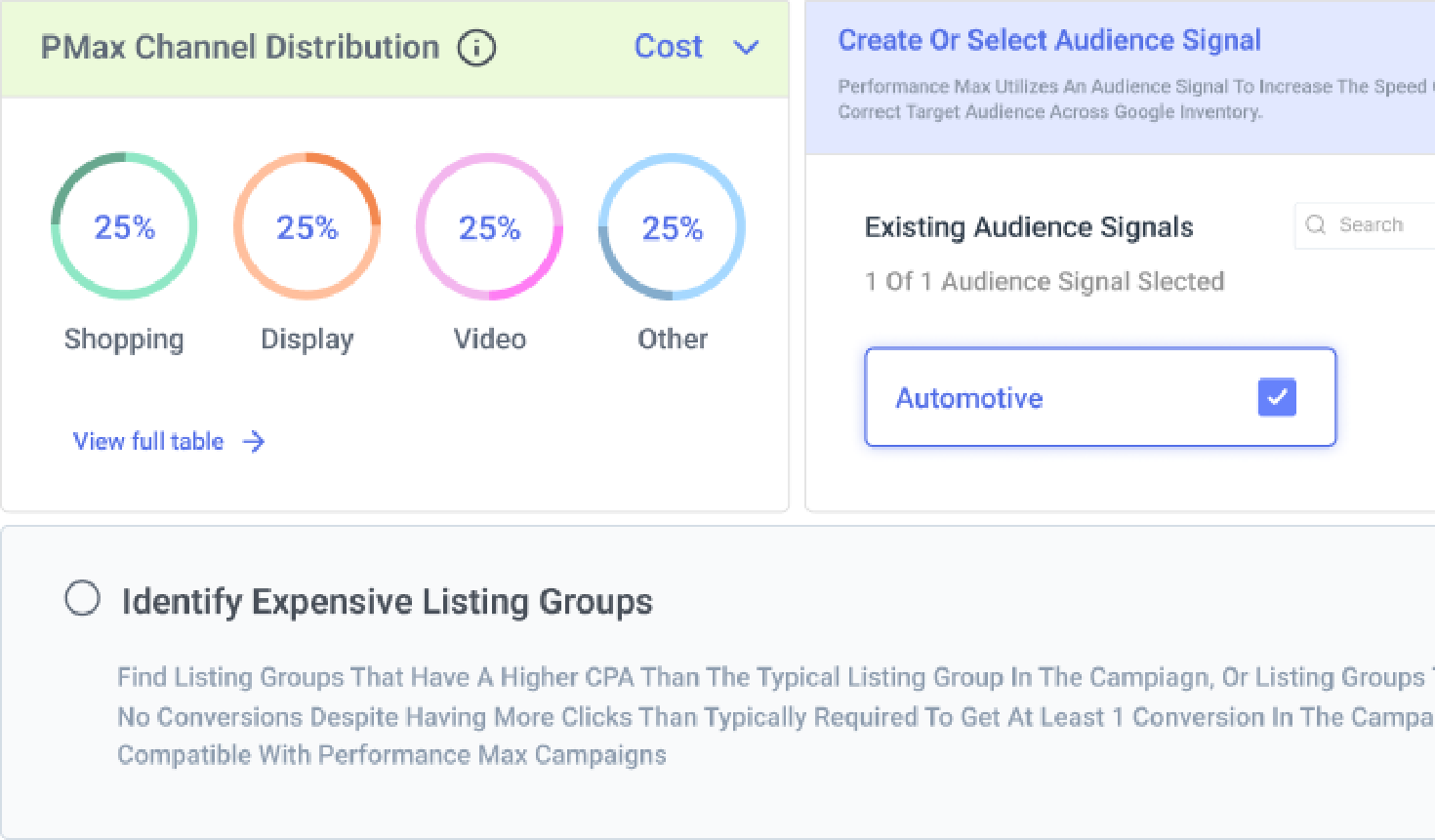
PMax for ecommerce runs across Search, Shopping, YouTube, Display, Discover, Gmail, and Maps from one campaign. That makes it hard to know which channel is driving conversions and which is spending without much to show for it. Optmyzr’s channel distribution widget breaks this down by surface across all your PMax retail campaigns and lets you A/B test channel performance across specific campaigns before committing more budget to them.
When performance shifts and you can’t explain it, PPC Investigator pinpoints the exact root cause so you can act on a diagnosis. You can also measure your performance against your market averages based on CPC, CPA, conversion rate, ROAS, and bidding strategy.
Split and test PMax spend by channel
When performance shifts and you can’t explain it, PPC Investigator pinpoints the exact root cause so you can act on a diagnosis. You can also measure your performance against your market averages based on CPC, CPA, conversion rate, ROAS, and bidding strategy.

Keep tabs on how your creatives perform
PMax campaigns use audience signals as the starting point to reach the right audience, but finding which asset groups are missing them means checking each one separately in Google Ads. For large ecommerce accounts, most teams skip it.
Optmyzr Express surfaces every asset group without audience signals across your account in one place and lets you add signals or create new ones without leaving the tool.
Optmyzr breaks down your asset performance across campaigns and asset groups, compares assets within the same group, and surfaces your top and poor performers directly, without having to open every campaign in Google Ads.
You can also set Rule Engine alerts to flag week-over-week shifts in asset group performance, so you catch problems at the group level before they drag overall campaign results down.
Find asset groups missing audience signals
Optmyzr Express surfaces every asset group without audience signals across your account in one place and lets you add signals or create new ones without leaving the tool.
Optmyzr breaks down your asset performance across campaigns and asset groups, compares assets within the same group, and surfaces your top and poor performers directly, without having to open every campaign in Google Ads.
You can also set Rule Engine alerts to flag week-over-week shifts in asset group performance, so you catch problems at the group level before they drag overall campaign results down.

Stay on top of PMax spend across every campaign, all month
PMax can spend up to double your daily budget on high-traffic days by design. That means campaigns can pace ahead of plan before you have time to adjust.
Optmyzr tracks actual spend against monthly targets in real time, alerts you when any PMax campaign is getting ahead of pace, and lets you set hard caps. You can also automate daily budget increases on historically high-spend days so the full monthly budget is used without surprise invoices at the end of the month.
Set PMax monthly budget pacing alerts
Optmyzr tracks actual spend against monthly targets in real time, alerts you when any PMax campaign is getting ahead of pace, and lets you set hard caps. You can also automate daily budget increases on historically high-spend days so the full monthly budget is used without surprise invoices at the end of the month.

Catch feed problems before they reach your PMax campaigns
Feed-based ads account for 74% to 97% of PMax spend, which means every missing image, disapproved attribute, and out-of-stock SKU has a direct cost to campaign performance. The Shopping Feed Audit scans continuously and flags issues before they reach live campaigns, including products not active in any PMax or Shopping campaign.
Scan your feed for missing images and out-of-stock SKUs

Put budget behind the products that actually earn it
When conversion data sits at the campaign level, it is genuinely hard to know whether budget is going to the products that deserve it. Optmyzr breaks performance down to the product and listing group level.
Smart Product Labeler goes further by segmenting your catalog into five performance buckets — Heroes, Sidekicks, Flukes, Villains, and Zombies — so you can set different ROAS targets per segment, bid differently on each bucket, and pull underperformers out of PMax retail campaigns entirely based on real performance data.
Split PMax campaigns by product performance tier
Smart Product Labeler goes further by segmenting your catalog into five performance buckets — Heroes, Sidekicks, Flukes, Villains, and Zombies — so you can set different ROAS targets per segment, bid differently on each bucket, and pull underperformers out of PMax retail campaigns entirely based on real performance data.

Go into every peak season with every campaign fully under control
Peak season is when PMax budgets need the most precision and when manual monitoring across many campaigns is most likely to let something slip.
The Sale Day Command Center tracks live budget, top products, and campaign performance across Google, Microsoft, Amazon, and Meta Ads, with Google Analytics and Merchant Center data alongside, and year-over-year comparison or against any other day, while Budget Pacing alerts, Spend Projection, and the Rule Engine handle monitoring and hard caps automatically.
Set up Sale Day Command Center for peak season
The Sale Day Command Center tracks live budget, top products, and campaign performance across Google, Microsoft, Amazon, and Meta Ads, with Google Analytics and Merchant Center data alongside, and year-over-year comparison or against any other day, while Budget Pacing alerts, Spend Projection, and the Rule Engine handle monitoring and hard caps automatically.

Adjust PMax bids automatically based on weather conditions
For many ecommerce brands, local weather conditions can have a direct impact on what people buy and when they buy it.
The Optimize by Weather tool lets you automatically target or exclude locations and enable or pause campaigns based on real-time weather data and forecasts.When combined with Rule Engine, you can also automatically adjust PMax target ROAS or target CPA based on conditions like rain, heat, or cold, giving you a way to automate PMax ecommerce campaigns around weather shifts.
Set up weather-based PMax bids
The Optimize by Weather tool lets you automatically target or exclude locations and enable or pause campaigns based on real-time weather data and forecasts.When combined with Rule Engine, you can also automatically adjust PMax target ROAS or target CPA based on conditions like rain, heat, or cold, giving you a way to automate PMax ecommerce campaigns around weather shifts.

Used by ecommerce teams managing millions in Shopping spend
5 minutes
to set up shopping campaigns, down from 5 hours
+69%
conversion value growth YoY
$1.5M+
added in conversion value during peak season for a client
Setting up shopping campaigns in Optmyzr takes minutes, not hours. Optmyzr is so integrated with the way we work now that we don't really measure the time savings anymore. It's just how we operate.
Jorgen Schultz, Momentum Performance
Read the Momentum Performance story


Get complete visibility into your PMax retail campaigns
Try Optmyzr for 14 days. No credit card required.


FAQs
Yes. Optmyzr can create, optimize, manage, and monitor PMax campaigns running on Search, Display, and Shopping. You can layer Optmyzr on top of Google's smart bidding algorithms to optimize conversion value goals based on performance and external business data, get alerts when PMax campaigns see unexpected drops in performance, and manage budgets, audience signals, and assets at scale.
Ecommerce teams running PMax retail campaigns get the most value from Optmyzr's feed diagnostics, product-level performance reporting, and Shopping Campaign Management. You can audit your Merchant Center feed automatically, catch issues before they affect serving, see which products are driving revenue versus draining budget, and build structured PMax retail campaigns 10x faster than setting them up directly in Google Ads.
Many advertisers see better results with multiple PMax retail campaigns segmented by performance goal, grouping high-ROAS products separately from products that are still building history. This gives you more precise budget allocation and clearer performance data by segment.
Optmyzr's Shopping Campaign Management makes it straightforward to build and maintain that structure in bulk without it becoming a daily maintenance task.
Optmyzr's Shopping Campaign Management makes it straightforward to build and maintain that structure in bulk without it becoming a daily maintenance task.
Yes. Optmyzr's Shopping Campaign Management handles both Standard Shopping campaigns and PMax retail campaigns in the same workspace. You can create, audit, and optimize across both types, and the Shopping Dashboard shows all your Shopping and PMax campaigns together regardless of whether they were created in Optmyzr or directly in Google Ads. When you manage both in one workspace, you can compare the performance of PMax and Standard Shopping campaigns side by side without switching tools.
Yes. Optmyzr's AI suggests PMax retail campaign structures based on your Merchant Center feed and goals. It can propose structures based on the most frequent attributes in your account, the best-performing attribute combinations, or a performance-based segmentation approach. You get a strong starting point you can review and customize rather than building structure from scratch in Google Ads.
More than most ecommerce teams expect. Feed-based ads account for 74 to 97% of PMax spend, which means the product data in your Merchant Center feed is the single biggest lever for PMax campaign performance.
A campaign is only as good as the data powering it. When your products have issues like short titles, missing GTINs, disapproved attributes, and out-of-stock products, they directly limit what PMax can serve and who it can reach.
Optmyzr's Shopping Feed Audit scans your Merchant Center feed automatically and surfaces those issues before they affect live campaigns, including products that are not included in any active Shopping or PMax retail campaign.
A campaign is only as good as the data powering it. When your products have issues like short titles, missing GTINs, disapproved attributes, and out-of-stock products, they directly limit what PMax can serve and who it can reach.
Optmyzr's Shopping Feed Audit scans your Merchant Center feed automatically and surfaces those issues before they affect live campaigns, including products that are not included in any active Shopping or PMax retail campaign.
AI Max and PMax are two different things and they are not competing for the same job. AI Max for Shopping extends standard Shopping campaigns into conversational queries, adding text customization, final URL expansion, and optimal format selection.
PMax runs across Google's full ad inventory including Search, Shopping, YouTube, Display, Discover, Gmail, and Maps, with a different control model using asset groups and listing groups. The practical difference for ecommerce teams is that AI Max is the right choice when your team wants conversational reach without giving up the campaign architecture you have already invested in tuning, while PMax is the campaign type to run when the goal is total Google inventory exposure with goal-based bidding doing the heavy lifting. Most retailers end up running both.
Optmyzr supports PMax retail campaigns specifically, covering feed management, channel distribution reporting, product-level performance, and campaign creation from your Merchant Center feed.
PMax runs across Google's full ad inventory including Search, Shopping, YouTube, Display, Discover, Gmail, and Maps, with a different control model using asset groups and listing groups. The practical difference for ecommerce teams is that AI Max is the right choice when your team wants conversational reach without giving up the campaign architecture you have already invested in tuning, while PMax is the campaign type to run when the goal is total Google inventory exposure with goal-based bidding doing the heavy lifting. Most retailers end up running both.
Optmyzr supports PMax retail campaigns specifically, covering feed management, channel distribution reporting, product-level performance, and campaign creation from your Merchant Center feed.
The Smart Product Labeler segments your Merchant Center catalog into five performance buckets based on ROAS and traffic data. Those labels are applied via a supplemental feed and can be used to create separate PMax retail campaigns or Standard Shopping campaigns for each bucket, each with its own bid target and budget.
This lets ecommerce teams concentrate spend on high-ROAS products and handle underperformers separately without manually reviewing thousands of SKUs.
This lets ecommerce teams concentrate spend on high-ROAS products and handle underperformers separately without manually reviewing thousands of SKUs.
If you run a PMax retail campaign and a Standard Shopping or Optmyzr Smart Campaign for the same products, Google can prioritize the PMax campaign. Optmyzr recommends running them for separate groups of products to keep performance data clean and avoid internal competition for impressions. The product performance reporting in Optmyzr helps you identify where overlap is happening and restructure accordingly.
Scripts can break, time out, and require updates when Google changes its API. The channel distribution widget in Optmyzr is built into the platform, stays current automatically, and connects directly to your other campaign data so you can go from insight to action without leaving the workspace. It also makes A/B testing channel performance across specific PMax campaigns much easier to set up and read.
Yes. Optmyzr's Shopping Campaign Management is available for Microsoft Ads and provides a unified workflow for managing existing Shopping and PMax campaigns across both platforms.
Most teams are connected and seeing their channel breakdown and feed audit within 10 to 15 minutes of linking their Google Ads account. The 14-day free trial gives you full access to every tool at no cost with no credit card required.
If you want a walkthrough, the Optmyzr team is available to run through your specific PMax setup with you. And if you already are using a PPC management platform, we can migrate your existing workflows, automation rules and budget alerts to Optmyzr. This is complementary for Premium and Enterprise customers.
If you want a walkthrough, the Optmyzr team is available to run through your specific PMax setup with you. And if you already are using a PPC management platform, we can migrate your existing workflows, automation rules and budget alerts to Optmyzr. This is complementary for Premium and Enterprise customers.