


Manage more shopping accounts without hiring more people
One tool that watches every account’s budget, cleans up search terms, sends custom reports to your clients every week, and builds the next campaign, so your team doesn’t have to.


Scalable automation for agencies, with your strategic oversight
Get back the day you lose to search term cleanup
Search term cleanup shouldn’t eat a whole day of your week, but for most agencies it does. One agency owner told us cleanup takes 30 minutes to an hour per client, every single day. Across a full client roster, that’s a job all by itself, and it produces zero new revenue.
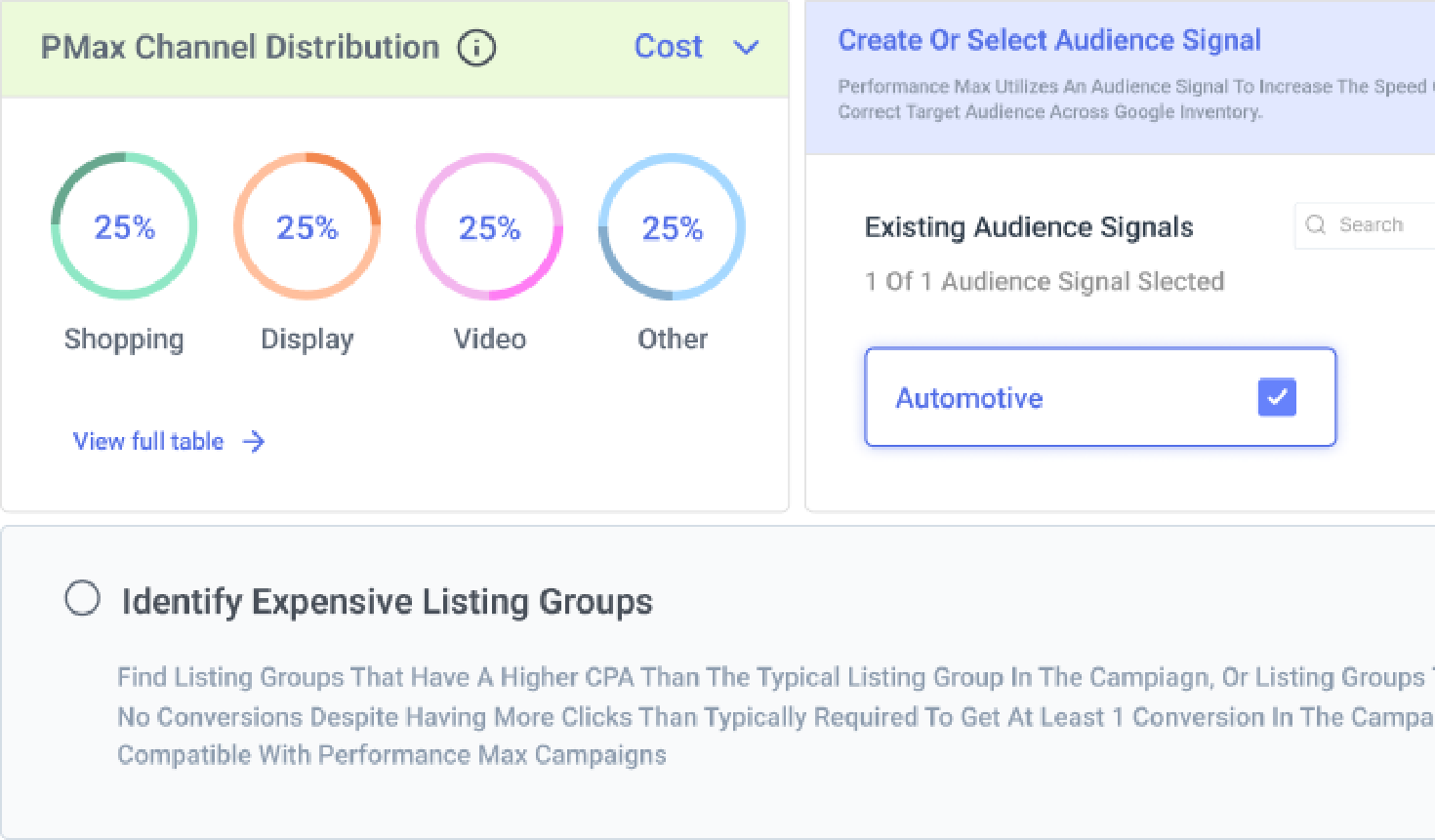
Here’s how to get that time back. Rule Engine can help you catch irrelevant search terms using AI-powered intent similarity, then pair that with spend, conversion, or performance filters before adding them as negatives. You can build the strategy once, schedule it, and either review the suggestions first or let approved actions run automatically, depending on how much control you want.
Clean up search terms with AI intent matching
Here’s how to get that time back. Rule Engine can help you catch irrelevant search terms using AI-powered intent similarity, then pair that with spend, conversion, or performance filters before adding them as negatives. You can build the strategy once, schedule it, and either review the suggestions first or let approved actions run automatically, depending on how much control you want.

Manage every client's budget from one portfolio
Checking dozens or hundreds of accounts by hand every day isn’t realistic. But with Optmyzr, you can set budget targets, pacing checks, and threshold-based actions across accounts using Budget Dashboard and shift spend from an account that’s underspending to one about to blow past its cap using Optimize Budgets. Add anomaly detection on top and you’ll get alerted when Optmyzr detects pacing or performance issues, instead of finding out at the end of the month.
For agencies during important sale days like Black Friday or flash sale, the Sale Day Command Center can be used across your whole portfolio, and the Google Ads view can be shared with a client through a link, so they can watch performance live without needing a login.
Track every client's pacing in the Budget Dashboard
For agencies during important sale days like Black Friday or flash sale, the Sale Day Command Center can be used across your whole portfolio, and the Google Ads view can be shared with a client through a link, so they can watch performance live without needing a login.

Build the client's next campaign in minutes
Every new client means building a campaign from a blank account, which is slow, repetitive work.
For Google Ads and Microsoft Ads, you can build feed-driven campaigns at scale using Campaign Automator and Shopping Campaign Management, generating and updating product ads automatically as your client’s feed changes.
For accounts with existing creative, Shopping Campaign Management let you pull images and videos straight from the Google Ads Asset Library for PMax campaigns. Combined with feed-driven automation, your client’s product ads update automatically as their feed changes, without a rebuild every time.
AI Campaign Creation builds a complete Search or PMax Lead Gen campaign, structure, keywords, and ad copy directly from a website URL.
Build a client campaign from their feed
For Google Ads and Microsoft Ads, you can build feed-driven campaigns at scale using Campaign Automator and Shopping Campaign Management, generating and updating product ads automatically as your client’s feed changes.
For accounts with existing creative, Shopping Campaign Management let you pull images and videos straight from the Google Ads Asset Library for PMax campaigns. Combined with feed-driven automation, your client’s product ads update automatically as their feed changes, without a rebuild every time.
AI Campaign Creation builds a complete Search or PMax Lead Gen campaign, structure, keywords, and ad copy directly from a website URL.

Build Meta Ads campaigns at scale
For Meta Ads, you can build a campaign using Social Campaign Launcher that covers placements like Feed, Stories, Reels, and Explore from one workflow. Instead of managing five placement-specific setups per client, it’s one campaign, one structure, one place to check. [This is currently available by request, reach out to support@optmyzr.com to get it turned on for your account.]
Launch Meta campaigns with Social Campaign Launcher

The one report every client actually reads
Most agency reporting either takes an hour to assemble or gets ignored the moment it lands in a client’s inbox. But with Optmyzr, you can create a white-label version of the report you want and schedule it based on your preference. And Optmyzr pulls in the data at the scheduled time and shares the report automatically.
Plus if you want to get instant answers on any account performance, you can just chat with Sidekick, ask it to explain why an account’s performance shifted, pull top-performing search terms, or draft a plain-language summary of what changed this month.
Set up white-label client reports
Plus if you want to get instant answers on any account performance, you can just chat with Sidekick, ask it to explain why an account’s performance shifted, pull top-performing search terms, or draft a plain-language summary of what changed this month.

Automate custom use cases with Rule Engine
There are often unique use cases for agencies to improve performance and refine their strategy, but it becomes difficult to scale them across multiple campaigns and accounts. With Rule Engine, you can build it once and apply it across different accounts within a platform.
To start with, it comes with a library of pre-built strategies ready to apply:
• Flagging products that have spent money but haven’t converted in the last 30 days
• Cutting bids on product groups costing more per conversion than the rest of the campaign
• Setting Shopping bids automatically to hit a target return on ad spend
• Clearing out search queries with zero conversions, high cost, and low click-through rate
• Catching listing groups, including inside PMax, that are spending more than they should relative to what they’re returning
• Finding listing groups that have a higher CPA than the typical listing group in the campaign
• Getting flagged the moment a PMax campaign’s conversions or ROAS shift
If none of them fit exactly, you can describe what you want in plain language and let ‘Create Strategy Using AI’ (still in beta) create the strategy for you, ready for you to review before it runs.
Replicate a Rule Engine strategy across clients
To start with, it comes with a library of pre-built strategies ready to apply:
• Flagging products that have spent money but haven’t converted in the last 30 days
• Cutting bids on product groups costing more per conversion than the rest of the campaign
• Setting Shopping bids automatically to hit a target return on ad spend
• Clearing out search queries with zero conversions, high cost, and low click-through rate
• Catching listing groups, including inside PMax, that are spending more than they should relative to what they’re returning
• Finding listing groups that have a higher CPA than the typical listing group in the campaign
• Getting flagged the moment a PMax campaign’s conversions or ROAS shift
If none of them fit exactly, you can describe what you want in plain language and let ‘Create Strategy Using AI’ (still in beta) create the strategy for you, ready for you to review before it runs.
Know exactly why performance changed, on any platform
When a metric moves, the real question is always why, and digging through a native dashboard for the answer eats time you don’t have when you’re managing this across every client.
Root Cause Analysis, a part of PPC Investigator tool, answers that question the same way no matter which platform you’re looking at. Google Ads, Microsoft Ads, Amazon Ads, and Meta Ads all trace a shift back through campaigns, ad groups, bids, or placements, and show which campaign, ad group, keyword, placement, product partition, device, or network contributed most to the shift.
For Google and Microsoft Ads, you can also use Change History to check whether recent account changes may have caused it. And you can also set KPI alerts for your performance metrics and get notified via email and Slack.
Run Root Cause Analysis in PPC Investigator
Root Cause Analysis, a part of PPC Investigator tool, answers that question the same way no matter which platform you’re looking at. Google Ads, Microsoft Ads, Amazon Ads, and Meta Ads all trace a shift back through campaigns, ad groups, bids, or placements, and show which campaign, ad group, keyword, placement, product partition, device, or network contributed most to the shift.
For Google and Microsoft Ads, you can also use Change History to check whether recent account changes may have caused it. And you can also set KPI alerts for your performance metrics and get notified via email and Slack.

Automate campaigns around weather changes
For ecommerce clients, weather can change demand faster than a weekly account check ever will. A sudden heatwave can lift demand for outdoor furniture and cooling products, or apparel. A rainy weekend can hurt store visits, delay seasonal purchases, or shift demand toward completely different products.
Optmyzr helps you optimize Google Ads and Meta Ads campaigns based on weather conditions in the locations you choose. You can target specific cities and pause or enable campaigns based on rules like rainy weather, temperature thresholds, or probability of rain.
For more advanced control, Rule Engine includes weather attributes such as Weather Condition, Max. Temperature, Min. Temperature, and Probability of Rain. You can combine those weather signals with campaign, budget, and ad group logic to adjust budgets, target CPA, target ROAS, or campaign status when the conditions match.
That gives your team an automated way to manage weather-sensitive ecommerce clients without checking forecasts city by city or making the same seasonal adjustments by hand.
Set up weather-based rules for client campaigns
Optmyzr helps you optimize Google Ads and Meta Ads campaigns based on weather conditions in the locations you choose. You can target specific cities and pause or enable campaigns based on rules like rainy weather, temperature thresholds, or probability of rain.
For more advanced control, Rule Engine includes weather attributes such as Weather Condition, Max. Temperature, Min. Temperature, and Probability of Rain. You can combine those weather signals with campaign, budget, and ad group logic to adjust budgets, target CPA, target ROAS, or campaign status when the conditions match.
That gives your team an automated way to manage weather-sensitive ecommerce clients without checking forecasts city by city or making the same seasonal adjustments by hand.

Let new hires help without the risk
Growing past a founder-led team means bringing on junior marketers and analysts. But you can’t hand a new hire the keys to a client’s live budget on day one, and you shouldn’t have to babysit every change they make either.
Rule Engine works with a human in the loop. You set the logic, and depending on how you configure it, changes either apply automatically or get flagged for a senior team member to approve first.
You can pair that with Blueprints, ready-made workflow templates for things like a Shopping campaign setup or a full account audit, so a new hire follows a proven process instead of guessing.
Set up Blueprints with approval steps
Rule Engine works with a human in the loop. You set the logic, and depending on how you configure it, changes either apply automatically or get flagged for a senior team member to approve first.
You can pair that with Blueprints, ready-made workflow templates for things like a Shopping campaign setup or a full account audit, so a new hire follows a proven process instead of guessing.

Colewood Digital gains 15% revenue and saves 2,900+ hours
61%
increase in year-over-year CTR through Shopping
15%
increase in year-over-year revenue
12%
boost in conversion rate
9%
increase in conversions
From the start of our time with Optmyzr to this current day, we receive fast responses to queries, regular updates, and amazing content. We feel the support is top level, and the current features and proactivity in adding new things to the platform is amazing.
Paul Taylor, Head of Paid Advertising Sector, Colewood Digital
Read how Colewood saved 2,900+ hours

Ready to give your team their time back?
Try Optmyzr for 14 days. No credit card required.

FAQs
Yes. Optmyzr gives agencies a single workspace to manage Shopping and PMax campaigns across your entire client portfolio. You can monitor budgets, automate repetitive work, review recommendations, and build campaigns without jumping between dozens of individual accounts.
That's exactly what it's designed for. Instead of repeating the same optimization across every account, you build it once and apply it across your MCC. For instance, you can replicate your Rule Engine automation strategies across different accounts, which means you only need to create them once and run it forever across multiple clients.
Yes, once a Meta account is connected, you get an Account Dashboard and Portfolio Dashboard for performance at a glance, Rule Engine strategies to automatically adjust budgets, pause underperforming campaigns, or re-enable them on a schedule, and Reallocate and Optimize Budgets to shift spend across accounts before one overspends.
Budget Alerts and Metric Alerts flag pacing or performance issues via email, Slack, or Microsoft Teams, and Sale Day Command Center gives you a real-time view during high-stakes events like Black Friday or Cyber Monday.
You can also share a live, white-labeled Shareable Dashboard with clients so they can check in without needing a login, and on Enterprise plans it can run under your own domain. Campaign building itself runs through Social Campaign Manager and Social Campaign Launcher.
Budget Alerts and Metric Alerts flag pacing or performance issues via email, Slack, or Microsoft Teams, and Sale Day Command Center gives you a real-time view during high-stakes events like Black Friday or Cyber Monday.
You can also share a live, white-labeled Shareable Dashboard with clients so they can check in without needing a login, and on Enterprise plans it can run under your own domain. Campaign building itself runs through Social Campaign Manager and Social Campaign Launcher.
Yes, you can create or use a pre-defined Rule Engine strategy to automatically identify irrelevant search terms, brand misspellings, and close intent matches across every client account. It also supports campaign types like PMax and AI Max that don't rely on traditional keyword lists.
It starts with the product feed, not individual campaigns. The Feed Audit helps you identify issues with the Merchant Feed and fix most of them right then and there. And Smart Product Labeler groups products using attributes like ROAS, inventory, margin, seasonality, or custom labels, while Campaign Automator keeps campaigns aligned as the feed changes. Instead of manually managing thousands of SKUs, your campaigns update alongside your catalog.
Optmyzr acts as the middle layer between your feed and campaigns. This means you can use Optmyzr to surface and fix issues in your feed. And organize products into meaningful groups using business data like profitability, inventory, or performance, making Shopping and Performance Max campaigns much easier to optimize.
Yes. Optmyzr’s Blueprints let you create repeatable workflows for campaign launches, account audits, and optimization routines, so every client follows the same proven process without relying on checklists or memory.
There isn't a single platform that's right for every agency. The best choice depends on the size of your client portfolio, the amount of manual work your team handles each week, and whether you need help with reporting, Shopping optimization, campaign management, or automation.
For ecommerce agencies, the most valuable platforms usually combine cross-account management, product-level optimization, budget monitoring, reporting, and AI into one workflow instead of solving just one problem. That's where Optmyzr stands out. It brings together Rule Engine automation, AI-supported Shopping campaign creation, budget management, reporting, and AI chat assistance in a single platform for agencies.
For ecommerce agencies, the most valuable platforms usually combine cross-account management, product-level optimization, budget monitoring, reporting, and AI into one workflow instead of solving just one problem. That's where Optmyzr stands out. It brings together Rule Engine automation, AI-supported Shopping campaign creation, budget management, reporting, and AI chat assistance in a single platform for agencies.
Large agencies don't scale by logging into every account each day. They standardize workflows, automate repetitive optimizations, monitor budgets centrally, and only investigate accounts that need attention.
That's the approach Optmyzr was built around. Features like Rule Engine, Budget Monitor, portfolio management, anomaly detection, and Blueprints let agencies manage significantly more accounts without growing headcount at the same pace.
That's the approach Optmyzr was built around. Features like Rule Engine, Budget Monitor, portfolio management, anomaly detection, and Blueprints let agencies manage significantly more accounts without growing headcount at the same pace.
For many common automation tasks, yes. Instead of writing, testing, and maintaining custom scripts, agencies can build automations visually using Rule Engine, schedule them across multiple accounts, and review changes before they're applied. That reduces maintenance while making automation accessible to the entire team, not just the most technical account manager.
Yes. Shopping Campaign Management, Smart Product Labeler, and feed-based automation are designed for ecommerce, while AI Campaign Creation, Rule Engine, reporting, budget management, and Sidekick support Search, PMax, and lead generation campaigns as well. Many agencies use the same Optmyzr account to manage both client types.
Yes. Many Optmyzr tools work at the MCC level, allowing you to build an optimization once and apply it across every eligible client account. That's one of the biggest reasons agencies adopt the platform—it removes repetitive work without removing control.
Our onboarding team helps you connect your Google Ads, Microsoft Ads, and Amazon Ads accounts, then brings over your account structures, budgets, and any existing automation so you're not rebuilding from scratch. Most agencies are fully set up within their first week.
No. Connecting an ad account uses the platform’s official API and doesn’t pause or change anything that’s already running. After that, you decide how much Optmyzr does on its own. Recommendations wait for your approval, and automations like Rule Engine strategies, Budget Monitor automation and Campaign Automator only act on the conditions you set, on the accounts you choose.
Yes. Rule Engine strategies, budget monitoring, and anomaly alerts apply across your full account list at once, on a schedule, which is how agencies like Colewood Digital and StubGroup scale account volume without scaling headcount at the same rate.
Pricing is based on ad spend under management, not seats, so adding team members never cost more. Current plans and tiers are on the pricing page.