


Get more for every dollar from your Shopping Campaigns
See which products deserve more spend, which feed issues are quietly costing you clicks, and where PMax is actually putting your money.


How can you maximize ROAS from Shopping campaigns
Let AI build your first Shopping and PMax campaign structure
Setting up a well-structured Shopping or PMax campaign from scratch, with the right product groups and asset groups, usually takes hours of manual setup.
Optmyzr’s AI can suggest a campaign structure based on your product feed and goals, for both Shopping and PMax Retail campaigns, giving you a customizable starting point instead of a blank page. You can build campaigns roughly 10x faster than doing it manually in Google Ads, then adjust the structure to fit your actual strategy.
See how AI builds a Shopping campaign from your feed
Optmyzr’s AI can suggest a campaign structure based on your product feed and goals, for both Shopping and PMax Retail campaigns, giving you a customizable starting point instead of a blank page. You can build campaigns roughly 10x faster than doing it manually in Google Ads, then adjust the structure to fit your actual strategy.

Launch Meta campaigns without rebuilding from scratch every time
Building paid social campaigns gets tedious and error-prone once you’re doing it across accounts, since every campaign means starting over with objectives, placements, and targeting.
Social Campaign Launcher lets you build and launch Meta and LinkedIn campaigns from reusable templates, with pre-approved audiences, account-level settings, and naming conventions carried over automatically. Campaign creation is available on request by contacting our support team.
You can build in bulk across accounts grouped in portfolios, copy campaign structures from one account to another, and choose Advantage+ placements or go manual, with campaigns syncing directly to Meta Ads Manager or LinkedIn Campaign Manager once published.
Launch Meta campaigns from a reusable template
Social Campaign Launcher lets you build and launch Meta and LinkedIn campaigns from reusable templates, with pre-approved audiences, account-level settings, and naming conventions carried over automatically. Campaign creation is available on request by contacting our support team.
You can build in bulk across accounts grouped in portfolios, copy campaign structures from one account to another, and choose Advantage+ placements or go manual, with campaigns syncing directly to Meta Ads Manager or LinkedIn Campaign Manager once published.

Structure campaigns around how products actually perform
Most Shopping and PMax campaigns treat every product the same, so top performers and poor performers sit in the same structure with no way to prioritize spend.
Smart Product Labeler automatically groups products into performance-based segments, like Heroes, Sidekicks, Zombies, Flukes, and Villains, based on ROAS, or product type, and keeps those labels updated as performance changes from Google & Microsoft Merchant Centers. Shopping Analysis adds a deeper layer, letting you break down performance by any two attributes at once, such as price point and ROAS, so you can see exactly which part of your catalog is worth pushing harder.
Label products with Smart Product Labeler
Smart Product Labeler automatically groups products into performance-based segments, like Heroes, Sidekicks, Zombies, Flukes, and Villains, based on ROAS, or product type, and keeps those labels updated as performance changes from Google & Microsoft Merchant Centers. Shopping Analysis adds a deeper layer, letting you break down performance by any two attributes at once, such as price point and ROAS, so you can see exactly which part of your catalog is worth pushing harder.

Bid based on what each product is actually worth
A single bid strategy rarely fits a feed with thousands of SKUs, since a $15 phone case and a $600 pair of sneakers don’t deserve the same bid logic.
Shopping Attribute Bidder lets you set and adjust bids in Google Ads by product attribute instead of one blanket rule. Separately, you can feed Google value signals based on location, device, or audience through Conversion Value Rules so PMax and Smart Bidding treat higher-value conversions accordingly, ensuring budget follows value instead of volume.
Set product-level bids with Shopping Attribute Bidder
Shopping Attribute Bidder lets you set and adjust bids in Google Ads by product attribute instead of one blanket rule. Separately, you can feed Google value signals based on location, device, or audience through Conversion Value Rules so PMax and Smart Bidding treat higher-value conversions accordingly, ensuring budget follows value instead of volume.

Fix feed gaps without leaving the audit
Finding a missing brand name or a thin product title is one thing. Fixing it across hundreds of products without opening a spreadsheet is another.
Once Shopping Feed Audits flags an issue, you can resolve it right there. Missing brand, price, or GTIN fields get fixed in an intuitive side tray, AI-powered suggestions help rewrite titles and descriptions, and bulk editing lets you fix them in batches of 25 products with no spreadsheet required.
Fix missing titles and attributes in bulk
Once Shopping Feed Audits flags an issue, you can resolve it right there. Missing brand, price, or GTIN fields get fixed in an intuitive side tray, AI-powered suggestions help rewrite titles and descriptions, and bulk editing lets you fix them in batches of 25 products with no spreadsheet required.

Give PMax clearer direction on where to spend
PMax decides where your budget goes across Shopping, Display, Video, or other channels, but that decision is normally invisible and hard to influence.
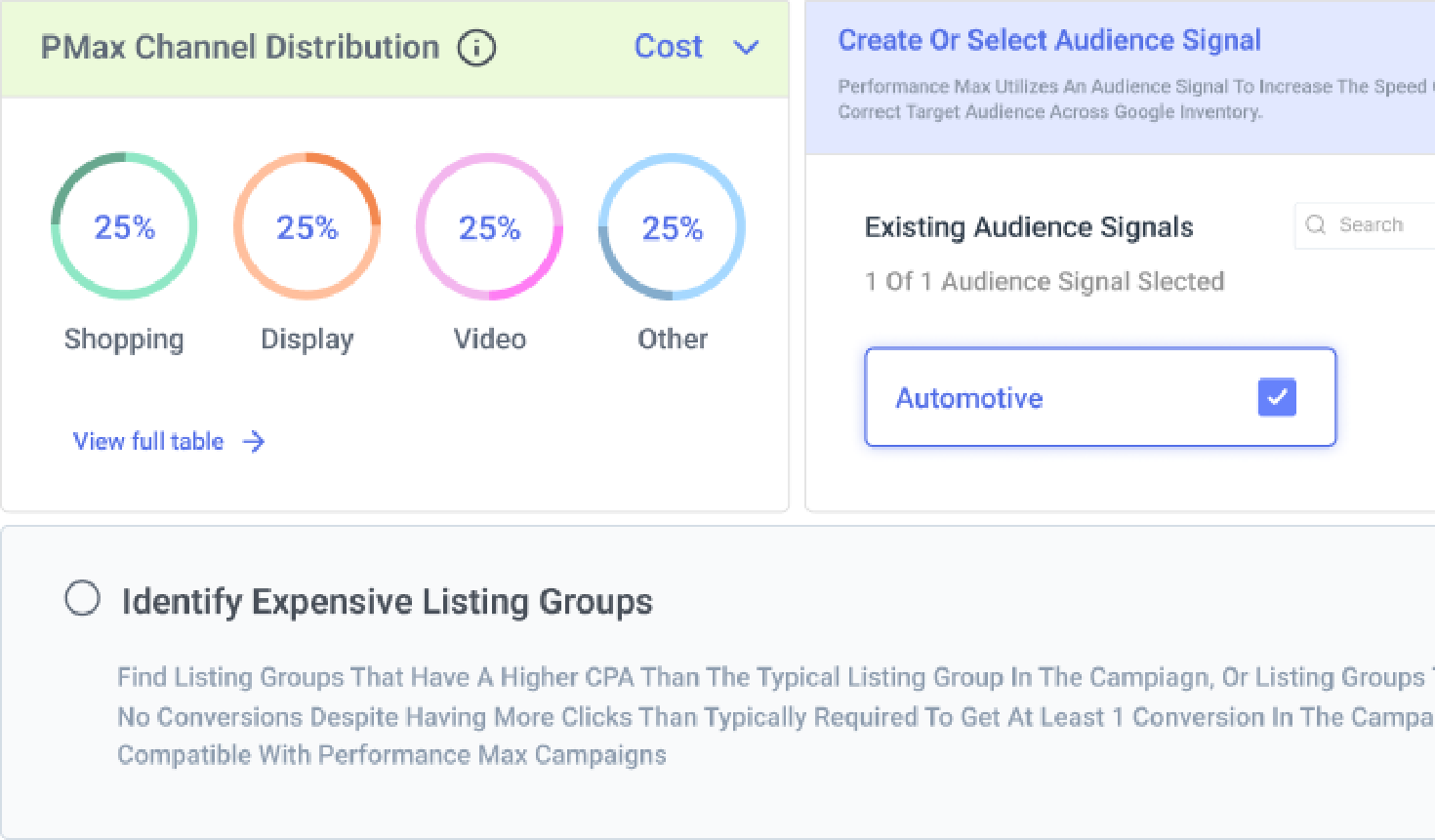
PMax Channel Distribution shows exactly how your spend and impressions split across channels, so you can see whether it’s actually working the way you expect. Audience Signals fills in the asset groups Optmyzr finds running without any targeting direction, and Location Exclusions lets you cut spend to countries, regions, or ZIP codes that aren’t converting.
Break down PMax spend by channel
PMax Channel Distribution shows exactly how your spend and impressions split across channels, so you can see whether it’s actually working the way you expect. Audience Signals fills in the asset groups Optmyzr finds running without any targeting direction, and Location Exclusions lets you cut spend to countries, regions, or ZIP codes that aren’t converting.

Ask Sidekick to find the next optimization
Digging through every report and tool to find what actually needs optimizing takes time most teams don’t have.
Optmyzr Sidekick is a built-in AI assistant that reads your account data, summarizes reports, highlights trends, and gives tailored optimization recommendations based on the tool and page you’re on. Through Optmyzr’s MCP, you can do the same analysis directly from Claude or ChatGPT, including generating Rule Engine strategies and pulling performance reports, without opening Optmyzr at all.
Ask Sidekick what to optimize next
Optmyzr Sidekick is a built-in AI assistant that reads your account data, summarizes reports, highlights trends, and gives tailored optimization recommendations based on the tool and page you’re on. Through Optmyzr’s MCP, you can do the same analysis directly from Claude or ChatGPT, including generating Rule Engine strategies and pulling performance reports, without opening Optmyzr at all.

See which PMax assets are actually pulling their weight
Performance Max hides which of your headlines, images, and videos are doing the work, so creative that’s dragging down a campaign can sit there unnoticed for months.
PMax Asset Optimization shows text and video performance at the asset level across every campaign and asset group, flags top and poor performers, and tells you whether an underperforming asset should be kept, paused, replaced, or refreshed. Auto-created and uploaded videos are labeled separately, so you know exactly what Google generated versus what your team built. You can edit or swap assets directly in bulk, and copy a winning asset to other asset groups without rebuilding it from scratch.
Review and replace underperforming PMax assets
PMax Asset Optimization shows text and video performance at the asset level across every campaign and asset group, flags top and poor performers, and tells you whether an underperforming asset should be kept, paused, replaced, or refreshed. Auto-created and uploaded videos are labeled separately, so you know exactly what Google generated versus what your team built. You can edit or swap assets directly in bulk, and copy a winning asset to other asset groups without rebuilding it from scratch.

Let weather decide when your campaigns should run
Demand for a lot of products shifts with the weather, but almost no one adjusts bids, budgets, or targeting fast enough to catch it.
Optimize Campaigns by Weather lets you target or exclude locations, and pause or enable campaigns, based on real-time conditions like rain or temperature, across Google Ads and Meta Ads. For Shopping and PMax specifically, Rule Engine can adjust bids, budgets, or campaign status by weather and date at the campaign, budget, or ad group level, so you can choose to focus on products based on the weather conditions.
Set up weather-based bid rules
Optimize Campaigns by Weather lets you target or exclude locations, and pause or enable campaigns, based on real-time conditions like rain or temperature, across Google Ads and Meta Ads. For Shopping and PMax specifically, Rule Engine can adjust bids, budgets, or campaign status by weather and date at the campaign, budget, or ad group level, so you can choose to focus on products based on the weather conditions.

Optmyzr in action
10–20%
increase in ROAS through data-driven segmentation
100%
automated labeling process, customized by performance, margin, and product type
We're all about working smarter, not harder. Optmyzr helps us focus on strategy, not spreadsheets. We’ve been able to scale spend and revenue, but more importantly, find new winners that weren’t getting seen before. It opened up new opportunities and made campaign management more strategic.
Shae Cullum, Senior Digital Marketing Manager, Overdose Digital
Read the full story


Better structure, smarter bids, cleaner feeds start here.
Try Optmyzr for 14 days. No credit card required.


FAQs
The fastest way is to segment products by performance metrics like ROAS or margin instead of reviewing them one by one, so the ones actually driving results stand out from the ones just taking up budget. Optmyzr's Smart Product Labeler does this automatically, grouping products into performance segments that update as the data changes.
No. Products vary widely in price, margin, and demand, so a single bid rule usually overpays for low-value products and underbids on high-value ones. Optmyzr's Shopping Attribute Bidder lets you set bid logic by product attribute, so bids reflect what each product is actually worth.
Bulk editing tools that apply one fix across every affected product at once are the practical way to clean up a feed at scale, rather than opening each listing individually. Optmyzr's Shopping Feed Audits flag the issue and let you fix it directly, with AI-powered suggestions for thin titles and descriptions and bulk actions across every product that needs the same fix.
Performance Max automatically decides how to split spend across Shopping, Display, Video, and Search based on where it predicts the best results, which can mean one channel dominates. Optmyzr's PMax Channel Distribution shows you that split directly, since Google Ads doesn't surface it on its own.
Reviewing performance by location and excluding the ones that consistently underperform is the direct way to stop the bleed, rather than waiting for overall ROAS to reflect the problem. Optmyzr's Location Exclusions let you cut spend to specific countries, regions, or ZIP codes inside your PMax campaigns.
ROAS tells you how efficiently a product is generating revenue relative to ad spend, while margin tells you how much profit is actually left after costs, and a high-ROAS product can still be low-margin. Optmyzr's Smart Product Labeler lets you build segments based on either metric, or combine them, so structure reflects actual profitability, not just ad performance.
Yes. Once you set the rules for a performance segment, based on cost, conversions, ROAS, or product attributes, labels update automatically as performance shifts, without manual re-tagging.
Yes. Inside Shopping Feed Audits, AI-powered suggestions help rewrite thin or missing product titles and descriptions, which you can review before applying.
Yes. You can integrate Value-Based Bidding with PMax campaigns to define how much different conversions are actually worth, rather than treating every conversion equally.
Yes. Optmyzr's Location Exclusions let you exclude non-converting locations at the country, region, or ZIP code level from your PMax campaigns.